







Question: Exercise 4: Creating view component - JSP Task 1: Create a JSP for login page. a) Right click on the WebPages folder, select New-JSP file.
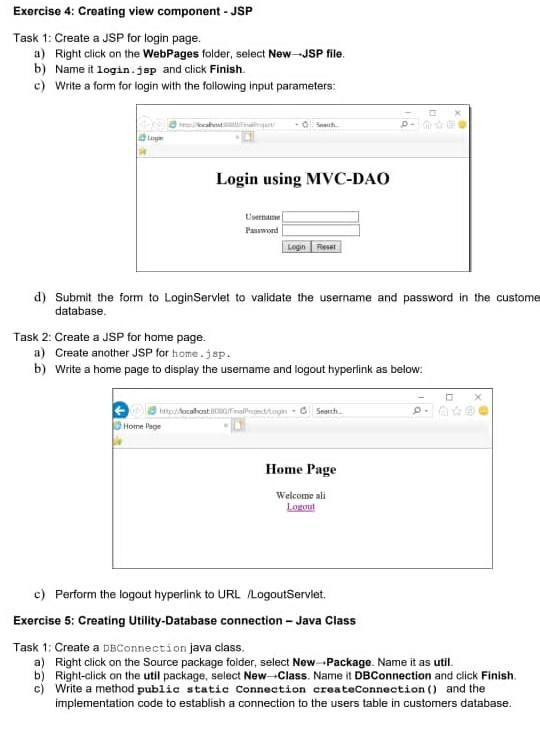
Exercise 4: Creating view component - JSP Task 1: Create a JSP for login page. a) Right click on the WebPages folder, select New-JSP file. b) Name it login.jsp and click Finish c) Write a form for login with the following input parameters: Login using MVC-DAO -ird Login Reset d) Submit the form to LoginServlet to validate the username and password in the custome database Task 2: Create a JSP for home page a) Create another JSP for home.jsp. b) Write a home page to display the username and logout hyperlink as below: titted front oration Soth Home Page Home Page Welcome ali Logo c) Perform the logout hyperlink to URL /LogoutServlet. Exercise 5: Creating Utility-Database connection - Java Class Task 1: Create a DoConnection java class. a) Right click on the Source package folder, select New--Package. Name it as util. b) Right click on the util package, select New-Class. Name it DBConnection and click Finish c) Write a method public static Connection createConnection () and the implementation code to establish a connection to the users table in customers database
Step by Step Solution
There are 3 Steps involved in it

Get step-by-step solutions from verified subject matter experts
 Study Help