







Question: Exercise 9-1 Calculate Reservation Totals *I need the code in Visual Basic. In this exercise, youll add code that calculates the number of nights, total
Exercise 9-1 Calculate Reservation Totals
*I need the code in Visual Basic.
In this exercise, youll add code that calculates the number of nights, total price, and average price for a reservation based on the arrival and departure dates the user enters. Open the project and implement the calculations.
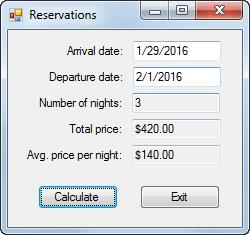
1. Open the Reservations project in the Assignment Exercises\Chapter 09\Reservations directory.
2. Add code to get the arrival and departure dates the user enters when the user clicks the Calculate button. Then, calculate the number of days between those dates, calculate the total price based on a price per night of $160, calculate the average price per night, and display the results.
3. Test the application to be sure it works correctly. At this point, the average price will be the same as the nightly price. Enhance the way the form works
4. Add an event handler for the Load event of the form. This event handler should get the current date and three days after the current date and assign these dates to the Arrival Date and Departure Date text boxes as default values. Be sure to format the dates as shown above.
5. Modify the code so Friday and Saturday nights are charged at $180 and other nights are charged at $160. One way to do this is to use a while loop that checks the day for each date of the reservation. (Please use the While loop to perform this action.)
6. Test the application to be sure that the default dates are displayed correctly and that the totals are calculated correctly. Add code to validate the dates
7. Add code to the IsDateTime method to check that the arrival and departure dates are valid dates.
8. Add code to the IsWithinRange method to check that the arrival and departure dates are within a range that includes the minimum and maximum dates that are passed to it.
9. Add code to the IsValidData method that uses the IsPresent, IsDateTime, and IsWithinRange methods to validate the arrival and departure dates. These dates should be in a range from the current date to five years after the current date.
10. Add code that uses the IsValidData method to validate the arrival and departure dates. In addition, add code to check that the departure date is after the arrival date.
11. Test the application to be sure the dates are validated properly.
The code is provided below:
Public Class Form1
Public Function IsValidData() As Boolean
End Function
Public Function IsPresent(textbox As TextBox, name As String) _ As Boolean If textbox.Text = "" Then MessageBox.Show(name & " is a required field.", "Entry Error") textbox.Select() Return False Else Return True End If End Function
Public Function IsDateTime(textbox As TextBox, name As String) _ As Boolean
End Function
Public Function IsWithinRange(textbox As TextBox, name As String, ByVal min As Date, ByVal max As Date) As Boolean
End Function
Private Sub btnExit_Click(sender As Object, e As EventArgs) Handles btnExit.Click Me.Close() End Sub
End Class
Reservations Arrival date: 1/29/2016 Departure date: 2/1/2016 Number of nights: 3 Total price:$420.00 Avg. price per night: $140.00 Calculate Exit
Step by Step Solution
There are 3 Steps involved in it

Get step-by-step solutions from verified subject matter experts
 Study Help