







Question: Explain With Formulas F L 1 c E G H You are creating a simple project tracking template to help you understand the current project
Explain With Formulas
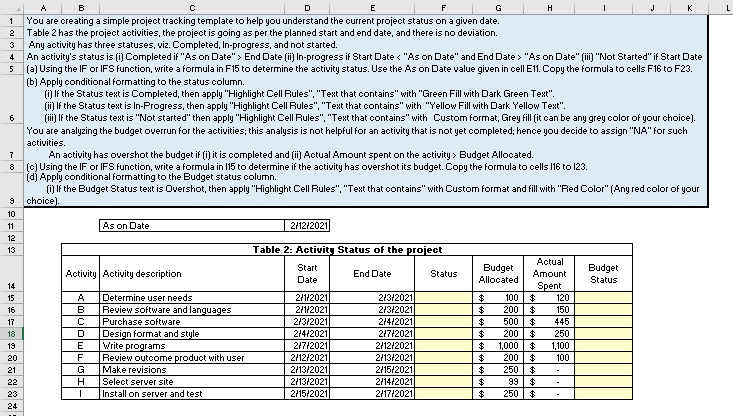
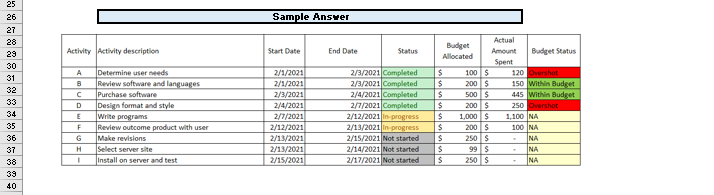
F L 1 c E G H You are creating a simple project tracking template to help you understand the current project status on a given date. 2 Table 2 has the project activities, the project is going as per the planned start and end date, and there is no deviation. 3 Any activity has three statuses, viz. Completed, In-progress, and not started. 4 An activity's status is (0) Completed if "As on Date" > End Date (i) In-progress if Start Date "As on Date" (1) "Not Started" if Start Date 5 (a) Using the IF or IFS function, write a formula in F15 to determine the activity status. Use the As on Date value given in cell E11. Copy the formula to cells F16 to F23. (b) Apply conditional formatting to the status column. (i) If the Status text is Completed, then apply "Highlight Cell Rules", "Text that contains" with "Green Fill with Dark Green Text". (i) If the Status text is In-Progress, then apply "Highlight Cell Rules", "Text that contains" with "Yellow Fill with Dark Yellow Text". 6 (ii) If the Status text is "Not started" then apply "Highlight Cell Rules", "Text that contains" with Custom format, Grey fill (it can be any grey color of your choice). You are analyzing the budget overrun for the activities; this analysis is not helpful for an activity that is not yet completed; hence you decide to assign "NA" for such activities An activity has overshot the budget if (1) it is completed and (i) Actual Amount spent on the activity > Budget Allocated. (c) Using the IF or IFS function, write a formula in 115 to determine if the activity has overshot its budget. Copy the formula to cells 116 to 123. id) Apply conditional formatting to the Budget status column. (i) If the Budget Status text is Overshot, then apply "Highlight Cell Rules", "Text that contains" with Custom format and fill with "Red Color" (Any red color of your 9 choice). 7 As on Date 2/12/2021 10 11 12 13 Activity Activity description Budget Status 14 15 16 17 18 19 20 21 22 23 24 $ B C D E F G H 1 Determine user needs Review software and languages Purchase software Design format and style Write programs Review outcome product with user Make revisions Select server site Install on server and test Table 2: Activity Status of the project Start End Date Status Date 2/1/2021 2/3/2021 2/1/2021 2/3/2021 2/3/2021 2/4/2021 2/4/2021 2/7/2021 2/7/2021 2/12/2021 2/12/2021 2/13/2021 2/13/2021 2/15/2021 2/13/2021 2/14/2021 2/15/2021 2/17/2021 Actual Budget Amount Allocated Spent $ 100 $ 120 $ 200 $ 150 $ 500 $ 445 $ 200 $ 250 $ 1,000 $ 1,100 $ 200 $ 100 $ 250 $ $ 99 $ $ 250 $ Sample Answer Activity Activity description Start Date End Date Status 25 26 27 28 29 30 31 32 33 34 35 36 37 38 A B D E F Determine user needs Review software and languages Purchase software Design format and style Write programs Review outcome product with user Make revisions Select server site Install on server and test 2/1/2021 2/1/2021 2/3/2021 2/4/2021 2/7/2021 2/12/2021 2/13/2021 2/13/2021 2/15/2021 2/3/2021 Completed 2/3/2021 Completed 2/4/2021 Completed 2/7/2021 Completed 2/12/2021 in progress 2/13/2021 in progress 2/15/2021 Not started 2/14/2021 Not started 2/17/2021 Not started Budget Actual Allocated Amount Budget Status Spent $ 100S 120 Overshot $ 2005 150 Within Budget $ 500 445 within Budget $ 2005 250 Overshot $ 1,000 $ 1,100 NA $ 200 $ 100 NA $ 250 $ NA $ 99 $ INA $ 250 s NA G H 1 40
Step by Step Solution
There are 3 Steps involved in it
1 Expert Approved Answer
Step: 1 Unlock

Question Has Been Solved by an Expert!
Get step-by-step solutions from verified subject matter experts
Step: 2 Unlock
Step: 3 Unlock
 Study Help