







Question: f - Adobe Acrobat Reader DC indow Helg Extra exercises. 2.pdf ) (4) 10 | / 49 103% Extra 6-1 Create a simple calculator In
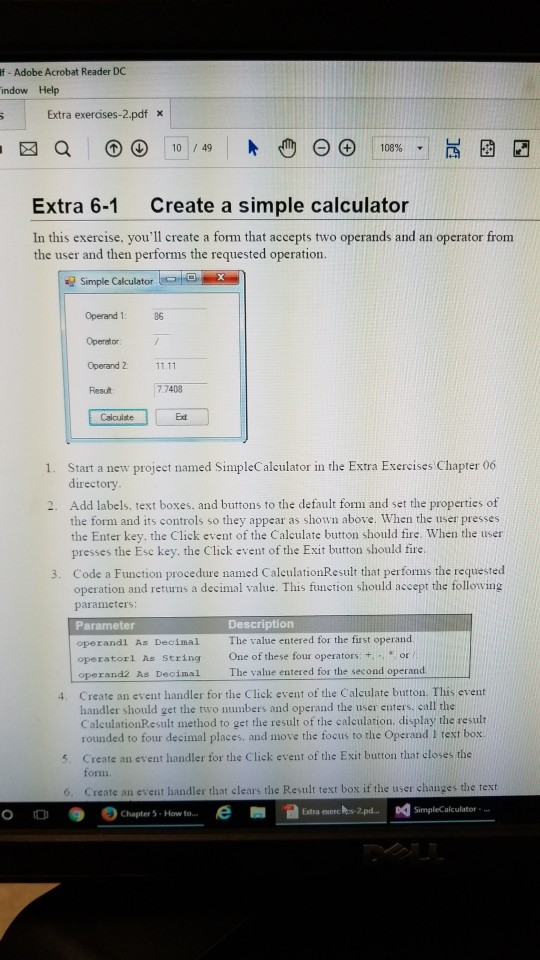
f - Adobe Acrobat Reader DC indow Helg Extra exercises. 2.pdf ) (4) 10 | / 49 103% Extra 6-1 Create a simple calculator In this exercise. you'll create a form that accepts two operands and an operator from the user and then performs the requested operation. Simple Calculator Operand 1: 86 Operator Operand 2 1111 Result 7.7408 Calculate Ed 1. Start a new project named SimpleCalculator in the Extra Exercises Chapter 06 directory 2. Add labels. text boxes. and buttons to the default form and set the properties of the form and its controls so they appear as shown above. When the user presses the Enter key. the Click event of the Calculate button should fire. When the user presses the Esc key. the Click event of the Exit button should fire. 3. Code a Function procedure named CaleulationResult that performs the requested operation and retuns a decimal value. This function should accept the following paramieters: Par operandi As Decimal The value entered for the first operand operatorl As String operand2 As Decimal Description One of these four operators: +, or The value entered for the second operand Create an event handler for the Click event of the Calculate button. This event handler should get the two numbers and operand the user enters, call the CalculationResult method to get the result of the calculation, display the result rounded to four decimal places, and move the focus to the Operand I text box. 4. s. Create an event handler for the Click event of the Exit button that closes the form 6. Create an event handler that clears the Result text box if the user changes the Chapter 5 . How to- e- @utra exercks-Zpd.. Da SimpleCalculator rext O
Step by Step Solution
There are 3 Steps involved in it

Get step-by-step solutions from verified subject matter experts
 Study Help