







Question: ( f= ) open('example.txt', ' ( r ) ') f.write(Hello, Python! ) f.write(This is a test file.) Assuming 'example.txt' contains multiple lines of text, what
( f= ) open('example.txt', ' ( r ) ') f.write("Hello, Python! ") f.write("This is a test file.") Assuming 'example.txt' contains multiple lines of text, what does this code do? Choose the correct option about the behavior of this code: An error occurs because write() operations are not allowed in read mode. The file contains the text "Hello, Python!" on the first line and "This is a test file." on the second line. The file contains only the text "This is a test file." as it overwrites the first line. The file contains both lines of text, but they are concatenated without any line break. Clear answer
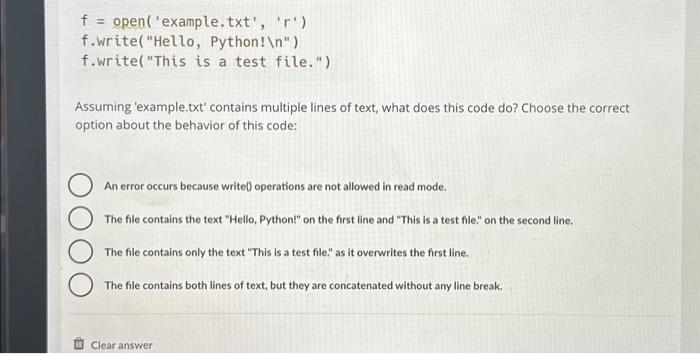
f= open ('example.txt', ' r ') f.write( "Hello, Python! ") f.write("This is a test file.") Assuming 'example.txt' contains multiple lines of text, what does this code do? Choose the correct option about the behavior of this code: An error occurs because write 0 operations are not allowed in read mode. The file contains the text "Hello, Python!" on the first line and "This is a test file." on the second line. The file contains only the text "This is a test file." as it overwrites the first line. The file contains both lines of text, but they are concatenated without any line break
Step by Step Solution
There are 3 Steps involved in it
1 Expert Approved Answer
Step: 1 Unlock

Question Has Been Solved by an Expert!
Get step-by-step solutions from verified subject matter experts
Step: 2 Unlock
Step: 3 Unlock
 Study Help