







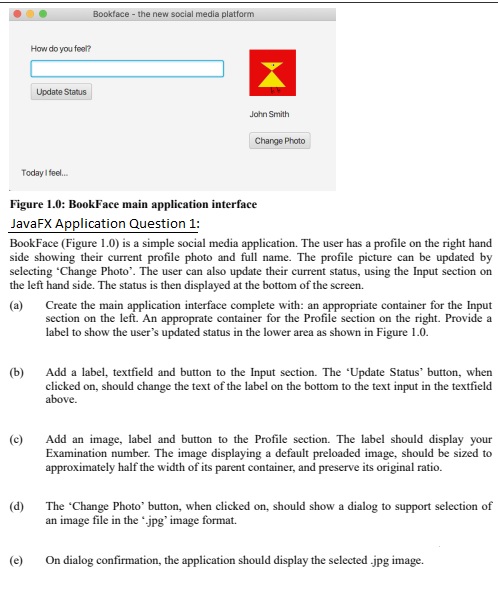
Question: Figure 1 . 0 : BookFace main application interface JavaFX Application Question 1 : BookFace ( Figure 1 . 0 ) is a simple social
Figure : BookFace main application interface
JavaFX Application Question :
BookFace Figure is a simple social media application. The user has a profile on the right hand
side showing their current profile photo and full name. The profile picture can be updated by
selecting 'Change Photo'. The user can also update their current status, using the Input section on
the left hand side. The status is then displayed at the bottom of the screen.
a Create the main application interface complete with: an appropriate container for the Input
section on the left. An approprate container for the Profile section on the right. Provide a
label to show the user's updated status in the lower area as shown in Figure
b Add a label, textfield and button to the Input section. The 'Update Status' button, when
clicked on should change the text of the label on the bottom to the text input in the textfield
above.
c Add an image, label and button to the Profile section. The label should display your
Examination number. The image displaying a default preloaded image, should be sized to
approximately half the width of its parent container, and preserve its original ratio.
d The 'Change Photo' button, when clicked on should show a dialog to support selection of
an image file in the jpg image format.
e On dialog confirmation, the application should display the selected jpg image.
Step by Step Solution
There are 3 Steps involved in it
1 Expert Approved Answer
Step: 1 Unlock

Question Has Been Solved by an Expert!
Get step-by-step solutions from verified subject matter experts
Step: 2 Unlock
Step: 3 Unlock
 Study Help