Question: File Tools View Exp 19_Excel_Ch12_HOEAssessment_To_Do_List_Instructions - Protected View - Saved to this PC- - PROTECTED VIEW Be careful_files from the Internet can contain viruses. Unless
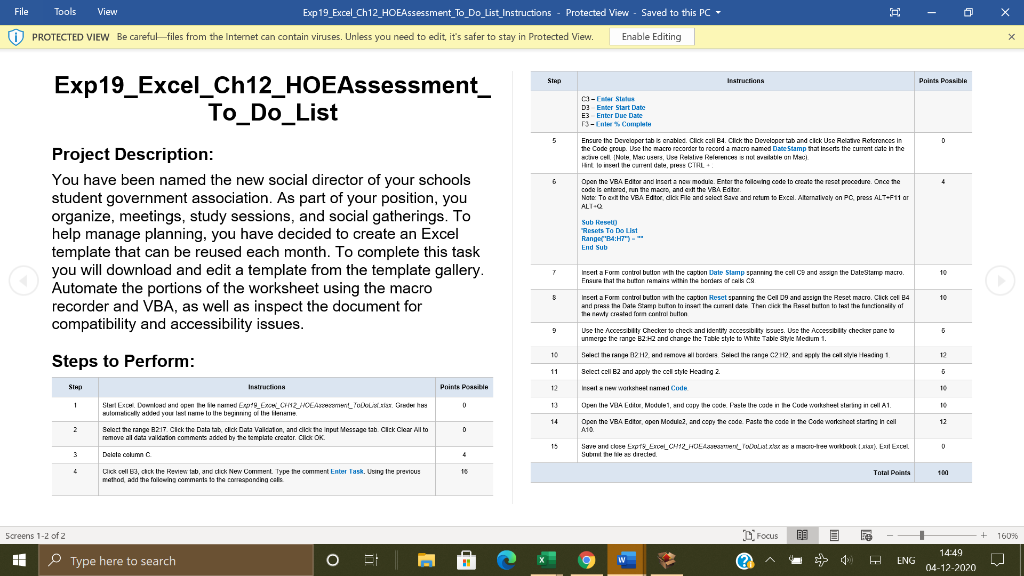
File Tools View Exp 19_Excel_Ch12_HOEAssessment_To_Do_List_Instructions - Protected View - Saved to this PC- - PROTECTED VIEW Be careful_files from the Internet can contain viruses. Unless you need to edit it's safer to stay in Protected View. Enable Editing X STAD Instructions Points possible Exp19_Excel_Ch12_HOEAssessment_ To_Do_List - der Status DEnter Start Date E3 Enter Due Date - Complet D Ensure the Developer tabt enabled. Click cell B4. Click the Dercopertab and click Use catre References in the Code group. Use the macro recorder to record a macro named Date Stamp that incerts the current cate in the Hell I Nole Mac USH, Use Retslive Rel Holten Mal Hint la nithe Guren PHS CTRL + Open the VBA Editor and Insert a new module. Enter the following code to create the reset procedure. Once the code is entered, run the macro, and exite VBA Edtor Note: To the VBA Edtor dick File and select Save and return to Exen. Alternatively on PC pres ALT-F11 ar ALI- 6 4 Project Description: You have been named the new social director of your schools student government association. As part of your position, you organize, meetings, study sessions, and social gatherings. To help manage planning, you have decided to create an Excel template that can be reused each month. To complete this task you will download and edit a template from the template gallery. Automate the portions of the worksheet using the macro recorder and VBA, as well as inspect the document for compatibility and accessibility issues. Sub Reset Resets To Do List Range("B4:H7"). End Sub 7 10 5 10 9 10 Insert a Forme control button with the caption Date Stamp spanning the cello and assign the Dale Stamp macro Fraure that the button remain within the borders of a CA Insert a Form Control button with the caption Reset spanning the cell 09 and assign the Reset macro. Click col B4 and press the Date Stamp button to in the date Than dick the fast button to treat the functionality of TAW Caled from contato Use the Acceeability Checker to check and identity accessibility issues. Use the Acceeablity checker par to unmerge the range B2 -2 and charge the Tablette to White Table Style Medlem Sead the range 82H2 and remove all bec Sand the range C2H2 and the col sty Heading 1 Select call and apply the col style Heading 2. insela new worked Code Open the VBA Eut, Module, and copy the code. Posle the deith Code workshelling in HlA1. Open the VBA Editor open Modul.2, and copy the code Paste the code in the code worksheet starting in cell A10 12 Steps to Perform: 11 SIA Iratruction Points Post 12 10 1 1 0 13 14 12 SleExch Download and open the learned Exp'_EXCH_CH12_HOEAxement_Tool Grade 1989 wulancelled your loan lu the beginning of the lense Select the range B217. Click the Dala tab, click Data Vacation, and dick the input Message tab. Click Clear All to Temove al data validation comments added by the template creator Click OK. Delete column D 19 0 4 Save and the bypt_Exce_0912_ HULASIT as a cree wurkbook LA). Exil Excel Subtha dretted 2 16 Total Points 100 Click cell 3, chok the Review tab, and dick New Comment Type the comment Enter Task. Using the previous metod add the following comments to the corresponding als Screens 1-2 of 2 Focus + 16096 HE Type here to search O a W ? ENG 14:49 04-12-2020 File Tools View Exp 19_Excel_Ch12_HOEAssessment_To_Do_List_Instructions - Protected View - Saved to this PC- - PROTECTED VIEW Be careful_files from the Internet can contain viruses. Unless you need to edit it's safer to stay in Protected View. Enable Editing X STAD Instructions Points possible Exp19_Excel_Ch12_HOEAssessment_ To_Do_List - der Status DEnter Start Date E3 Enter Due Date - Complet D Ensure the Developer tabt enabled. Click cell B4. Click the Dercopertab and click Use catre References in the Code group. Use the macro recorder to record a macro named Date Stamp that incerts the current cate in the Hell I Nole Mac USH, Use Retslive Rel Holten Mal Hint la nithe Guren PHS CTRL + Open the VBA Editor and Insert a new module. Enter the following code to create the reset procedure. Once the code is entered, run the macro, and exite VBA Edtor Note: To the VBA Edtor dick File and select Save and return to Exen. Alternatively on PC pres ALT-F11 ar ALI- 6 4 Project Description: You have been named the new social director of your schools student government association. As part of your position, you organize, meetings, study sessions, and social gatherings. To help manage planning, you have decided to create an Excel template that can be reused each month. To complete this task you will download and edit a template from the template gallery. Automate the portions of the worksheet using the macro recorder and VBA, as well as inspect the document for compatibility and accessibility issues. Sub Reset Resets To Do List Range("B4:H7"). End Sub 7 10 5 10 9 10 Insert a Forme control button with the caption Date Stamp spanning the cello and assign the Dale Stamp macro Fraure that the button remain within the borders of a CA Insert a Form Control button with the caption Reset spanning the cell 09 and assign the Reset macro. Click col B4 and press the Date Stamp button to in the date Than dick the fast button to treat the functionality of TAW Caled from contato Use the Acceeability Checker to check and identity accessibility issues. Use the Acceeablity checker par to unmerge the range B2 -2 and charge the Tablette to White Table Style Medlem Sead the range 82H2 and remove all bec Sand the range C2H2 and the col sty Heading 1 Select call and apply the col style Heading 2. insela new worked Code Open the VBA Eut, Module, and copy the code. Posle the deith Code workshelling in HlA1. Open the VBA Editor open Modul.2, and copy the code Paste the code in the code worksheet starting in cell A10 12 Steps to Perform: 11 SIA Iratruction Points Post 12 10 1 1 0 13 14 12 SleExch Download and open the learned Exp'_EXCH_CH12_HOEAxement_Tool Grade 1989 wulancelled your loan lu the beginning of the lense Select the range B217. Click the Dala tab, click Data Vacation, and dick the input Message tab. Click Clear All to Temove al data validation comments added by the template creator Click OK. Delete column D 19 0 4 Save and the bypt_Exce_0912_ HULASIT as a cree wurkbook LA). Exil Excel Subtha dretted 2 16 Total Points 100 Click cell 3, chok the Review tab, and dick New Comment Type the comment Enter Task. Using the previous metod add the following comments to the corresponding als Screens 1-2 of 2 Focus + 16096 HE Type here to search O a W ? ENG 14:49 04-12-2020









 Study Help