







Question: Find an image from google and modify the sample code so that the image sits in the middle of the screen and rotates at a
Find an image from google and modify the sample code so that the image sits in the middle of the screen and rotates at a rate of 1 revolution every 2 seconds. (See pygame.transform.rotate() documentation)
*skeleton code:*
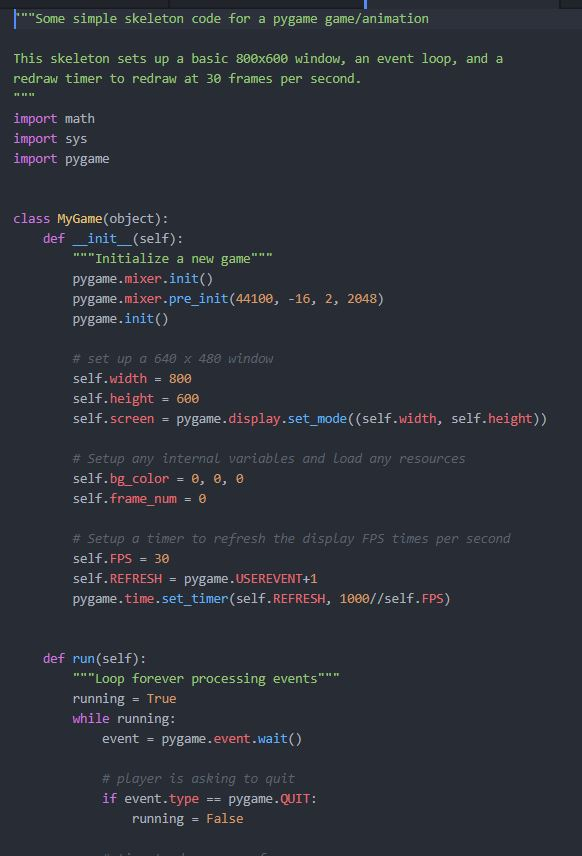
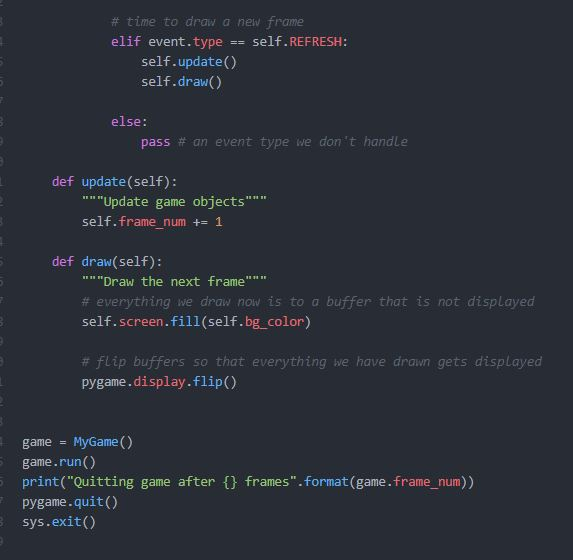
"Some simple skeleton code for a pygame game/animation This skeleton sets up a basic 80ex600 window, an event loop, and a redraw timer to redraw at 30 frames per second import math import sys import pygame class MyGame (object): def init (self) ""Initialize a new game"" pygame.mixer.init() pygame.mixer.pre_init(4410e, -16, 2, 2048) pygame.init() # set up a 640 x 480 window self.width 800 self.height 600 self. screen#pygame . display . set-mode((self"width, self. height)) # Setup any internal variables and Load any resources self.bg. Color = , , self.frame nume # Setup a timer to refresh the display FPS times per second self. FPS 30 self. REFRESH = pygane.USEREVENT+1 pygame.time.set timer (self.REFRESH, 1000//self.FPS) def run (self): Loop forever processing events"" running True while running: event pygame.event.wait() # player is asking to quit if event.type pygame.QUIT runningFalse # time to draw a new frame elif event.typeself.REFRESH: self.update() self.draw() else: pass # an event type we don't handle def update(self): ""Update game objects"" " self.frame num += 1 def draw(self): "Draw the next frame" # everything we draw now is to a buffer that is not displayed self.screen.fill(self.bg color) # flip buffers so that everything we have drawn gets displayed pygame.display.flip() game - MyGame () game.run() print("Quitting game after pygame.quit) sys.exit() frames".format(game.frame_num)) "Some simple skeleton code for a pygame game/animation This skeleton sets up a basic 80ex600 window, an event loop, and a redraw timer to redraw at 30 frames per second import math import sys import pygame class MyGame (object): def init (self) ""Initialize a new game"" pygame.mixer.init() pygame.mixer.pre_init(4410e, -16, 2, 2048) pygame.init() # set up a 640 x 480 window self.width 800 self.height 600 self. screen#pygame . display . set-mode((self"width, self. height)) # Setup any internal variables and Load any resources self.bg. Color = , , self.frame nume # Setup a timer to refresh the display FPS times per second self. FPS 30 self. REFRESH = pygane.USEREVENT+1 pygame.time.set timer (self.REFRESH, 1000//self.FPS) def run (self): Loop forever processing events"" running True while running: event pygame.event.wait() # player is asking to quit if event.type pygame.QUIT runningFalse # time to draw a new frame elif event.typeself.REFRESH: self.update() self.draw() else: pass # an event type we don't handle def update(self): ""Update game objects"" " self.frame num += 1 def draw(self): "Draw the next frame" # everything we draw now is to a buffer that is not displayed self.screen.fill(self.bg color) # flip buffers so that everything we have drawn gets displayed pygame.display.flip() game - MyGame () game.run() print("Quitting game after pygame.quit) sys.exit() frames".format(game.frame_num))
Step by Step Solution
There are 3 Steps involved in it

Get step-by-step solutions from verified subject matter experts
 Study Help