







Question: Python Pygame Modify the sample code so that your image sits in the middle of the screen and rotates at a rate of 1 revolution
Python Pygame
Modify the sample code so that your image sits in the middle of the screen and rotates at a rate of 1 revolution every 2 seconds
Here is the sample code
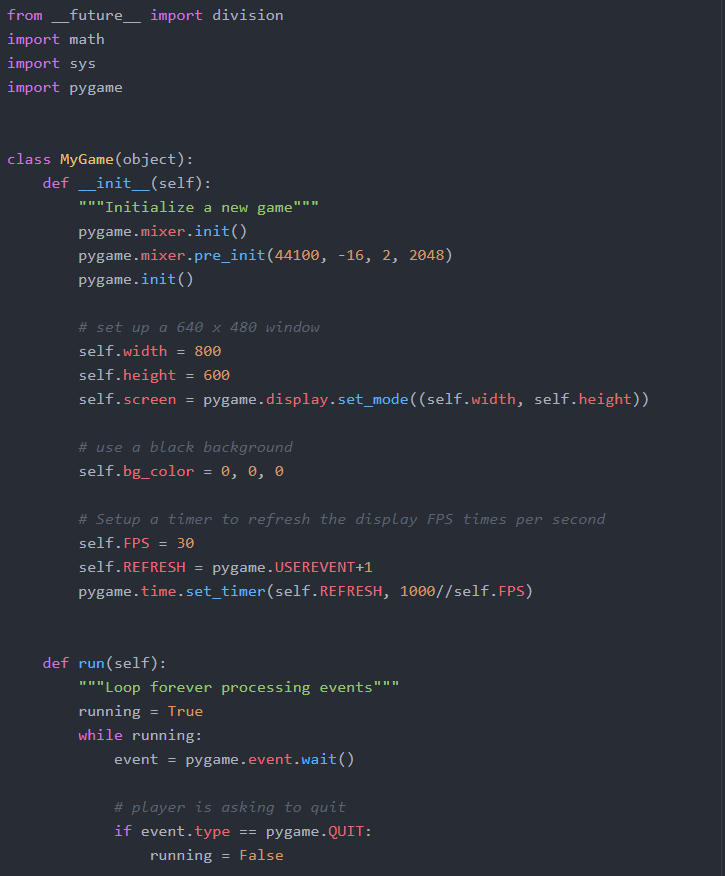
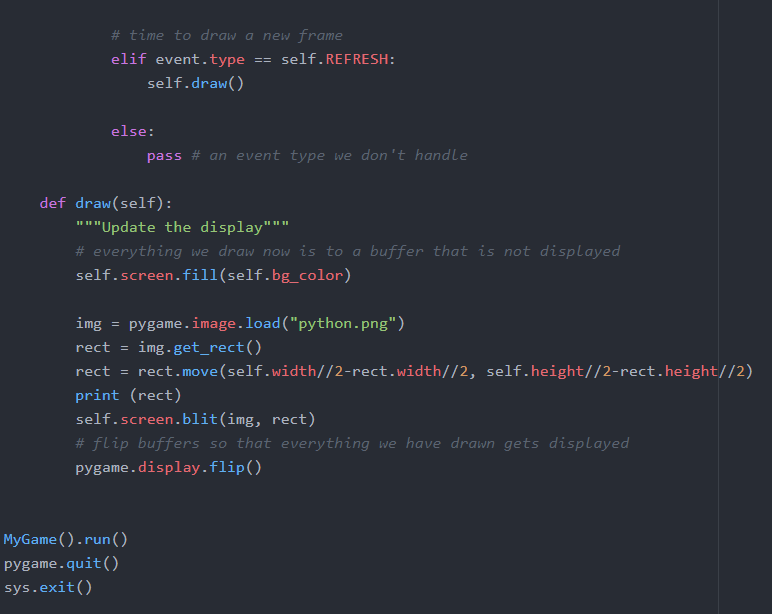
from future import division import math import sys import pygame class MyGame (object): def _init__(self): " " "Initialize a new game" " pygame.mixer.init) pygame.mixer.pre_init(44100, -16, 2, 2048) pygame.init() # set up a 640 x 480 window self.width800 self.height-600 self.screen pygame.display.set_mode((self.width, self.height)) # use a black background self.bg.-color , , # Setup a timer to refresh the display FPS times per second self.FPS3 self.REFRESH pygame. USEREVENT+1 pygame.time.set_timer (self.REFRESH, 1000//self. FPS) def run(self): "Loop forever processing events""" running True while running: event-pygame.event.wait( # player is asking to quit if event.typepygame.QUIT: running = False # time to draw a new frame elif event.typeself.REFRESH self.draw) else: pass # an event type we don't handle def draw(self): ""Update the display"" # everything we draw now is to a buffer that is not displayed self.screen.fill(self.bg_color) img pygame.image.load ("python.png") rect -img.get_rect() rect rect.move(self.width//2-rect.width//2, self.height//2-rect.height//2) print (rect) self.screen.blit(img, rect) # flip buffers so that everything we have drawn gets displayed pygame.display.flip() MyGame().run() pygame.quit) sys.exit) from future import division import math import sys import pygame class MyGame (object): def _init__(self): " " "Initialize a new game" " pygame.mixer.init) pygame.mixer.pre_init(44100, -16, 2, 2048) pygame.init() # set up a 640 x 480 window self.width800 self.height-600 self.screen pygame.display.set_mode((self.width, self.height)) # use a black background self.bg.-color , , # Setup a timer to refresh the display FPS times per second self.FPS3 self.REFRESH pygame. USEREVENT+1 pygame.time.set_timer (self.REFRESH, 1000//self. FPS) def run(self): "Loop forever processing events""" running True while running: event-pygame.event.wait( # player is asking to quit if event.typepygame.QUIT: running = False # time to draw a new frame elif event.typeself.REFRESH self.draw) else: pass # an event type we don't handle def draw(self): ""Update the display"" # everything we draw now is to a buffer that is not displayed self.screen.fill(self.bg_color) img pygame.image.load ("python.png") rect -img.get_rect() rect rect.move(self.width//2-rect.width//2, self.height//2-rect.height//2) print (rect) self.screen.blit(img, rect) # flip buffers so that everything we have drawn gets displayed pygame.display.flip() MyGame().run() pygame.quit) sys.exit)
Step by Step Solution
There are 3 Steps involved in it

Get step-by-step solutions from verified subject matter experts
 Study Help