







Question: First, install the data in Rstudio, and then answer the follow questions install packages NHANES) library (NHANES) str (NHANES) save (NHANES, f ile NHANES .2.1.rdata)
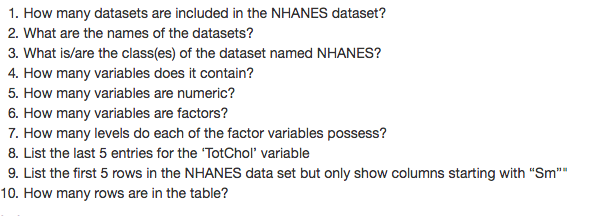
First, install the data in Rstudio, and then answer the follow questions 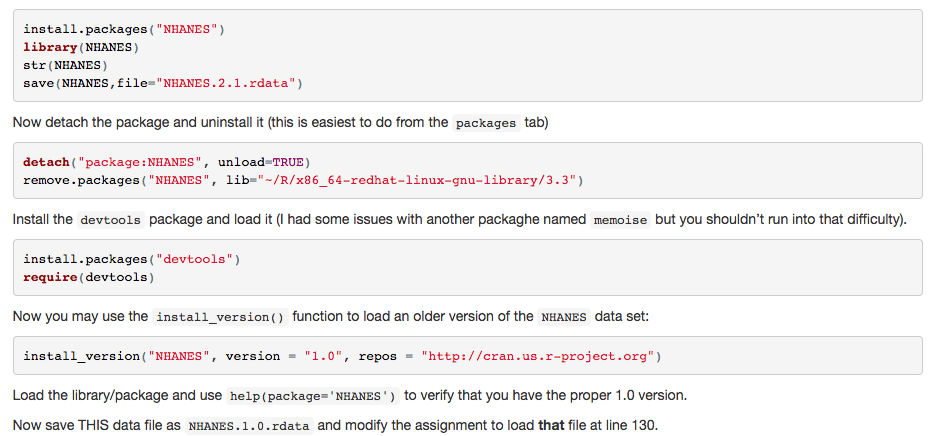
install packages "NHANES") library (NHANES) str (NHANES) save (NHANES, f ile NHANES .2.1.rdata") Now detach the package and uninstall it (this is easiest to do from the packages tab) detach package NHANES unload TRUE) remove packages NHANES lib R/x86-64-redhat-linux-gnu-library/3.3") Install the devtools package and load it (I had some issues with another packaghe named ise but you shouldn't run into that difficulty) install packages "devtools") require (devtools) Now you may use the install version function to load an older version of the NHANES data set install version ("NHANES", version 1.0", repos http:// cran us .r-project.org Load the library package and use help (package NHANES to verify that you have the proper 1.0 version. Now save THIS data file as NHANES.1.0.rdata and modify the assignment to load that file at line 130. install packages "NHANES") library (NHANES) str (NHANES) save (NHANES, f ile NHANES .2.1.rdata") Now detach the package and uninstall it (this is easiest to do from the packages tab) detach package NHANES unload TRUE) remove packages NHANES lib R/x86-64-redhat-linux-gnu-library/3.3") Install the devtools package and load it (I had some issues with another packaghe named ise but you shouldn't run into that difficulty) install packages "devtools") require (devtools) Now you may use the install version function to load an older version of the NHANES data set install version ("NHANES", version 1.0", repos http:// cran us .r-project.org Load the library package and use help (package NHANES to verify that you have the proper 1.0 version. Now save THIS data file as NHANES.1.0.rdata and modify the assignment to load that file at line 130
Step by Step Solution
There are 3 Steps involved in it

Get step-by-step solutions from verified subject matter experts
 Study Help