





Question: First, launch IntelliJ and close any previous projects that may be open (at the top menu go to File => Close All Projects). Then create
First, launch IntelliJ and close any previous

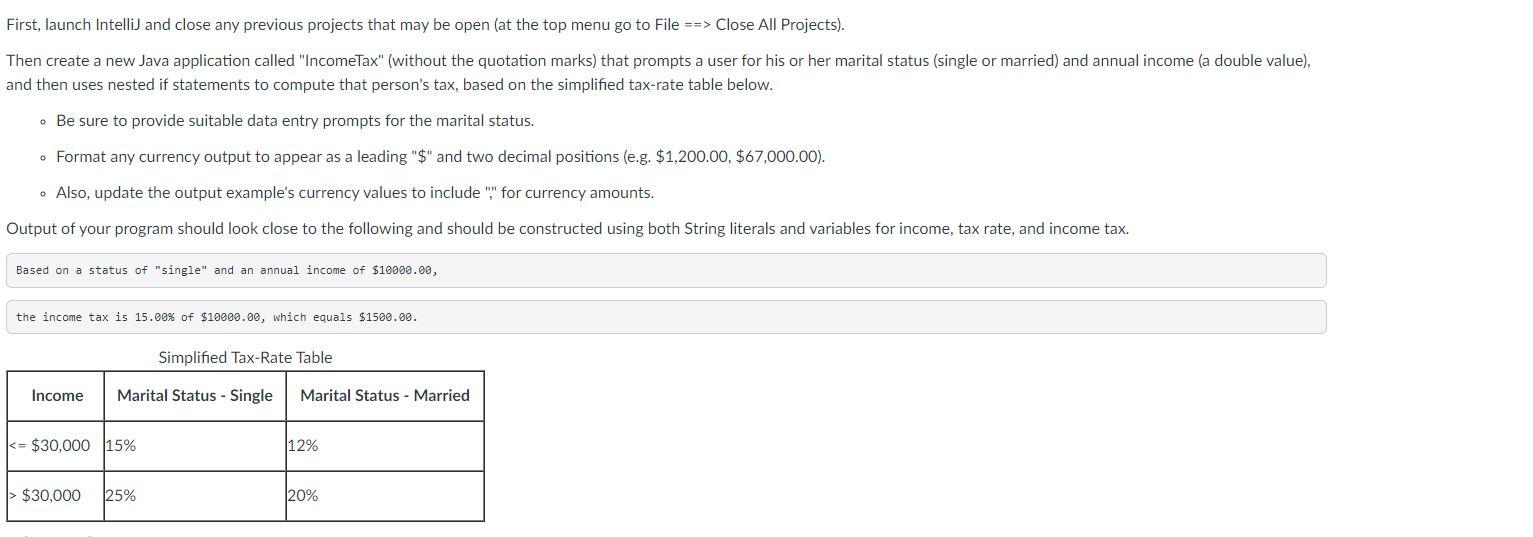
First, launch IntelliJ and close any previous projects that may be open (at the top menu go to File => Close All Projects). Then create a new Java application called "IncomeTax" (without the quotation marks) that prompts a user for his or her marital status (single or married) and annual income (a double value), and then uses nested if statements to compute that person's tax, based on the simplified tax-rate table below. - Be sure to provide suitable data entry prompts for the marital status. - Format any currency output to appear as a leading "\$" and two decimal positions (e.g. $1,200.00,$67,000.00). - Also, update the output example's currency values to include "," for currency amounts. Output of your program should look close to the following and should be constructed using both String literals and variables for income, tax rate, and income tax

Step by Step Solution

There are 3 Steps involved in it

1 Expert Approved Answer
Step: 1 Unlock blur-text-image

Question Has Been Solved by an Expert!

Get step-by-step solutions from verified subject matter experts

Step: 2 Unlock
Step: 3 Unlock

Students Have Also Explored These Related General Management Questions!