







Question: Keep as simple as possible please First, launch IntelliJ and close any previous projects that may be open (at the top menu go to File
Keep as simple as possible please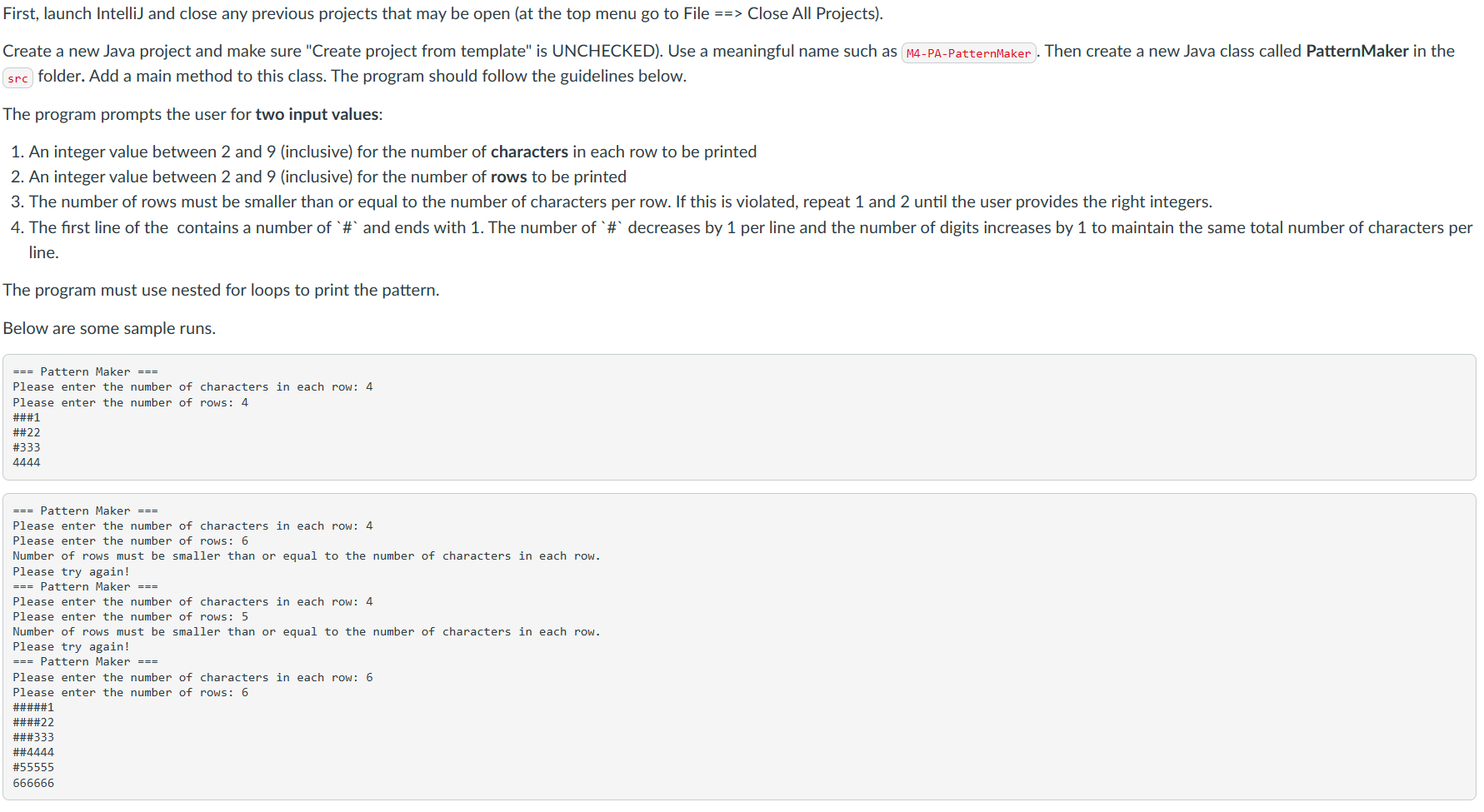
First, launch IntelliJ and close any previous projects that may be open (at the top menu go to File ==> Close All Projects). Create a new Java project and make sure "Create project from template" is UNCHECKED). Use a meaningful name such as Then create a new Java class called PatternMaker in the folder. Add a main method to this class. The program should follow the guidelines below. The program prompts the user for two input values: 1. An integer value between 2 and 9 (inclusive) for the number of characters in each row to be printed 2. An integer value between 2 and 9 (inclusive) for the number of rows to be printed 3. The number of rows must be smaller than or equal to the number of characters per row. If this is violated, repeat 1 and 2 until the user provides the right integers. 4. The first line of the contains a number of `\# and ends with 1 . The number of ` \# decreases by 1 per line and the number of digits increases by 1 to maintain the same total number of characters per line. The program must use nested for loops to print the pattern. Below are some sample runs. == Pattern Maker == Please enter the number of characters in each row: 4 Please enter the number of rows: 4 \#\#\#1 ##22 #333 4444 === Pattern Maker === Please enter the number of characters in each row: 4 Please enter the number of rows: 6 Number of rows must be smaller than or equal to the number of characters in each row. Please try again! == Pattern Maker === Please enter the number of characters in each row: 4 Please enter the number of rows: 5 Number of rows must be smaller than or equal to the number of characters in each row. Please try again! == Pattern Maker == Please enter the number of characters in each row: 6 Please enter the number of rows: 6 \#\#\#\#\#1 \#\#\#\#22 \#\#\#333 \#55555 666666
Step by Step Solution
There are 3 Steps involved in it

Get step-by-step solutions from verified subject matter experts
 Study Help