







Question: FIRST PIC EXPLAINS THE ASSIGNMENT. REST ARE (TRANSCRIPTS) OF THE VIDEO..... IF U SEE THE FIRST PIC IT EXPLAINS ASSIGNMENT AND SAYS REQUIRED SECTION IN
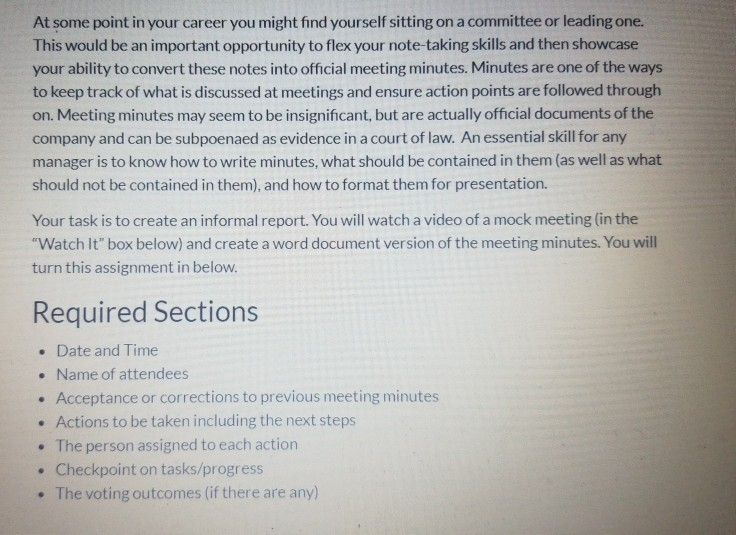
FIRST PIC EXPLAINS THE ASSIGNMENT. REST ARE (TRANSCRIPTS) OF THE VIDEO..... IF U SEE THE FIRST PIC IT EXPLAINS ASSIGNMENT AND SAYS "REQUIRED SECTION" IN BIG LETTERS. PLEASE FOLLOW THAT AND ANSWER THOSE (7 BULLET POINTS) IN A INFORMAL REPORT FORMAT.
MAKE SURE U DO A INFORMAL REPORT, THATS THE ACTUAL ASSIGNMENT.
READ THE FIRST PIC WHERE IT SAYS " REQUIRED SECTIONS" IN BIG LETTERS....THATS THE MAIN ASSIGNMENT.
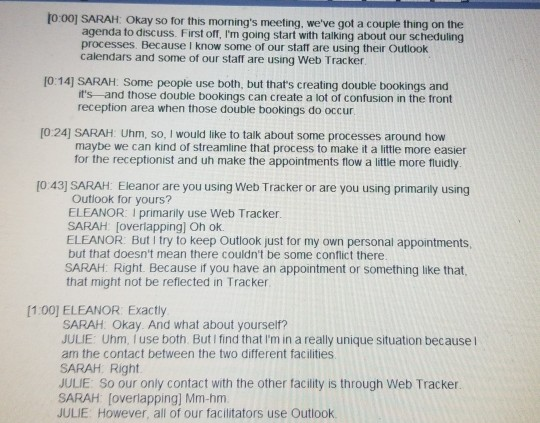
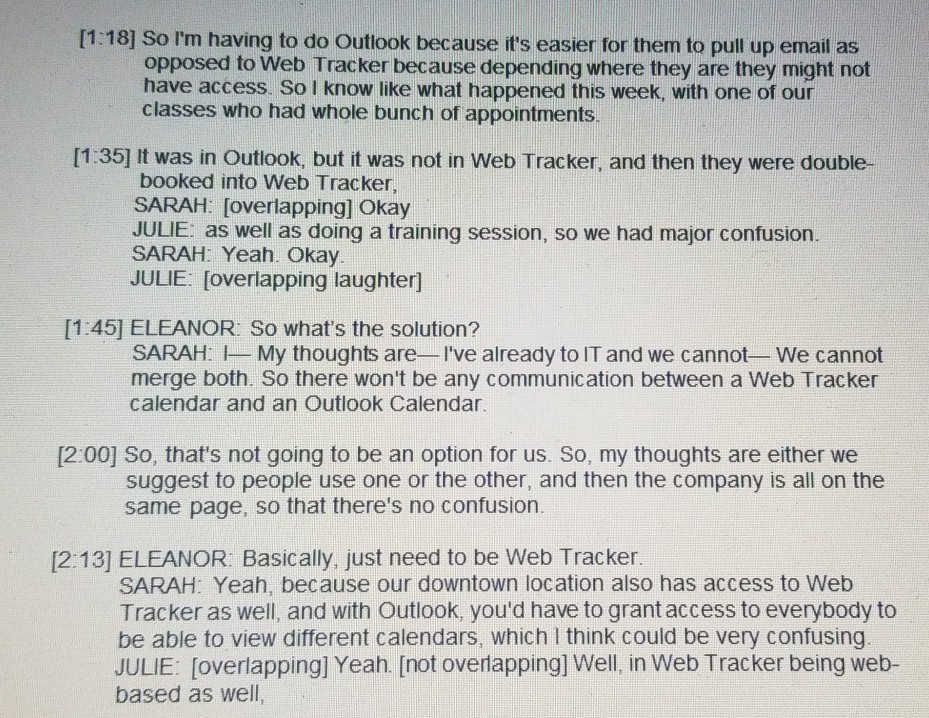
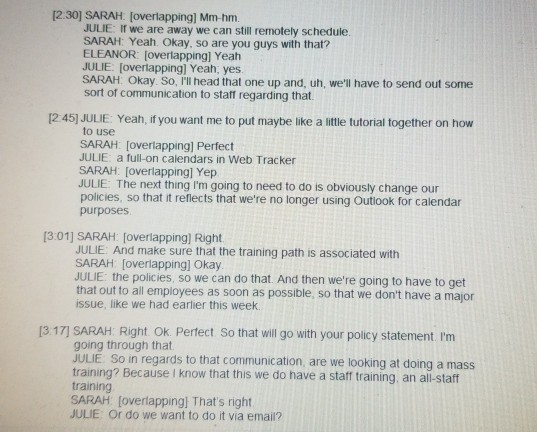
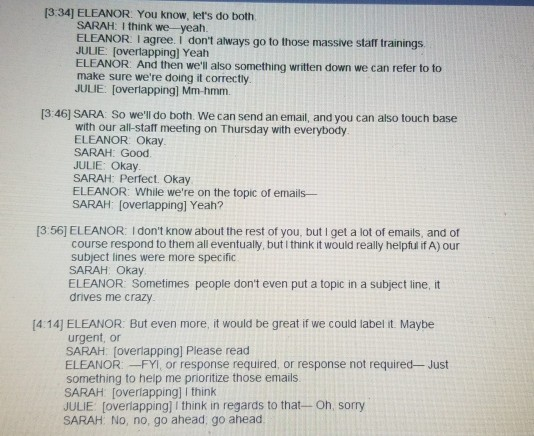
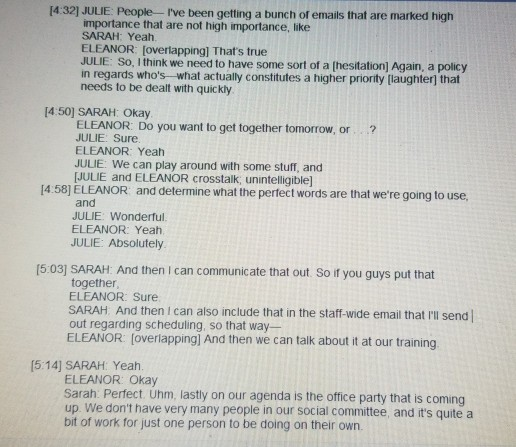
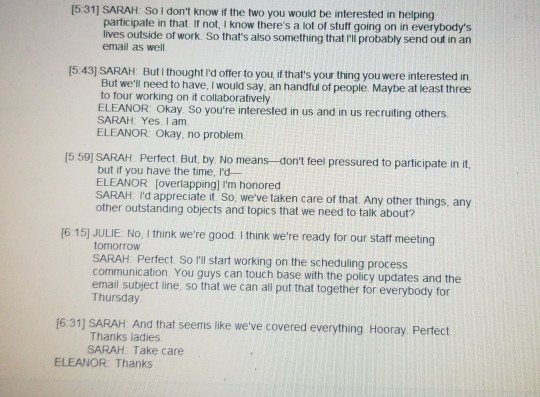
At some point in your career you might find yourself sitting on a committee or leading one. This would be an important opportunity to flex your note-taking skills and then showcase your ability to convert these notes into official meeting minutes. Minutes are one of the ways to keep track of what is discussed at meetings and ensure action points are followed through on. Meeting minutes may seem to be insignificant, but are actually official documents of the company and can be subpoenaed as evidence in a court of law. An essential skill for any manager is to know how to write minutes, what should be contained in them (as well as what should not be contained in them), and how to format them for presentation. Your task is to create an informal report. You will watch a video of a mock meeting (in the "Watch It" box below) and create a word document version of the meeting minutes. You will turn this assignment in below. Required Sections Date and Time Name of attendees Acceptance or corrections to previous meeting minutes Actions to be taken including the next steps The person assigned to each action Checkpoint on tasks/progress The voting outcomes (if there are any) . 10:00 SARAH: Okay so for this morning's meeting, we've got a couple thing on the agenda to discuss. First off, I'm going start with talking about our scheduling processes. Because I know some of our staff are using their Outlook calendars and some of our staff are using Web Tracker 10:14) SARAH: Some people use both, but that's creating double bookings and it's and those double bookings can create a lot of confusion in the front reception area when those double bookings do occur [0:24] SARAH: Uhm, so, I would like to talk about some processes around how maybe we can kind of streamline that process to make it a little more easier for the receptionist and uh make the appointments flow a little more fluidly. [0:43) SARAH Eleanor are you using Web Tracker or are you using primarily using Outlook for yours? ELEANOR: primarily use Web Tracker SARAH [overlapping) Oh ok. ELEANOR: But I try to keep Outlook just for my own personal appointments, but that doesn't mean there couldn't be some conflict there. SARAH: Right. Because if you have an appointment or something like that, that might not be reflected in Tracker [1.00] ELEANOR Exactly SARAH. Okay. And what about yourself? JULIE Uhm, I use both But I find that I'm in a really unique situation because am the contact between the two different facilities SARAH Right JULIE So our only contact with the other facility is through Web Tracker SARAH (overlapping) Mm-hm JULIE However, all of our facilitators use Outlook [1:18] So I'm having to do Outlook because it's easier for them to pull up email as opposed to Web Tracker because depending where they are they might not have access. So I know like what happened this week, with one of our classes who had whole bunch of appointments. [1.35] It was in Outlook, but it was not in Web Tracker, and then they were double- booked into Web Tracker, SARAH: (overlapping] Okay JULIE: as well as doing a training session, so we had major confusion. SARAH: Yeah. Okay. JULIE: [overlapping laughter] [1:45] ELEANOR: So what's the solution? SARAH: I My thoughts are l've already to IT and we cannot We cannot merge both. So there won't be any communication between a Web Tracker calendar and an Outlook Calendar. [2:00] So, that's not going to be an option for us. So, my thoughts are either we suggest to people use one or the other, and then the company is all on the same page, so that there's no confusion. [2:13] ELEANOR: Basically, just need to be Web Tracker. SARAH: Yeah, because our downtown location also has access to Web Tracker as well, and with Outlook, you'd have to grant access to everybody to be able to view different calendars, which I think could be very confusing. JULIE: (overlapping] Yeah. [not overlapping] Well, in Web Tracker being web- based as well, [230] SARAH [overlapping] Mm-hm. JULIE: If we are away we can still remotely schedule. SARAH: Yeah Okay, so are you guys with that? ELEANOR: (overlapping] Yeah JULIE (overlapping] Yeah, yes SARAH Okay. So, I'll head that one up and, uh, we'll have to send out some sort of communication to staff regarding that [2:45] JULIE: Yeah, if you want me to put maybe like a little tutorial together on how to use SARAH: [overlapping) Perfect JULIE a full-on calendars in Web Tracker SARAH: (overlapping] Yep JULE The next thing I'm going to need to do is obviously change our policies, so that it reflects that we're no longer using Outlook for calendar purposes [3:01) SARAH: (overlapping) Right JULIE And make sure that the training path is associated with SARAH [overlapping] Okay. JULIE: the policies, so we can do that. And then we're going to have to get that out to all employees as soon as possible, so that we don't have a major issue, like we had earlier this week [3.17) SARAH: Right. Ok. Perfect So that will go with your policy statement. I'm going through that JULIE So in regards to that communication, are we looking at doing a mass training? Because I know that this we do have a staff training, an all-staff training SARAH (overlapping! That's right JULIE Or do we want to do it via email? [3:34] ELEANOR: You know, let's do both SARAH: I think we yeah ELEANOR I agree. I don't always go to those massive staff trainings JULIE (overlapping] Yeah ELEANOR: And then we'll also something written down we can refer to to make sure we're doing it correctly. JULIE (overlapping] Mm-hmm. [3:46] SARA: So we'll do both. We can send an email, and you can also touch base with our all-staff meeting on Thursday with everybody ELEANOR: Okay SARAH: Good JULIE: Okay SARAH: Perfect. Okay ELEANOR: While we're on the topic of emails- SARAH [overlapping] Yeah? [3:56] ELEANOR: I don't know about the rest of you, but I get a lot of emails, and of course respond to them all eventually, but I think it would really helpful if A) our subject lines were more specific SARAH Okay ELEANOR: Sometimes people don't even put a topic in a subject line, drives me crazy [4:14] ELEANOR: But even more, it would be great if we could label it. Maybe urgent, or SARAH (overlapping] Please read ELEANOR --FYI, or response required, or response not required- Just something to help me prioritize those emails SARAH [overlapping] I think JULIE (overlapping] I think in regards to that -- Oh sorry SARAH No, no, go ahead, go ahead [4:32] JULIE: People - I've been getting a bunch of emails that are marked high importance that are not high importance, like SARAH: Yeah ELEANOR: (overlapping] That's true JULIE So, I think we need to have some sort of a hesitation) Again, a policy in regards who's what actually constitutes a higher priority [laughter that needs to be dealt with quickly [4.50] SARAH: Okay ELEANOR: Do you want to get together tomorrow, or ? JULIE Sure. ELEANOR: Yeah JULIE: We can play around with some stuff, and [JULIE and ELEANOR crosstalk, unintelligible] [4:58] ELEANOR and determine what the perfect words are that we're going to use, and JULIE Wonderful ELEANOR: Yeah JULIE: Absolutely [5:03] SARAH: And then I can communicate that out. So if you guys put that together ELEANOR: Sure SARAH And then I can also include that in the staff-wide email that I'll send out regarding scheduling, so that way- ELEANOR (overlapping] And then we can talk about it at our training [5:14] SARAH: Yeah ELEANOR: Okay Sarah: Perfect. Uhm, lastly on our agenda is the office party that is coming up. We don't have very many people in our social committee, and it's quite a bit of work for just one person to be doing on their own [5:31) SARAH: So I don't know if the two you would be interested in helping participate in that if not, I know there's a lot of stuff going on in everybody's lives outside of work. So that's also something that I'll probably send out in an email as well [5.43) SARAH: But I thought I'd offer to you, if that's your thing you were interested in But we'll need to have, I would say, an handful of people. Maybe at least three to four working on it collaboratively ELEANOR: Okay. So you're interested in us and in us recruiting others. SARAH: Yes. I am ELEANOR: Okay, no problem. [5:59) SARAH Perfect But, by no meansdon't feel pressured to participate in it, but if you have the time, I'd ELEANOR (overlapping) I'm honored SARAH: I'd appreciate it so, we've taken care of that. Any other things, any other outstanding objects and topics that we need to talk about? [6:15) JULIE. No, I think we're good. I think we're ready for our staff meeting tomorrow SARAH: Perfect So I'll start working on the scheduling process communication You guys can touch base with the policy updates and the email subject line, so that we can all put that together for everybody for Thursday [631) SARAH. And that seems like we've covered everything. Hooray. Perfect Thanks ladies SARAH Take care ELEANOR: ThanksStep by Step Solution
There are 3 Steps involved in it
1 Expert Approved Answer
Step: 1 Unlock

Question Has Been Solved by an Expert!
Get step-by-step solutions from verified subject matter experts
Step: 2 Unlock
Step: 3 Unlock
 Study Help