







Question: Follow these steps to create a network scheme: 1. Using the information in Tables 1 and 2, assign static IP addresses to the three router
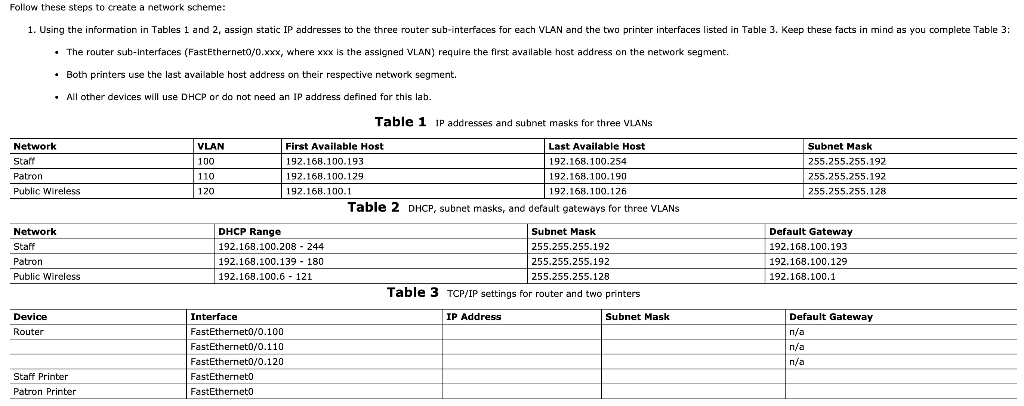
Follow these steps to create a network scheme: 1. Using the information in Tables 1 and 2, assign static IP addresses to the three router sub-interfaces for each VLAN and the two printer interfaces listed in Table 3. Keep these facts in mind as you complete Table 3: The router sub-interfaces (FastEthernet0/0.xxx, where xxx is the assigned VLAN) require the first available host address on the network segment. Both printers use the last available host address on their respective network segment. . All other devices will use DHCP or do not need an IP address defined for this lab. Table 1 IP addresses and subnet masks for three VLANS Network Start VLAN 100 110 120 First Available Host Last Available Host 192.168.100.193 192.168.100.254 192.168.100.129 192.168.100.190 192.168.100.1 192.168.100.126 Table 2 DHCP, subnet masks, and default gateways for three VLANS Subnet Mask 255.255.255.192 255.255.255.192 255.255.255.128 Patron Public Wireless Network Staff Patron Public Wireless DHCP Range 192.168.100.208 - 244 192.168.100.139 - 180 192.168.100.6 - 121 Subnet Mask 255.255.255.192 255.255.255.192 255.255.255.128 Table 3 TCP/IP settings for router and two printers Default Gateway 192.168.100.193 192.168.100.129 192.168.100.1 IP Address Subnet Mask Device Router Interface FastEthernet0/0.100 FastEthernet0/0.110 FastEthernet0/0.120 FastEtherneto FastEtherneto Default Gateway n/a n/a n/a Staff Printer Patron Printer Follow these steps to create a network scheme: 1. Using the information in Tables 1 and 2, assign static IP addresses to the three router sub-interfaces for each VLAN and the two printer interfaces listed in Table 3. Keep these facts in mind as you complete Table 3: The router sub-interfaces (FastEthernet0/0.xxx, where xxx is the assigned VLAN) require the first available host address on the network segment. Both printers use the last available host address on their respective network segment. . All other devices will use DHCP or do not need an IP address defined for this lab. Table 1 IP addresses and subnet masks for three VLANS Network Start VLAN 100 110 120 First Available Host Last Available Host 192.168.100.193 192.168.100.254 192.168.100.129 192.168.100.190 192.168.100.1 192.168.100.126 Table 2 DHCP, subnet masks, and default gateways for three VLANS Subnet Mask 255.255.255.192 255.255.255.192 255.255.255.128 Patron Public Wireless Network Staff Patron Public Wireless DHCP Range 192.168.100.208 - 244 192.168.100.139 - 180 192.168.100.6 - 121 Subnet Mask 255.255.255.192 255.255.255.192 255.255.255.128 Table 3 TCP/IP settings for router and two printers Default Gateway 192.168.100.193 192.168.100.129 192.168.100.1 IP Address Subnet Mask Device Router Interface FastEthernet0/0.100 FastEthernet0/0.110 FastEthernet0/0.120 FastEtherneto FastEtherneto Default Gateway n/a n/a n/a Staff Printer Patron Printer
Step by Step Solution
There are 3 Steps involved in it

Get step-by-step solutions from verified subject matter experts
 Study Help