







Question: For any given doctor's full name returned by Step2, you need to write a formula to create the doctor's email address according to the following
For any given doctor's full name returned by Step2, you need to write a formula to create the doctor's email address according to the following rule, the doctor's last name followed by the first letter of the doctor's first name, then add @yhospital.com to the end.
Note: If the doctor's last name contains space, you need to replace the space with an underscore symbol.
Example1: if the doctor's full name is Jonas Salk, the email should be SalkJ@yhospital.com
Example2: if the doctor's full name is Robert Reynolds Macintosh, the email should be Reynolds_MacintoshR@yhospital.com
Hint: for emails, you probably need to use a combination of text functions LEFT, RIGHT, FIND, SUBSTITUTE, LEN etc.
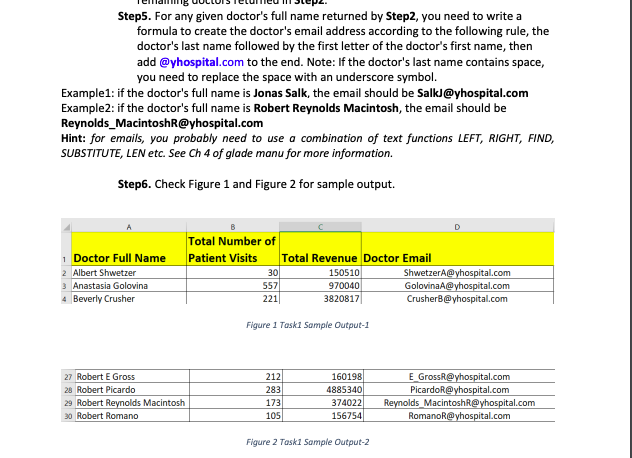
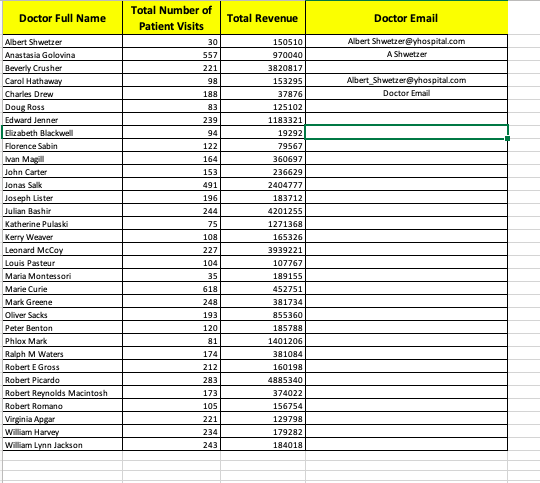
Step5. For any given doctor's full name returned by Step2, you need to write a formula to create the doctor's email address according to the following rule, the doctor's last name followed by the first letter of the doctor's first name, then add @yhospital.com to the end. Note: If the doctor's last name contains space, you need to replace the space with an underscore symbol. Example1: if the doctor's full name is Jonas Salk, the email should be SalkJ@yhospital.com Example2: if the doctor's full name is Robert Reynolds Macintosh, the email should be Reynolds_MacintoshR@yhospital.com Hint: for emails, you probably need to use a combination of text functions LEFT, RIGHT, FIND, SUBSTITUTE, LEN etc. See Ch 4 of glade manu for more information. Step6. Check Figure 1 and Figure 2 for sample output. Figure I Taskl Sample Output-1 Figure 2 Task1 Sample Output-2
Step by Step Solution
There are 3 Steps involved in it

Get step-by-step solutions from verified subject matter experts
 Study Help