







Question: for excel need help on creating a VLOOKUP formula for the yellow cells. 7 Some hints for filling in the yellow sells: 8. Try using
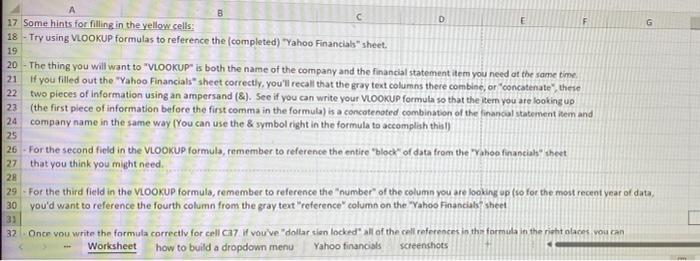
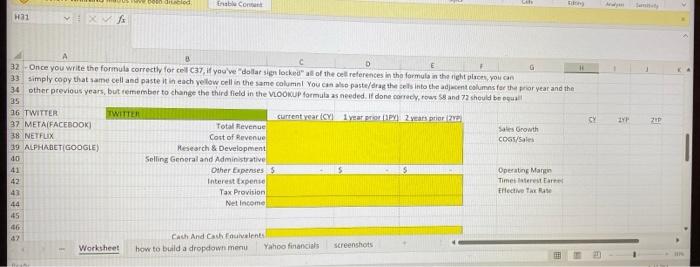
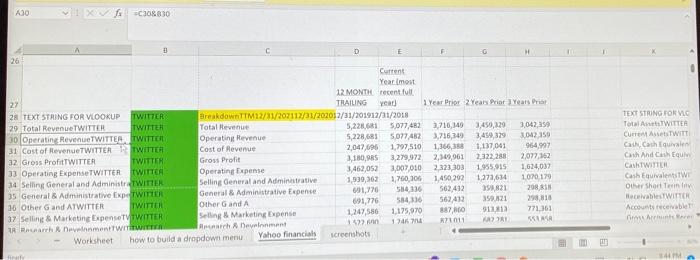
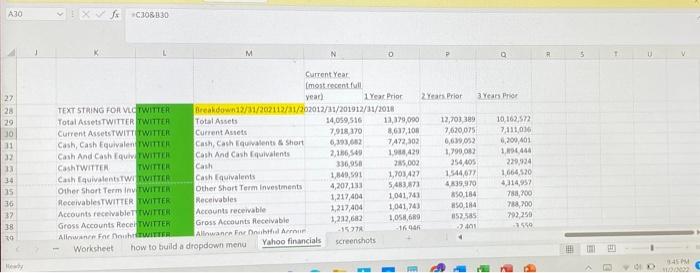
7 Some hints for filling in the yellow sells: 8. Try using Viookup formulas to reference the (completed) -Yahoo Financials" sheet. - The thing you will want to "VLOOKUP" is both the name of the company and the financial statement item you need at the same time. If you filled out the "Yahoo Financials" sheet correctly, you'll recall that the gray text columns there combine, or "concatenate", theie two pieces of information using an ampersand ( & ). See if you can write your vookup formula so that the leem you are looking up (the first piece of information before the first comma in the formula) is a concotenoted combination of the financal statement item and company name in the same way (You can use the \& symbol right in the formula to accomplah thisi) - For the second field in the VLookup formuls, remember to reference the entire "block" of data from the "Yahoo financiah" theet that you think you might need. - For the third field in the VLookup formuls, remember to reference the "number" of the column you are looking up (so for the most recent year of data, you'd want to reference the fourth column from the gray text "reference" column on the "Yahoo Financials" shcet Once vou write the formula correctlv for cell ca7 if vou've "dollar sien locked" all of the cell referencet in thr formula in the right olaces vou ran Worksheet how to build a dropdown menu Yahoo financisls scteengtiots Once you write the formula correcthy for cel C37, if yau've "dollar sign locked" all of the cell relerences in tha farmula in the night pisces, pou can simply cooy that same cell and paste it in each yelow cell in the same columni You can alse paste/drag the tels into the adjacent columns fer the proryear and the other previous years, but temember to change the third field in the vioomup formula as needed. It done porrecy, ross ss and 72 sheuld bo oealil A30 :fx C 108B30 7 Some hints for filling in the yellow sells: 8. Try using Viookup formulas to reference the (completed) -Yahoo Financials" sheet. - The thing you will want to "VLOOKUP" is both the name of the company and the financial statement item you need at the same time. If you filled out the "Yahoo Financials" sheet correctly, you'll recall that the gray text columns there combine, or "concatenate", theie two pieces of information using an ampersand ( & ). See if you can write your vookup formula so that the leem you are looking up (the first piece of information before the first comma in the formula) is a concotenoted combination of the financal statement item and company name in the same way (You can use the \& symbol right in the formula to accomplah thisi) - For the second field in the VLookup formuls, remember to reference the entire "block" of data from the "Yahoo financiah" theet that you think you might need. - For the third field in the VLookup formuls, remember to reference the "number" of the column you are looking up (so for the most recent year of data, you'd want to reference the fourth column from the gray text "reference" column on the "Yahoo Financials" shcet Once vou write the formula correctlv for cell ca7 if vou've "dollar sien locked" all of the cell referencet in thr formula in the right olaces vou ran Worksheet how to build a dropdown menu Yahoo financisls scteengtiots Once you write the formula correcthy for cel C37, if yau've "dollar sign locked" all of the cell relerences in tha farmula in the night pisces, pou can simply cooy that same cell and paste it in each yelow cell in the same columni You can alse paste/drag the tels into the adjacent columns fer the proryear and the other previous years, but temember to change the third field in the vioomup formula as needed. It done porrecy, ross ss and 72 sheuld bo oealil A30 :fx C 108B30
Step by Step Solution
There are 3 Steps involved in it

Get step-by-step solutions from verified subject matter experts
 Study Help