







Question: For the virtual grocer system, complete the user - case table description for the other cases based on the used-case diagram and the activity views
For the virtual grocer system, complete the user - case table description for the other cases based on the used-case diagram and the activity views for each of the use cases. The user-case diagram along with an example of the user-case table description and activity view is provided below.
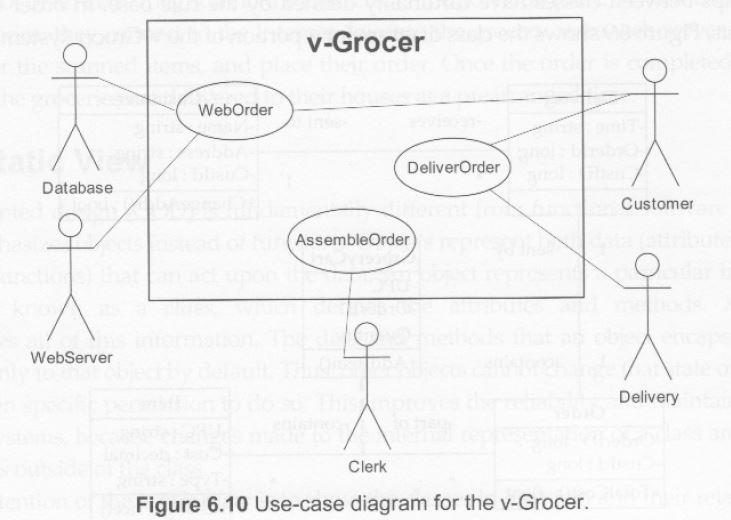
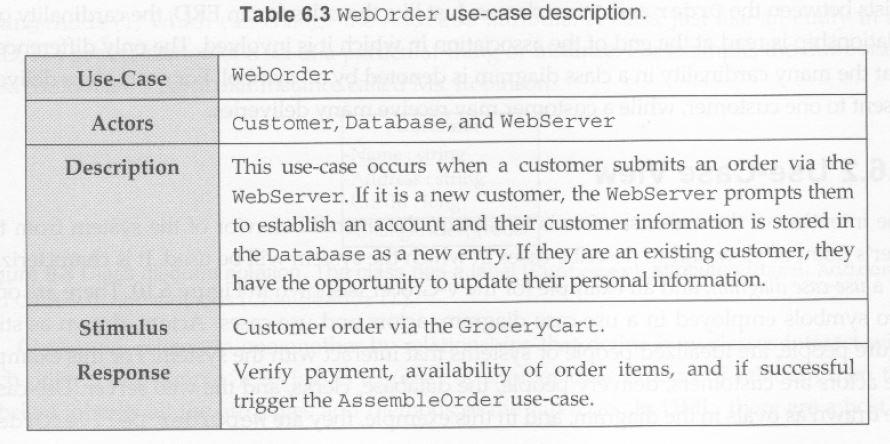
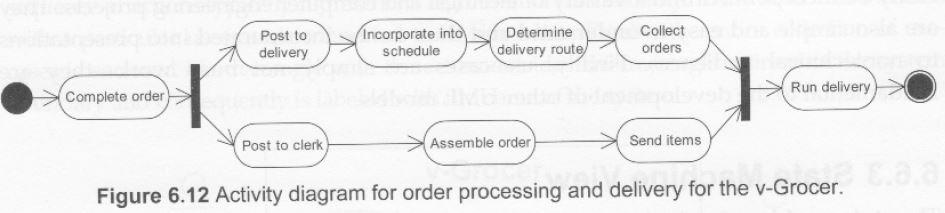
v-Grocer WebOrder DeliverOrder Database Customer AssembleOrder WebServer of Delivery Clerk Figure 6.10 Use-case diagram for the v-Grocer. Table 6.3 Weborder use-case description. Use-Case WebOrder Actors Customer, Database, and Webserver Description This use-case occurs when a customer submits an order via the WebServer. If it is a new customer, the WebServer prompts them to establish an account and their customer information is stored in the Database as a new entry. If they are an existing customer, they have the opportunity to update their personal information. Customer order via the Grocerycart. Verify payment, availability of order items, and if successful trigger the AssembleOrder use-case. Stimulus Response Post to delivery Incorporate into schedule Determine delivery route Collect orders Complete order Run delivery Post to clerk Assemble order Send items roser sa Figure 6.12 Activity diagram for order processing and delivery for the v-Grocer
Step by Step Solution
There are 3 Steps involved in it

Get step-by-step solutions from verified subject matter experts
 Study Help