







Question: For this assignment, you will be using the Computer.java and ComputerException.java classes ( Computer.java and ComputerExcetion.java code for reference is below ). **MAKE SURE TO
For this assignment, you will be using the Computer.java and ComputerException.java classes (Computer.java and ComputerExcetion.java code for reference is below). **MAKE SURE TO READ ALL INSTRUCTIONS CAREFULLY. **
However, you will need to do the following: Modify Computer.java so that it will implement the comparable interface by adding the compareTo method. The compareTo method should compare computers by barcode. For example barcode 22222 will be smaller than 23333 The driver class The driver class should be named: ComputerListStore.java. This class will feature a looping menu. You will have the following menu (overall program flow, looping menu, try/catch etc 60 points)
1. add a computer 2. remove a computer 3. find a computer 4. print all the computers 0. end As usual, this menu should loop until the user selects option 0.
If the user selects option 1, (add a computer) Your driver code should read the computer information from the user using the Scanner class. You should validate everything and in case of invalid input print the appropriate message and go back to the menu again. If the user information is valid then you create the computer and add it to the sorted linked list, sorted. To do this you will be calling on other methods from the CNode class and/or the SList class. You should make sure that there are no other computers with the same barcode.If the barcode already exists you should print a message saying so and go back to the main menu. For the purpose of this assignments a duplicate computer is a computer with the same barcode .
If the user selects option 2, (remove a computer) You should read the barcode number if the barcode is not a number then print an error message and loop back into the menu use the SList and/or the CNode methods as needed to remove the computer with the given barcode if found. If the barcode is not found, print a message and return back to the menu. If the user selects option3. (find a computer) You should read the barcode number if the barcode is not a number then print an error message and loop back into the menu use the SList and/or the CNode methods as needed to find a barcode. If found print the computer with such a barcode. If the barcode is not found, print a message and return back to the menu. If the user selects option 4, (print all the computers) use the SList and/or the CNode class method(s) to print all the computers. If there are no computers in the List you will print a message saying so Must return back to the menu If the user selects 0 (5 points). you will print a "thank you" message and end program execution The CNode class (node containing a computer)
CNode.java - node containing a Computer object. +CNode( ) - constructor, takes no parameters. +CNode(Computer c) - constructor takes a computer as a parameter You must write both constructors even if your program only uses one of them +setNext(CNode n): void +getNext( ): CNode +setComputer(Computer c): void +getComputer( ): Computer +toString( ): String The SList class (linked list) This linked list: SList.java should create and manipulate a sorted linked list and it should remain sorted at all times. Please watch the video showing you how this should work. This should be evident because when printing the computers, they will be sorted in ascending order. No duplicate computer barcodes should be accepted. The linked list should have the following methods: +SList( ) constructors, takes no parameters, initializes list and references +add(Computer): void adds a Computer to the sorted list in its rightful place sorted by barcode. You may choose to send an CNode or a Computer as a parameter. It depends on how you design your code. Just add a comment about your design choices. This method will be called to help implement the add computer option in the menu. +size( ):int returns the number of elements currently in the list (20 points) +remove(int barcode): boolean removes the Computer with the given barcode, if it exists. This method will be called to help implement the remove computer option in the menu. (60 points) +find(int barcode): computer returns the computer object if the computer was found. If the computer is not found it returns null. (50 points) This method will be called to help implement the find a computer option in the menu. +printList( ):void This method prints the list to the screen. Since the list is sorted the output should be sorted. (40 points) This method will be called to implement the print all the computers option in the menu. Other considerations
You should not use any of the linked-list methods implemented by Java. Everything should be done from scratch by you. You should not use any sorting methods provided by Java. You should use the proper exceptions, like InputMismatchException, ComputerException, NullPointerException etc as appropriate You may implement extra methods to help you out. And you must have the required methods. You do not need to create a CNode exception or a SList exception. However if your program design requires you to code them, please do. 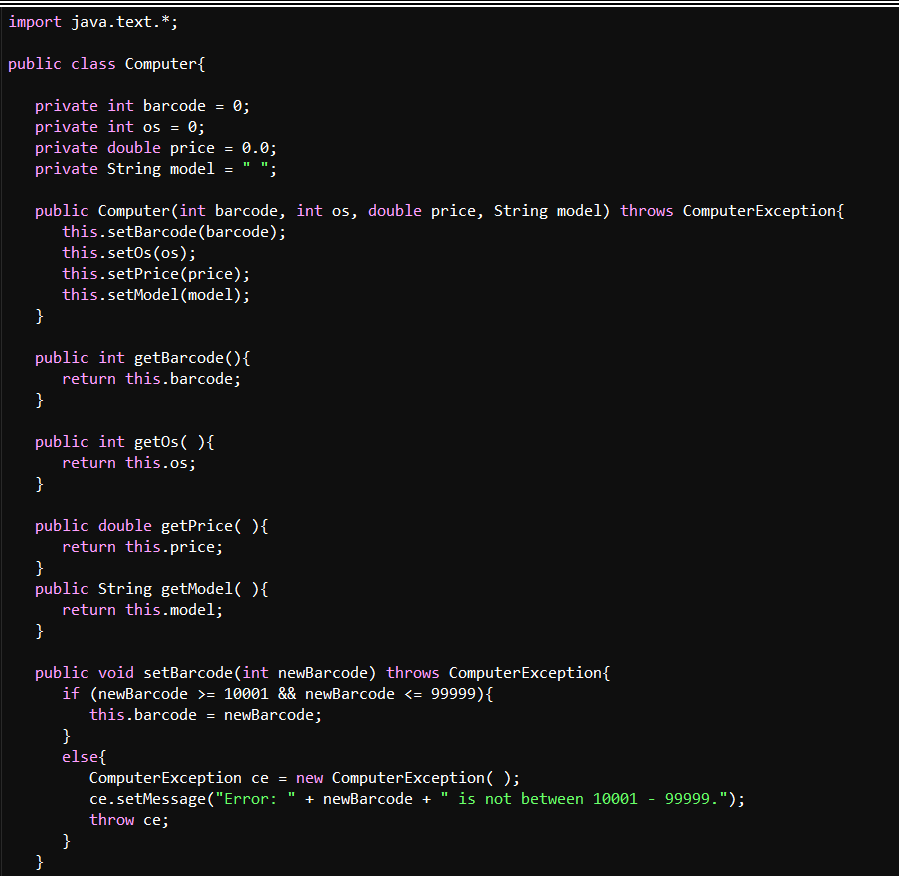
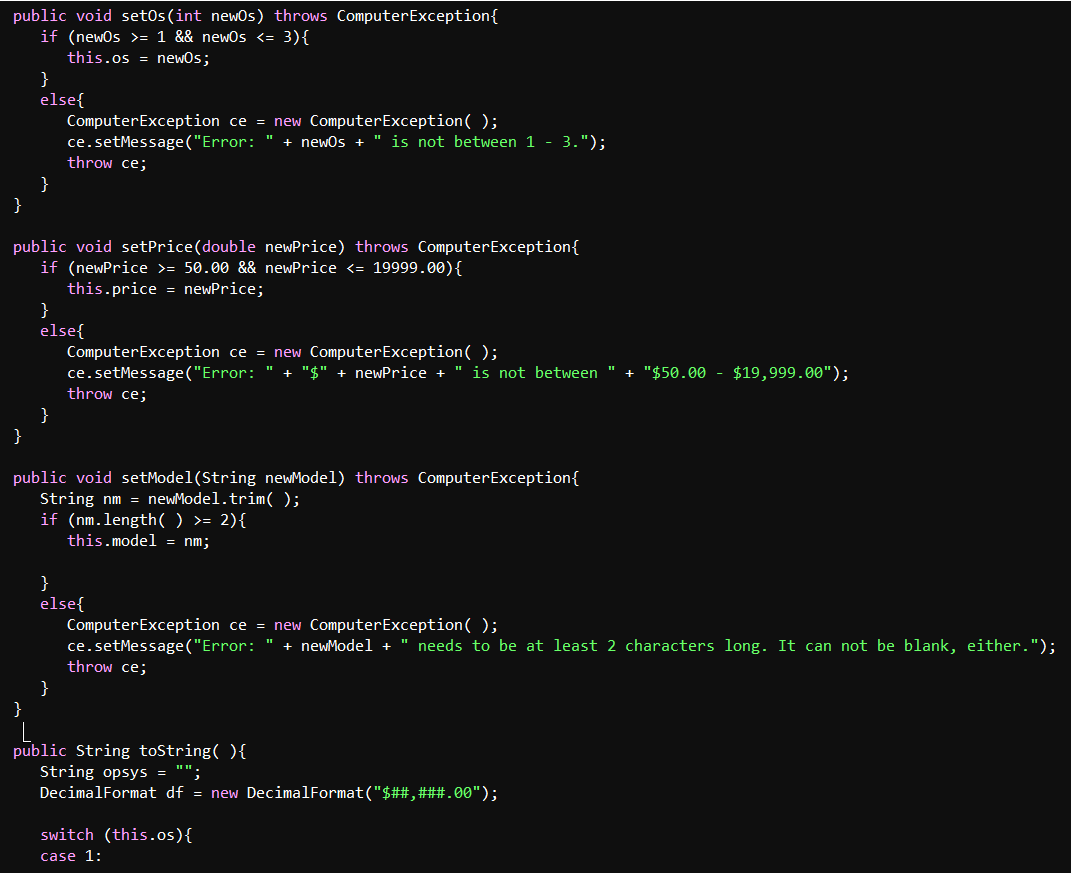
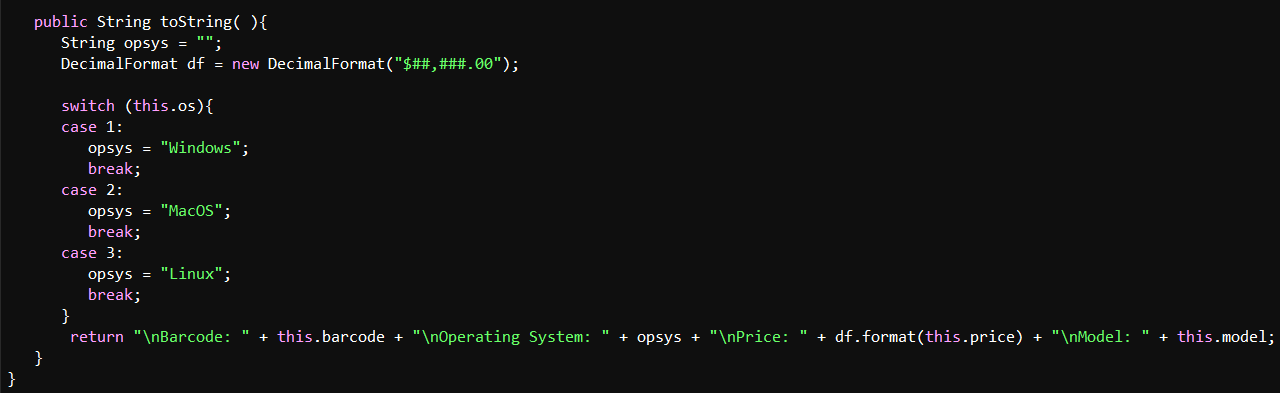
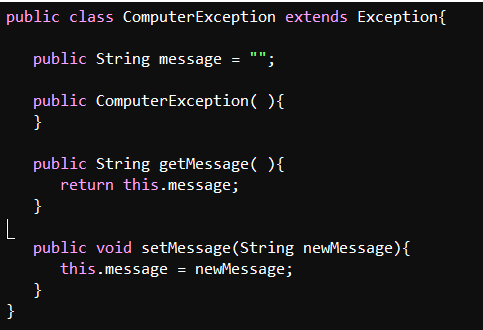
import java.text.*; public class Computer{ private int barcode = 0; private int os = 0; private double price = 0.0; private String model = " "; public Computer(int barcode, int os, double price, String model) throws ComputerException{ this.setBarcode(barcode); this.setOs(os); this.setPrice (price); this.setModel(model); } public int getBarcode(){ return this.barcode; } public int getos(){ return this.os; } public double getPrice(){ return this.price; } public String getModel(){ return this.model; } public void setBarcode(int newBarcode) throws ComputerException{ if (newBarcode >= 10001 && newBarcode = 1 && newOs = 50.00 && newPrice = 2) { this.model = nm; } else{ ComputerException ce = new ComputerException(); ce.setMessage("Error: " + newModel + " needs to be at least 2 characters long. It can not be blank, either."); throw ce; } public String toString(){ String opsys "": DecimalFormat df = new DecimalFormat("$##,###.00"); switch (this.os) { case 1: public String toString(){ String opsys = ""; DecimalFormat df = new DecimalFormat("$##,###.00"); switch (this.os) { case 1: opsys = "Windows"; break; case 2: opsys = "MacOS"; break; case 3: opsys = "Linux"; break; } return " Barcode: " + this.barcode + " Operating System: " + opsys + " Price: " + df.format(this.price) + " Model: " + this.model; } } public class ComputerException extends Exception{ = public String message public ComputerException(){ } public String getMessage(){ return this.message; } L public void setMessage(String newMessage) { this.message = newMessage; } }
Step by Step Solution
There are 3 Steps involved in it

Get step-by-step solutions from verified subject matter experts
 Study Help