







Question: For this code, instead of Retrieving Target Folder I would like to make it Retrieve Target File... What would I have to change in order
For this code, instead of "Retrieving Target Folder" I would like to make it "Retrieve Target File"... What would I have to change in order to do this?
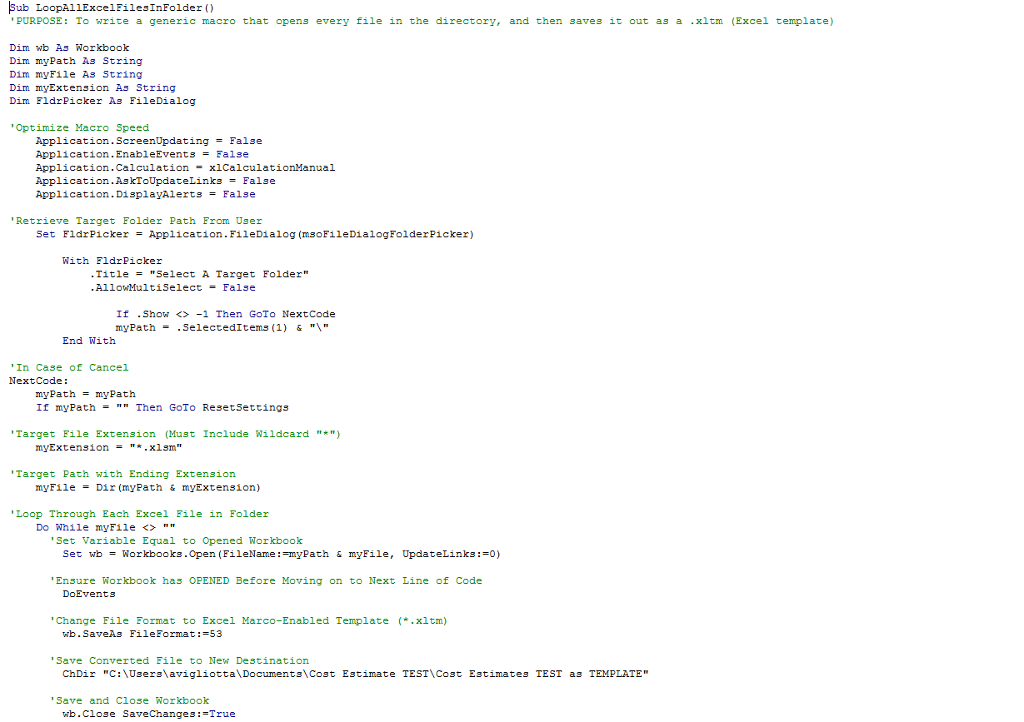
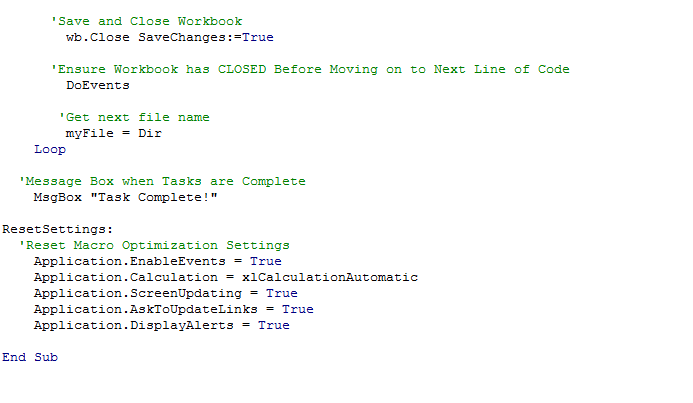
ub LoopAllExcel FilesInFolder PURPOSE To write a generic macro that opens every file in the directory and then saves it out as a .xltm Excel template Dim wb As Workbook Dim my path String Dim myFile As String Dim my Extension As String Dim Fldr Picker As FileDialog 'Optimize Macro Speed Application Updating False Screen Application.EnableEvents False Application Calculation ual Application AskToUpdateLinka False Application DisplayAlerts False 'Retrieve Target Folder Path From Uaer Set Fldr Picker Application. FileDialog (msoFileDialog Folder Picker With Eldr Picker Title Select A Target Folder Allow MultiSelect False If Show 1 Then GoTo NextCode myPath SelectedItems (1) & "V" End With In Case of Cancel Next Code my path myPats If my Path Then GoTo Reset Settings Target File Extension Must Include wildcard my Extension "Target Path with Ending Extension myFile Dir (myPath & myExtension) Loop Through Each Excel File in Folder Do While myFile 'Set Variable Equal to Opened Workbook Set wb orkbooks.Op en (FileName: EmyPath & myFil Update Links Ensure Workbook has OPENED Before Moving on to Next Line of Code DoEvents Change File Format to Excel Marco-Enabled Template .xltm) vib. SaveAs FileFormat 53 'Save Converted File to New Destination ChDir C: Users avigliotta Document Cost Estimate TEST ost Estimates TEST as TEMPLATE 'Save and Close Workbook wb.close SaveChanges True
Step by Step Solution
There are 3 Steps involved in it

Get step-by-step solutions from verified subject matter experts
 Study Help