







Question: For this project, some basic socket programming is going to be performed. You may have to do some research on how to write the code
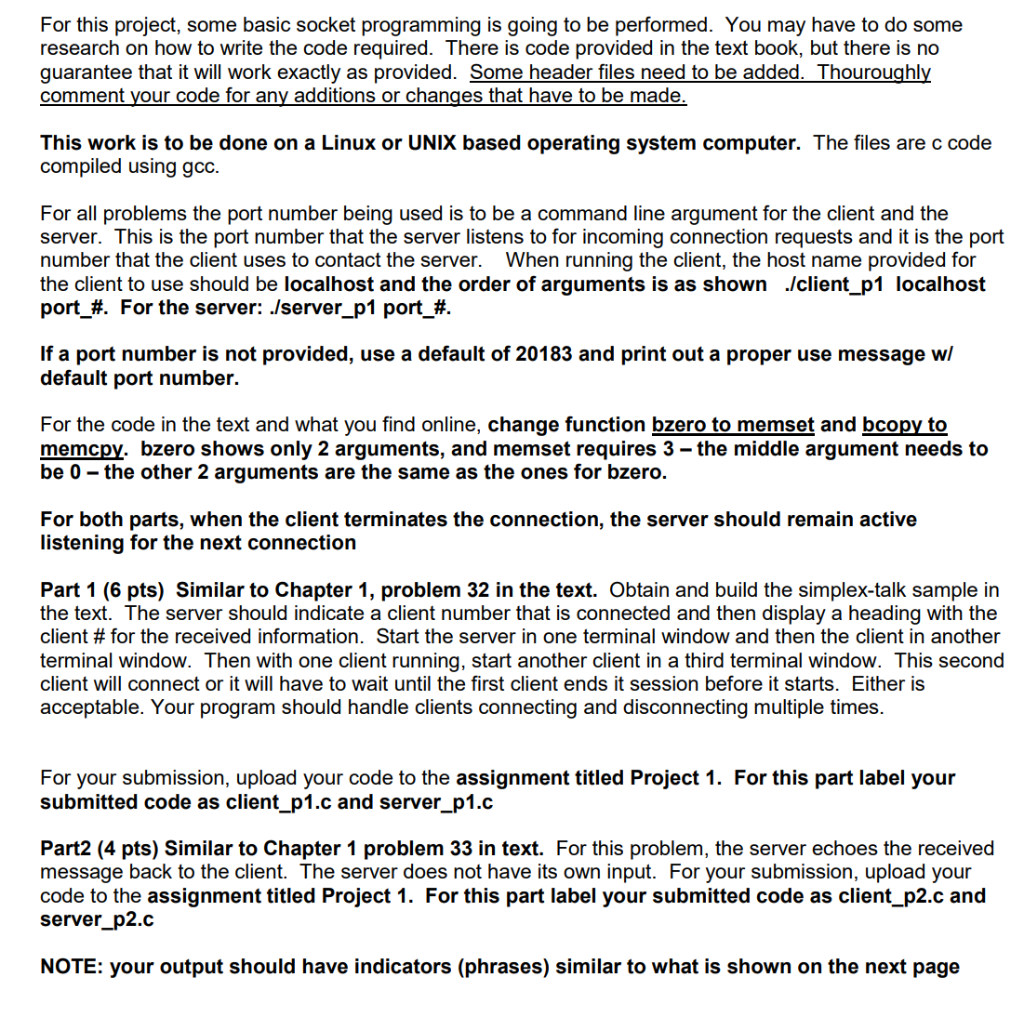
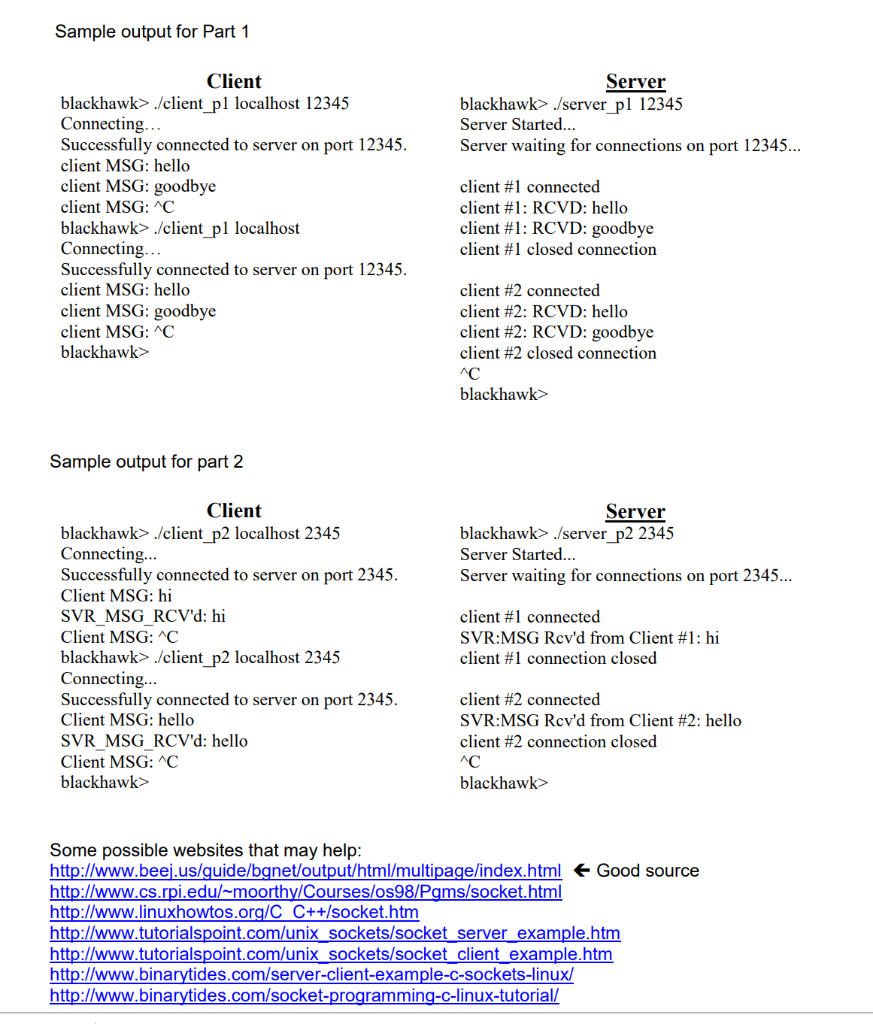
For this project, some basic socket programming is going to be performed. You may have to do some research on how to write the code required. There is code provided in the text book, but there is no guarantee that it will work exactly as provided. Some header files need to be added._Thouroughly comment your code for any additions or changes that have to be made This work is to be done on a Linux or UNIX based operating system computer. The files are c code compiled using gco. For all problems the port number being used is to be a command line argument for the client and the server. This is the port number that the server listens to for incoming connection requests and it is the port number that the client uses to contact the server. When running the client, the host name provided for the client to use should be localhost and the order of arguments is as shown .lclient p1 localhost port-#. For the server: ./server_p1 port#. If a port number is not provided, use a default of 20183 and print out a proper use message wi default port number. For the code in the text and what you find online, change function bzero to memset and bcopy to memcpy. bzero shows only 2 arguments, and memset requires 3-the middle argument needs to be 0-the other 2 arquments are the same as the ones for bzero. For both parts, when the client terminates the connection, the server should remain active listening for the next connection Part 1 (6 pts) Similar to Chapter 1, problem 32 in the text. Obtain and build the simplex-talk sample in the text. The server should indicate a client number that is connected and then display a heading with the Client # for the received information. Start the server in one terminal window and then the client in another terminal window. Then with one client running, start another client in a third terminal window. This second client will connect or it will have to wait until the first client ends it session before it starts. Either is acceptable. Your program should handle clients connecting and disconnecting multiple times For your submission, upload your code to the assignment titled Project 1. For this part label your submitted code as client p1.c and server p1.c Part2 (4 pts) Similar to Chapter 1 problem 33 in text. For this problem, the server echoes the received message back to the client. The server does not have its own input. For your submission, upload your code to the assignment titled Project 1. For this part label your submitted code as client p2.c and server p2.c NOTE: your output should have indicators (phrases) similar to what is shown on the next page Sample output for Part 1 Client Server blackhawk> /client pl localhost 12345 Connecting... Successfully connected to server on port 12345 client MSG: hello client MSG: goodbye client MSG: AC blackhawk> ./client pl localhost Connecting... Successfully connected to server on port 12345 client MSG: hello client MSG: goodbye client MSG:AC blackhawk> blackhawk> /server pl 12345 Server Started... Server waiting for connections on port 12345.. client #1 connected client #1: RCVD: hello client #1 : RCVD: goodbye client #1 closed connection client #2 connected client #2: RCVD: hello client #2: RCVD: goodbye client #2 closed connection blackhawk> Sample output for part 2 Client Server blackhawk> /client p2 localhost 2345 Connecting... Successfully connected to server on port 2345 Client MSG: hi SVR MSG RCV'd: hi Client MSG: C blackhawk> /client p2 localhost 2345 Connecting. Successfully connected to server on port 2345 Client MSG: hello SVR MSG RCV'd: hello Client MSG: C blackhawk> blackhawk> /server_p2 2345 Server Started Server waiting for connections on port 2345.. client #1 connected SVR:MSG Rcvd from Client #1 : hi client #1 connection closed client #2 connected SVR:MSG Rcv'd from Client #2: hello client #2 connection closed blackhawk> Some possible websites that may help http://www.beej.us/quide/bgnet/output/html/multipage/index.html E Good source http://www.cs.rpi.edu/ moorthy/Courses/os98/Pams/socket.html http://www.linuxhowtos.org/C C++/socket.htm htt htt http://www.binarytides.com/server-client-example-c-sockets-linux/ http://www.binarytides.com/socket-programming-c-linux-tutorial/ tutorialspoint.com/unix sockets/socket server example.htmm tutorialspoint.com/unix sockets/socketclient example.htm For this project, some basic socket programming is going to be performed. You may have to do some research on how to write the code required. There is code provided in the text book, but there is no guarantee that it will work exactly as provided. Some header files need to be added._Thouroughly comment your code for any additions or changes that have to be made This work is to be done on a Linux or UNIX based operating system computer. The files are c code compiled using gco. For all problems the port number being used is to be a command line argument for the client and the server. This is the port number that the server listens to for incoming connection requests and it is the port number that the client uses to contact the server. When running the client, the host name provided for the client to use should be localhost and the order of arguments is as shown .lclient p1 localhost port-#. For the server: ./server_p1 port#. If a port number is not provided, use a default of 20183 and print out a proper use message wi default port number. For the code in the text and what you find online, change function bzero to memset and bcopy to memcpy. bzero shows only 2 arguments, and memset requires 3-the middle argument needs to be 0-the other 2 arquments are the same as the ones for bzero. For both parts, when the client terminates the connection, the server should remain active listening for the next connection Part 1 (6 pts) Similar to Chapter 1, problem 32 in the text. Obtain and build the simplex-talk sample in the text. The server should indicate a client number that is connected and then display a heading with the Client # for the received information. Start the server in one terminal window and then the client in another terminal window. Then with one client running, start another client in a third terminal window. This second client will connect or it will have to wait until the first client ends it session before it starts. Either is acceptable. Your program should handle clients connecting and disconnecting multiple times For your submission, upload your code to the assignment titled Project 1. For this part label your submitted code as client p1.c and server p1.c Part2 (4 pts) Similar to Chapter 1 problem 33 in text. For this problem, the server echoes the received message back to the client. The server does not have its own input. For your submission, upload your code to the assignment titled Project 1. For this part label your submitted code as client p2.c and server p2.c NOTE: your output should have indicators (phrases) similar to what is shown on the next page Sample output for Part 1 Client Server blackhawk> /client pl localhost 12345 Connecting... Successfully connected to server on port 12345 client MSG: hello client MSG: goodbye client MSG: AC blackhawk> ./client pl localhost Connecting... Successfully connected to server on port 12345 client MSG: hello client MSG: goodbye client MSG:AC blackhawk> blackhawk> /server pl 12345 Server Started... Server waiting for connections on port 12345.. client #1 connected client #1: RCVD: hello client #1 : RCVD: goodbye client #1 closed connection client #2 connected client #2: RCVD: hello client #2: RCVD: goodbye client #2 closed connection blackhawk> Sample output for part 2 Client Server blackhawk> /client p2 localhost 2345 Connecting... Successfully connected to server on port 2345 Client MSG: hi SVR MSG RCV'd: hi Client MSG: C blackhawk> /client p2 localhost 2345 Connecting. Successfully connected to server on port 2345 Client MSG: hello SVR MSG RCV'd: hello Client MSG: C blackhawk> blackhawk> /server_p2 2345 Server Started Server waiting for connections on port 2345.. client #1 connected SVR:MSG Rcvd from Client #1 : hi client #1 connection closed client #2 connected SVR:MSG Rcv'd from Client #2: hello client #2 connection closed blackhawk> Some possible websites that may help http://www.beej.us/quide/bgnet/output/html/multipage/index.html E Good source http://www.cs.rpi.edu/ moorthy/Courses/os98/Pams/socket.html http://www.linuxhowtos.org/C C++/socket.htm htt htt http://www.binarytides.com/server-client-example-c-sockets-linux/ http://www.binarytides.com/socket-programming-c-linux-tutorial/ tutorialspoint.com/unix sockets/socket server example.htmm tutorialspoint.com/unix sockets/socketclient example.htm
Step by Step Solution
There are 3 Steps involved in it

Get step-by-step solutions from verified subject matter experts
 Study Help