







Question: For this project you will be writing a program called ChessElo.java that presents an interactive menu for calculating a player s chess Elo under different
For this project you will be writing a program called ChessElo.java that presents an interactive menu for calculating a players chess Elo under different conditions.
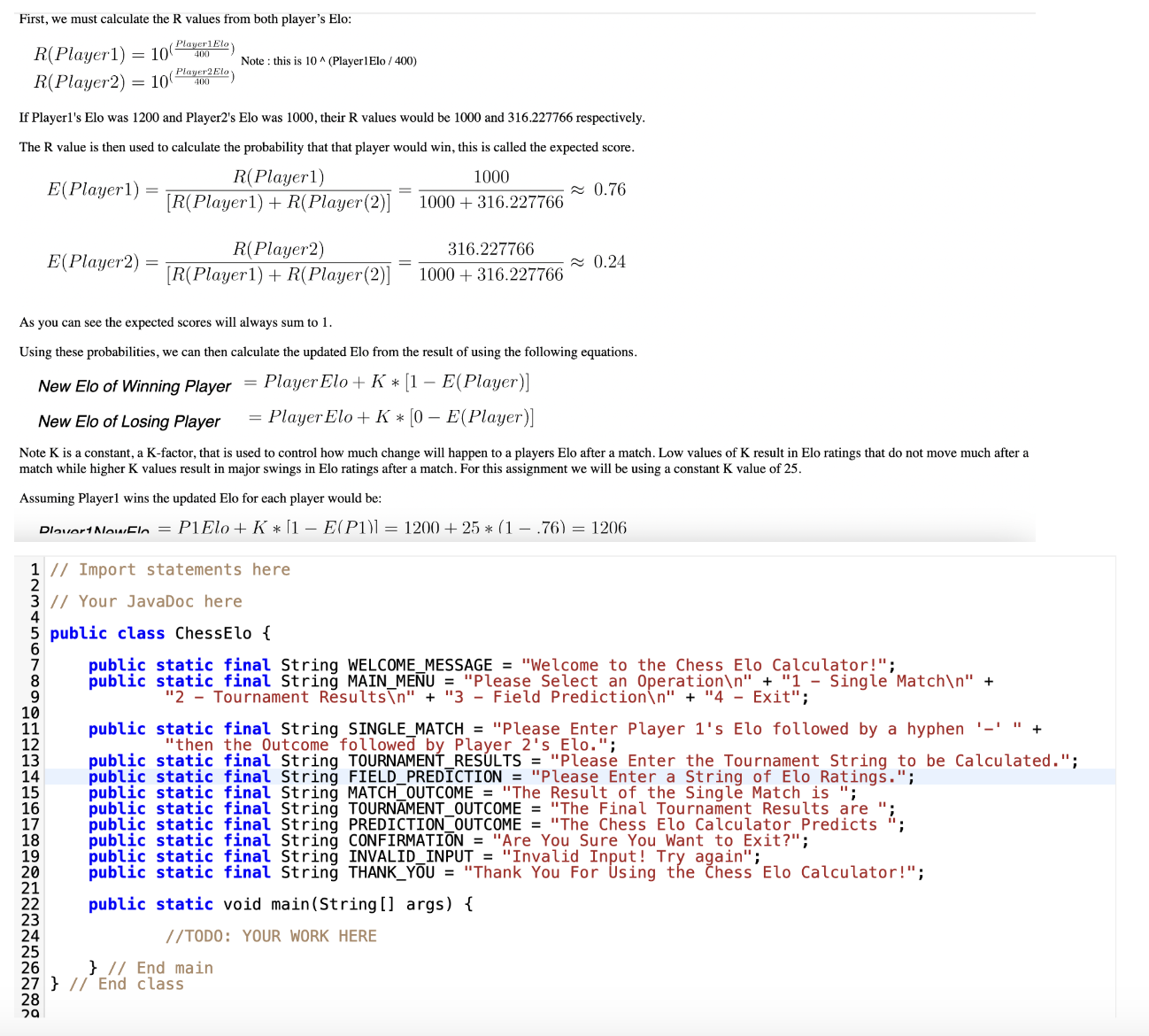
First, we must calculate the R values from both players Elo:
RPlayerfracPlayerElo Note : this is PlayerElo
RPlayerfracPlayerElo
Failure to use the provided Strings may result in a loss First, we must calculate the R values from both player's Elo:
Player Note : this Player
Player of points.
For this assignment you may not use Lists, ArrayLists, or String.split
You should not round during calculations. All final Elo ratings should be Integers. Integer truncation should automatically remove any decimal values. Do not round! Example: would be When doing multiple Elo calculations you should truncate the value between calculations. From the Example above: when you perform a second calculation you should use and not
The program will greet the user with a one time WELCOMEMESSAGE before printing the MAINMENU.
The user will then select of options.
Your program must handle invalid inputs on the MENU by printing INVALIDINPUT and reprinting the MAINMENU.
Option Single Match:
Prompt the user with the SINGLEMATCH prompt.
The user will input a single match in the format of PlayEloWLPlayerElo Examples : W wins vs Example: L loses to
The program should print the MATCHOUTCOME prompt followed by the new Elo for the players in the order entered separated by a hyphen Example Output: "The Result of the Single Match is Example Output: "The Result of the Single Match is
The program should then return to the MAINMENU.
You can assume the user will enter a valid parsable input.
Option Tournament Results:
Prompt the user with the TOURNAMENTRESULTS prompt.
The user will input a single line in the format of CompetitorEloResultOpponentEloResultOpponentElo ResultNOpponentNElo Example Input: LWLWL
Note that the length of the string is not set, your program should handle all result strings of or greater.
Note: A players Elo changes after EVERY match played. Which will impact the next match's calculation.
The program should print the TOURNAMENTOUTCOME prompt followed by competitor Elo then each of the opponents' Elo. Example Output: "The Final Tournament Results are is the final Elo for the competitor, and the following Elo values are the updated Elo of the opponents after their match.
The program should then return to the MAINMENU.
You can assume the user will enter a valid parsable input.
Option Field Prediction:
Prompt the user with the FIELDPREDICTION prompt.
The user will input a single line in the format EloEloEloEloN Example:
The program should print PREDICTIONOUTCOME prompt, the Elo rating of the lowest player the maximum amount they can win the max they can lose, and the Elo rating of the highest player the maximum amount they can win the max they can lose. Example: "The Chess Elo Calculator Predicts In this example the would gain the most Elo by winning against the but would lose the most Elo by losing to the Meanwhile, the would gain the most Elo by winning against the and lose the most Elo by losing to the
The program should then return to the MAINMENU.
You can assume the user will enter a valid parsable input.
Option Exit:
The program should print the CONFIRMATION prompt.
The user should then enter yesynon
On yesy the program should print the THANKYOU message and exit.
On non it should reprint the MAINMENU.
The program should ignore case for yesynon
On invalid input the program should print INVALIDINPUT and reprint the CONFIRMATION prompt.
The program should continue until the user chooses to exit the program from the main menu.
The output should match exactly as expected. Use String variables provided in the starter code.
You may not utilize static or multiple Scanner objects.
You may not utilize java.util.ArrayList, java.util.List, or String.split for this assignment.
You may not utilize System.exit in CS assignments.
Sample Test
Welcome to the Chess Elo Calculator!
Please Select an Operation
Single Match
Tournament Results
Field Prediction
Exit
Please Enter Player s Elo followed by a hyphen then the Outcome followed by Player s Elo.
W
The Result of the Single Match is
Please Select an Operation
Single Match
Tournament Results
Field Prediction
Exit
Are You Sure You Want to Exit?
yes
Thank You For Using the Chess Elo Calculator!
Step by Step Solution
There are 3 Steps involved in it
1 Expert Approved Answer
Step: 1 Unlock

Question Has Been Solved by an Expert!
Get step-by-step solutions from verified subject matter experts
Step: 2 Unlock
Step: 3 Unlock
 Study Help