







Question: // Fortune Teller import java.awt.Color; import java.awt.Container; import java.awt.FlowLayout; import java.awt.event.ActionListener; import java.awt.event.ActionEvent; import javax.swing.JFrame; import javax.swing.JTextField; import javax.swing.JButton; public class FortuneTeller extends JFrame implements
// Fortune Teller import java.awt.Color; import java.awt.Container; import java.awt.FlowLayout; import java.awt.event.ActionListener; import java.awt.event.ActionEvent; import javax.swing.JFrame; import javax.swing.JTextField; import javax.swing.JButton; public class FortuneTeller extends JFrame implements ActionListener { private static final EasySound ding = new EasySound("ding.wav"); // Declare an array of "fortunes" (strings): ___________________________________________ ... private JTextField display; public FortuneTeller() { super("Fortune Teller"); display = new JTextField(" Press \"Next\" to see your fortune...", 25); display.setBackground(Color.WHITE); display.setEditable(false); JButton go = new JButton("Next"); go.addActionListener(this); Container c = getContentPane(); c.setLayout(new FlowLayout()); c.add(display); c.add(go); } public void actionPerformed(ActionEvent e) { // Pick and display a random fortune: ___________________________________________ ... display.setText(" " + __________________ ); ding.play(); } public static void main(String[] args) { JFrame window = new FortuneTeller(); window.setBounds(300, 300, 300, 100); window.setDefaultCloseOperation(JFrame.EXIT_ON_CLOSE); window.setResizable(false); window.setVisible(true); } } that's the code that needs to be used in this lab
pls, i need help
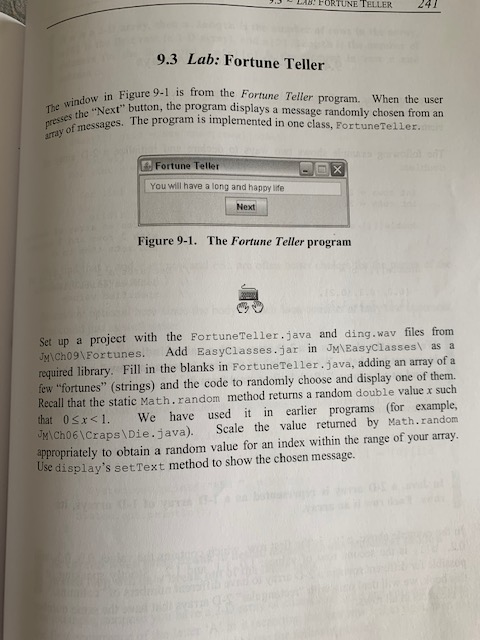
7. LAB! FORTUNE TELLER 247 9.3 Lab: Fortune Teller The window in Fion presses the "Next in Figure 9-1 is from the Fortune Teller program. When the user Next button, the program displays a message randomly chosen from an s. The program is implemented in one class, Fortune Teller. rray of messages. Then Fortune Teller You will have a long and happy life Next Figure 9-1. The Fortune Teller program Set up a project with the Fortune Teller.java and ding.wav files from JM\Ch09\Fortunes. Add EasyClasses.jar in JM\EasyClasses as a required library. Fill in the blanks in Fortune Teller.java, adding an array of a few "fortunes" (strings) and the code to randomly choose and display one of them. Recall that the static Math.random method returns a random double value x such that 0 5x
Step by Step Solution
There are 3 Steps involved in it

Get step-by-step solutions from verified subject matter experts
 Study Help