







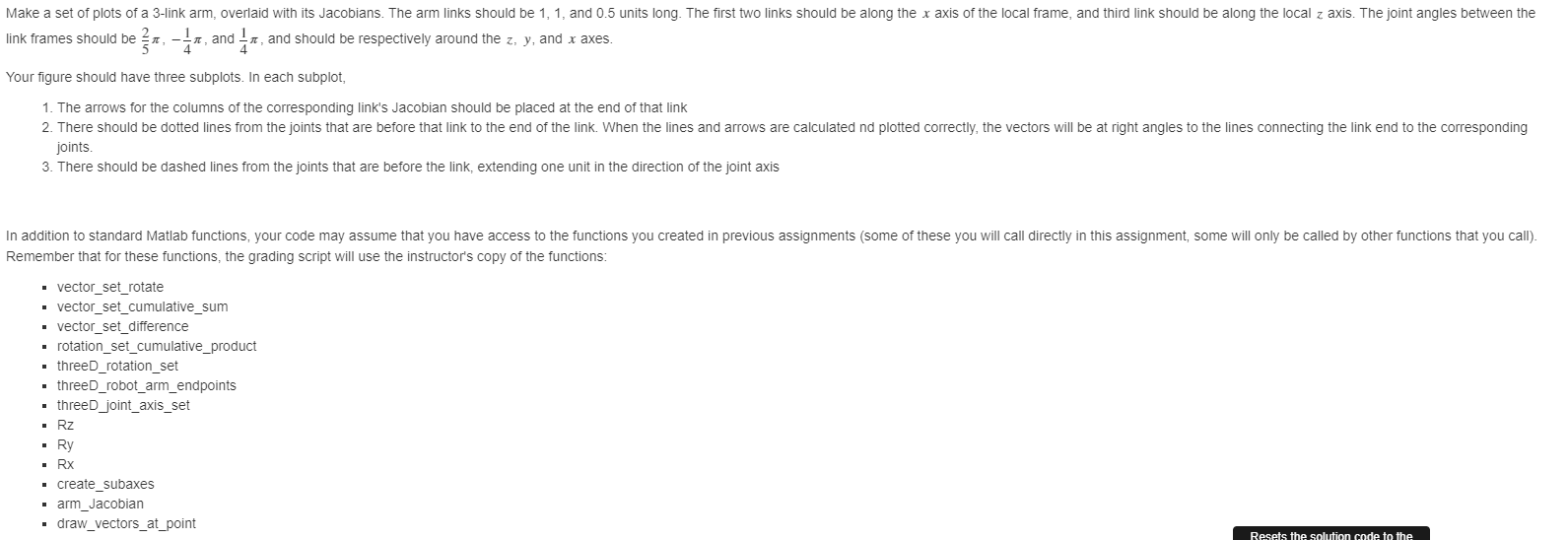
Question: function [link_vectors,... joint_angles,... joint_axes,... J,... link_ends,... link_end_set,... ax,... l,... l2,... l3,... q] = ME317_Assignment_draw_3D_arm_with_Jacobian % Make a set of plots (subplots in one axis) that
function [link_vectors,...
joint_angles,...
joint_axes,...
J,...
link_ends,...
link_end_set,...
ax,...
l,...
l2,...
l3,...
q] = ME317_Assignment_draw_3D_arm_with_Jacobian
% Make a set of plots (subplots in one axis) that illustrate the
% relationship between the geometry of the arm and the Jacobians of the
% links
%%%%%%%%%%
% Specify link vectors as a 1x3 cell array of 3x1 vectors, named
% 'link_vectors'
%%%%%%%%%%
% Specify joint angles as a 3x1 vector, named 'joint_angles'
%%%%%%%%%%
% Specify joint axes as a 3x1 cell array, named 'joint_axes'
%%%%%%%%%
% Create an empty cell array named of the same size as link_vectors,
% named J
%%%%%%%%%
% Loop over the elements of J
% In each element of J, use arm_Jacobian to find the Jacobian for
% the corresponding link on the arm.
%
% When you call arm_Jacobian, also get link_ends, link_end_set,
% and joint_axis_vectors_R
% as outputs (they will be used for plotting). These outputs are
% independent of the link number, so you don't need to store them
% separately for each link number -- the easy way to do this is to
% have the link_end outputs returned in each iteration of the loop,
% which will overwrite them every time, and leave them at their
% value from the final iteration
%%%%%%%%%%%%%%%%%%%%%%%%%%%%
% Plotting
%%%%%%%%%
% Create figure and subaxes for the plot, and store the axis handles in a
% variable named 'ax'. Use the 'create_subaxes' function you wrote
% earlier, with the square root of the number of links for m
% and n (round up to make these integer values), and only as many plots
% as you have links
%%%%%%%%
% Create empty cell arrays 'l', 'l2', 'l3', and 'q' to hold the handles to the
% lines and quivers that will illustrate the arm and the components of
% the Jacobians. Each cell array should be the same size as J.
%%%%%%%%
% Loop over the subfigure axes, drawing the robot arm into each axis.
% Use the information in link_ends to draw a line for the arm links,
% with circles at the endpoints, and save the handle to this line into
% the corresponding element of 'l'
%%%%%%%%
% Loop over the subfigure axes, making the system a 3d view in each
%%%%%%%%
% Loop over the subfigure axes, adding arrows for the column of the
% corresponding Jacobian into each axis. Get the location of the end of
% the link from link_end_set, and use the draw_vectors_at_point
% function you wrote earlier to make the arrows. Save the handles
% returned by draw_vectors_at_point into the corresponding elements of
% q
%%%%%%%%%
% Loop over the subfigure axes, adding a dashed line between the end of
% the link whose Jacobian is plotted in that axis and the joints
% corresponding to the columns of the Jacobian
% For each subfigure axis:
%
% 1. Make the corresponding elements of 'l2' and 'l3' empty 1xN cell
% arrays (where N is the number of columns in the Jacobian). This
% is now a nested cell array, so your command should look
% something like 'l2{idx} = cell(...'
% 2. Loop over the locations of the joints (the base points of
% the links), and draw a dotted line from each of the joints that
% is *before* the current link to the end of the current link
%
% Save the handles to these lines into the l2{idx} cell array you
% created for this plot (note that because this is a nested cell
% array, your command should look something like
% 'l2{idx}{idx2} = line(...'
%
% As you make these lines, set their color property to be the
% same as the corresponding Jacobian arrow
% [Use get(q{idx}{idx2},'Color') to get the color of the arrow]
% 3. Loop over the locations of the joints (the base points of
% the links), and draw a dashed line from each of the joints that
% is *before* the current link to the point one unit from the
% joint in the direction of that joint's axis
%
% Save the handles to these lines into the l3{idx} cell array you
% created for this plot (note that because this is a nested cell
% array, your command should look something like
% 'l3{idx}{idx2} = line(...'
%
% As you make these lines, set their color property to be the
% same as the corresponding Jacobian arrow
% [Use get(q{idx}{idx2},'Color') to get the color of the arrow]
end
![q] = ME317_Assignment_draw_3D_arm_with_Jacobian % Make a set of plots (subplots in one](https://dsd5zvtm8ll6.cloudfront.net/si.experts.images/questions/2024/10/6700f2c2e3ae6_3946700f2c291498.jpg)
Make a set of plots of a 3-link arm, overlaid with its Jacobians. The arm links should be 1, 1, and 0.5 units long. The first two links should be along the x axis of the local frame, and third link should be along the local z axis. The joint angles between the , and and should be respectively around the z, y, and x axes. link frames should be r, - IR Your figure should have three subplots. In each subplot, 1. The arrows for the columns of the corresponding link's Jacobian should be placed at the end of that link 2. There should be dotted lines from the joints that are before that link to the end of the link. When the lines and arrows are calculated nd plotted correctly, the vectors will be at right angles to the lines connecting the link end to the corresponding joints 3. There should be dashed lines from the joints that are before the link, extending one unit in the direction of the joint axis In addition to standard Matlab functions, your code may assume that you have access to the functions you created in previous assignments (some of these you will call directly in this assignment, some will only be called by other functions that you call). Remember that for these functions, the grading script will use the instructor's copy of the functions: vector_set_rotate vector_set_cumulative_sum vector_set_difference rotation_set_cumulative_product . threeD_rotation_set threeD_robot_arm_endpoints threeD_joint_axis_set Rz Ry Rx create_subaxes arm_Jacobian draw_vectors_at_point Resets the solution code to the Code to call your function 1 [link_vectors, ... 2 joint_angles,... 3 joint_axes,... ],... 5 link_ends,... link_end_set,... 7 ax,... 8 1,... 9 12,.. 6 10 13,... 11 9] = ME317_Assignment_draw_3D_arm_with_Jacobian; Make a set of plots of a 3-link arm, overlaid with its Jacobians. The arm links should be 1, 1, and 0.5 units long. The first two links should be along the x axis of the local frame, and third link should be along the local z axis. The joint angles between the , and and should be respectively around the z, y, and x axes. link frames should be r, - IR Your figure should have three subplots. In each subplot, 1. The arrows for the columns of the corresponding link's Jacobian should be placed at the end of that link 2. There should be dotted lines from the joints that are before that link to the end of the link. When the lines and arrows are calculated nd plotted correctly, the vectors will be at right angles to the lines connecting the link end to the corresponding joints 3. There should be dashed lines from the joints that are before the link, extending one unit in the direction of the joint axis In addition to standard Matlab functions, your code may assume that you have access to the functions you created in previous assignments (some of these you will call directly in this assignment, some will only be called by other functions that you call). Remember that for these functions, the grading script will use the instructor's copy of the functions: vector_set_rotate vector_set_cumulative_sum vector_set_difference rotation_set_cumulative_product . threeD_rotation_set threeD_robot_arm_endpoints threeD_joint_axis_set Rz Ry Rx create_subaxes arm_Jacobian draw_vectors_at_point Resets the solution code to the Code to call your function 1 [link_vectors, ... 2 joint_angles,... 3 joint_axes,... ],... 5 link_ends,... link_end_set,... 7 ax,... 8 1,... 9 12,.. 6 10 13,... 11 9] = ME317_Assignment_draw_3D_arm_with_Jacobian
Step by Step Solution
There are 3 Steps involved in it

Get step-by-step solutions from verified subject matter experts
 Study Help