







Question: Functions and Arithmetic 1. Compose a function called that accepts two numerical arguments: the original price of an item, and the tax rate applied to
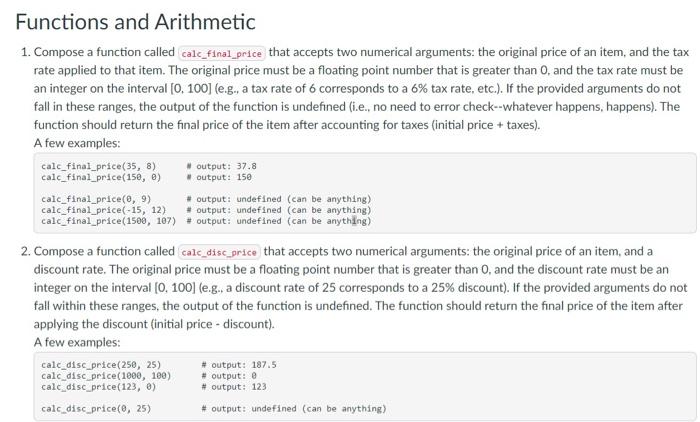
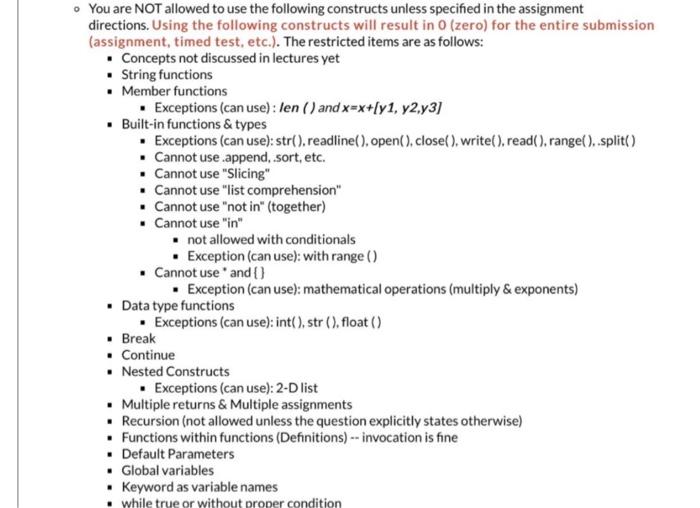
Functions and Arithmetic 1. Compose a function called that accepts two numerical arguments: the original price of an item, and the tax rate applied to that item. The original price must be a floating point number that is greater than 0 , and the tax rate must be an integer on the interval [0,100] (e.g., a tax rate of 6 corresponds to a 6% tax rate, etc.). If the provided arguments do not fall in these ranges, the output of the function is undefined (i.e., no need to error check--whatever happens, happens). The function should return the final price of the item after accounting for taxes (initial price + taxes). A few examples: \( \begin{array}{ll}\text { calc_final_price }(35,8) & \text { output: } 37.8 \\ \text { calc_final_price(150, 8) } & \text { output: } 150 \\ \text { calc_final_price }(0,9) & \text { \# output: undefined (can be anything) } \\ \text { calc_final_price }(-15,12) & \text { \# output: undefined (can be anything) } \\ \text { calc_final_price }(1500,107) & \text { \#output: undefined (can be anything) }\end{array} \) 2. Compose a function called calc_disc_price that accepts two numerical arguments: the original price of an item, and a discount rate. The original price must be a floating point number that is greater than 0 , and the discount rate must be an integer on the interval [0,100] (e.g., a discount rate of 25 corresponds to a 25% discount). If the provided arguments do not fall within these ranges, the output of the function is undefined. The function should return the final price of the item after applying the discount (initial price - discount). A few examples: \( \begin{array}{ll}\text { calc_disc_price }(250,25) & \text { \# output: } 187.5 \\ \text { calc_disc_price }(1000,100) & \text { \#output: } 8 \\ \text { calc_disc_price }(123,0) & \text { \# output: } 123 \\ \text { calc_disc_price }(\theta, 25) & \text { \# output: undefined (can be anything) }\end{array} \) You are NOT allowed to use the following constructs unless specified in the assignment directions. Using the following constructs will result in 0 (zero) for the entire submission (assignment, timed test, etc.). The restricted items are as follows: - Concepts not discussed in lectures yet - String functions - Member functions - Exceptions (can use) : len () and x=x+[y1,y2,y3] - Built-in functions \& types - Exceptions (can use): str(), readline(), open(), close(), write(), read(), range(), split() - Cannot use .append, sort, etc. - Cannot use "Slicing" - Cannot use "list comprehension" - Cannot use "not in" (together) - Cannot use "in" - not allowed with conditionals - Exception (can use): with range () - Cannot use " and \{\} - Exception (can use): mathematical operations (multiply \& exponents) - Data type functions - Exceptions (can use): int(), str (), float () - Break - Continue - Nested Constructs - Exceptions (can use): 2-D list - Multiple returns \& Multiple assignments - Recursion (not allowed unless the question explicitly states otherwise) - Functions within functions (Definitions) -- invocation is fine - Default Parameters - Global variables - Keyword as variable names
Step by Step Solution
There are 3 Steps involved in it

Get step-by-step solutions from verified subject matter experts
 Study Help