







Question: G GETTING STARTED - Open the file IL _ EX 1 9 _ 7 a _ FirstLastName _ 1 . xlsx , available for download
G GETTING STARTED
Open the file ILEXaFirstLastNamexlsx available for download from the SAM website. Click Continue to start the project.
Save the file as ILEXaFirstLastNamexIsx by changing the to a
If you do not see the xlsx file extension in the Save As dialog box, do not type it The program will add the file extension for you automatically.
To complete this SAM Project, you will also need to download and save the following data files from the SAM website onto your computer:
SupportEXapng
SupportEXaxIsx
SupportEXaBanner.jpg
SupportEXaCombined.csv
SupportEXaCompare.docx
SupportEXaSummary.pptx
With the file ILEXaFirstLastNamexlsx still open, ensure that your first and last name is displayed in cell B of the Documentation sheet.
If cell B does not display your name, delete the file and download a new copy from the SAM website.
PROJECT STEPS
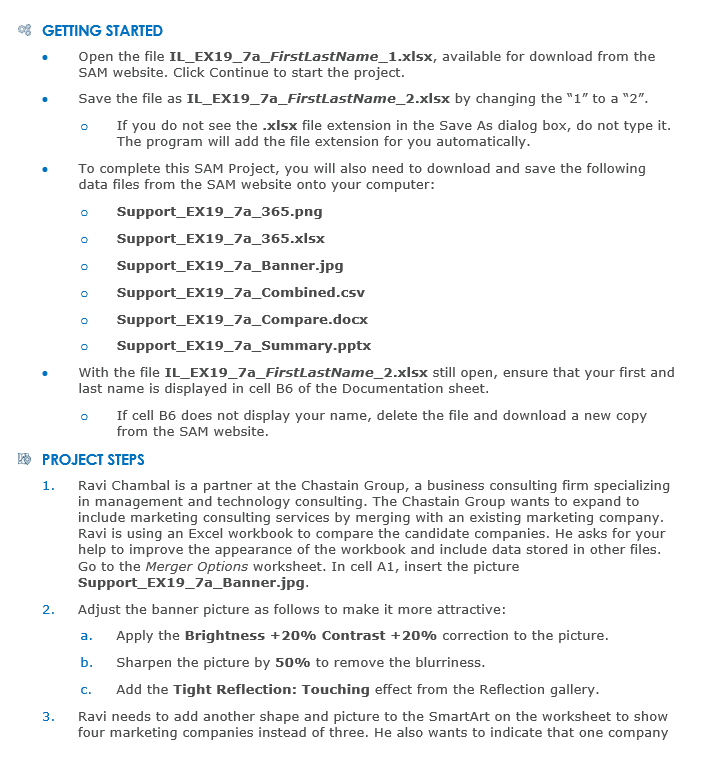
Ravi Chambal is a partner at the Chastain Group, a business consulting firm specializing in management and technology consulting. The Chastain Group wants to expand to include marketing consulting services by merging with an existing marketing company. Ravi is using an Excel workbook to compare the candidate companies. He asks for your help to improve the appearance of the workbook and include data stored in other files. Go to the Merger Options worksheet. In cell A insert the picture SupportEXaBanner.jpg
Adjust the banner picture as follows to make it more attractive:
a Apply the Brightness mathbf Contrast mathbf correction to the picture.
b Sharpen the picture by mathbf to remove the blurriness.
c Add the Tight Reflection: Touching effect from the Reflection gallery.
Ravi needs to add another shape and picture to the SmartArt on the worksheet to show four marketing companies instead of three. He also wants to indicate that one company
Step by Step Solution
There are 3 Steps involved in it
1 Expert Approved Answer
Step: 1 Unlock

Question Has Been Solved by an Expert!
Get step-by-step solutions from verified subject matter experts
Step: 2 Unlock
Step: 3 Unlock
 Study Help