







Question: GENERATING A PLOT FROM MULTIPLE DATA SETS ( Exercise 2 ) At the bottom, click on + to add a new worksheet. Change
GENERATING A PLOT FROM MULTIPLE DATA SETS Exercise
At the bottom, click on to add a new worksheet. Change the Label on this worksheet from "Sheet
to "Multiple Data Sets".
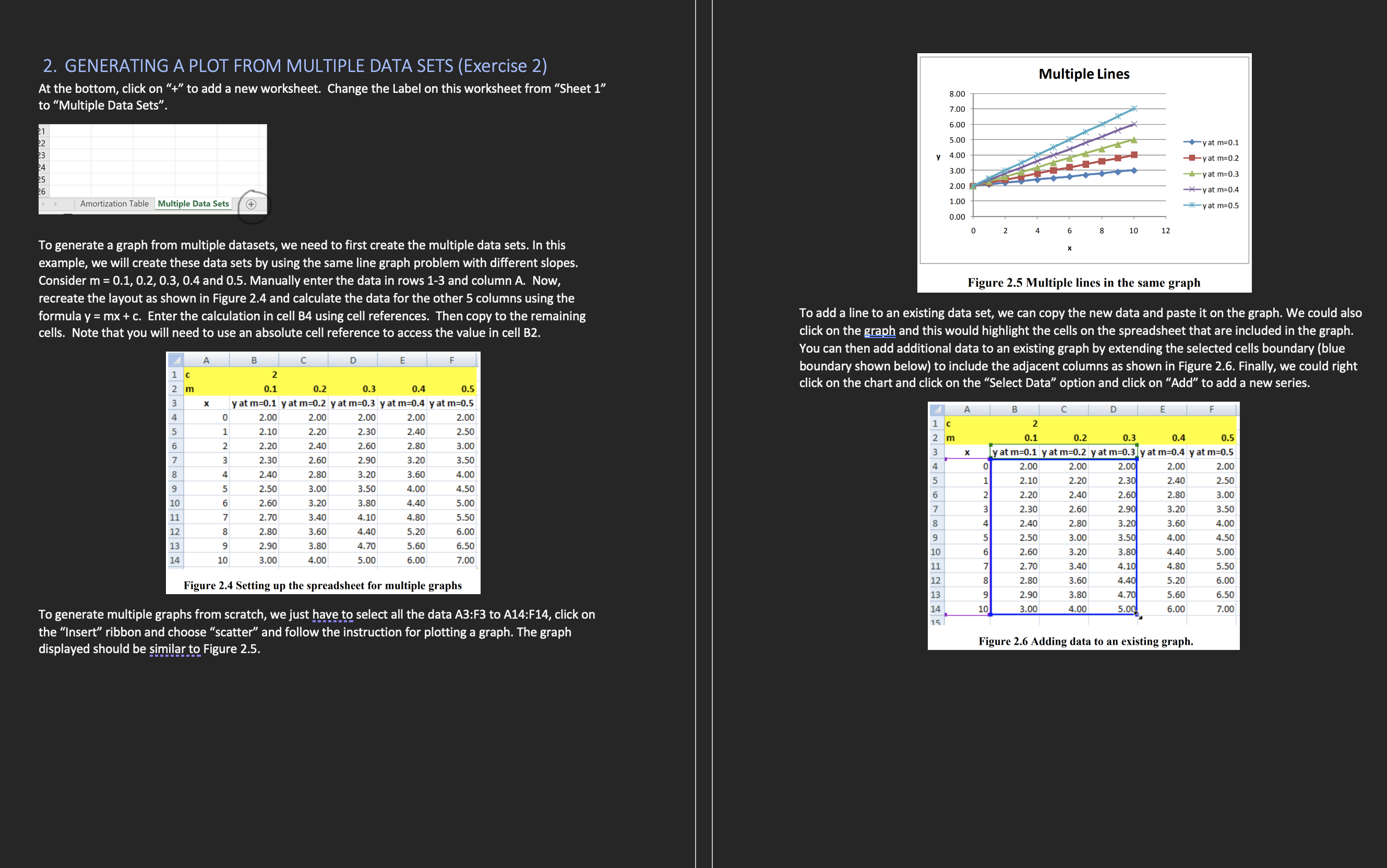
To generate a graph from multiple datasets, we need to first create the multiple data sets. In this
example, we will create these data sets by using the same line graph problem with different slopes.
Consider and Manually enter the data in rows and column A Now,
recreate the layout as shown in Figure and calculate the data for the other columns using the
formula Enter the calculation in cell B using cell references. Then copy to the remaining
cells. Note that you will need to use an absolute cell reference to access the value in cell B
Figure Setting up the spreadsheet for multiple graphs
To generate multiple graphs from scratch, we just have to select all the data A:F to A:F click on
the "Insert" ribbon and choose "scatter" and follow the instruction for plotting a graph. The graph
displayed should be similar to Figure
To add a line to an existing data set, we can copy the new data and paste it on the graph. We could also
click on the graph and this would highlight the cells on the spreadsheet that are included in the graph.
You can then add additional data to an existing graph by extending the selected cells boundary blue
boundary shown below to include the adjacent columns as shown in Figure Finally, we could right
click on the chart and click on the "Select Data" option and click on "Add" to add a new series.
Figure Adding data to an existing graph.
Step by Step Solution
There are 3 Steps involved in it
1 Expert Approved Answer
Step: 1 Unlock

Question Has Been Solved by an Expert!
Get step-by-step solutions from verified subject matter experts
Step: 2 Unlock
Step: 3 Unlock
 Study Help