







Question: Getting data from the user A better way to test programs with different data is to allow the user to enter the data during program
Getting data from the user
A better way to test programs with different data is to allow the user to enter the data during program execution. Moreover, it would be nice if the user could enter data in a user-friendly manner, with decimal notation for integer values.
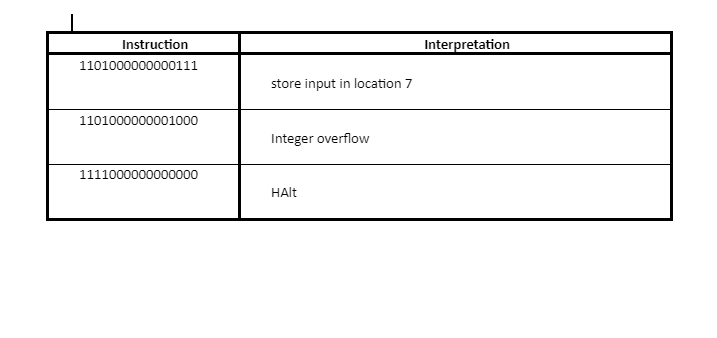
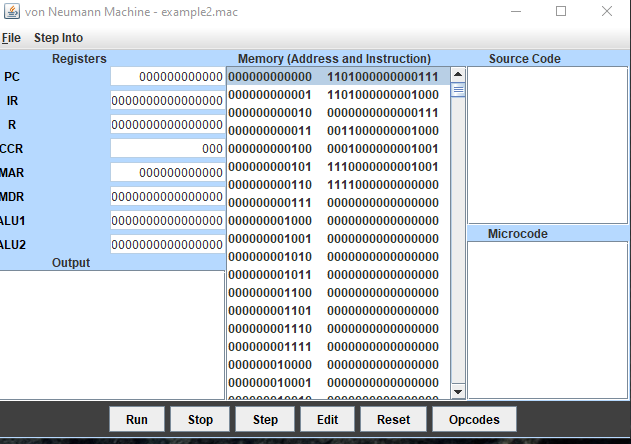
Download the document lab_09_03.docx. Using the table within the document complete the following. Load the file example2.mac from the EXAMPLES folder. Enter your interpretations of the first three instructions.
Now step through the program. When you are prompted for input data, enter binary values for decimal values such as 34 and 76.
Once you have completed the table, save your file with your last name in the file name (Example: lab_09_03_Jones.doc). To upload and submit your assignment, click the Choose File button below to find and select your saved document.
Editing memory to use different data
Based on what you saw in the first exercise, where are the data for the program located? Give the memory addresses where the data (as opposed to the instructions) are located.
You will now run the program again with different data. To place a new datum in a memory cell, select the desired cell and click the Edit button. Do that now for the first data cell of the program. You should see a cell editor box that displays the current contents of the cell (Figure 9.3).
Figure 9.3 Entering new data into a memory cell
Enter the number 7 in binary form. Then move to the next data cell and enter the number 8 in binary form. Finally, click the Reset button and run the program by clicking Run this time. Did you receive the expected output?
\begin{tabular}{|c|l|} \hline Instruction & \multicolumn{1}{|c|}{ Interpretation } \\ \hline 1101000000000111 & store input in location 7 \\ \hline 1101000000001000 & Integer overflow \\ \hline 1111000000000000 & HAlt \\ \hline \end{tabular} von Neumann Machine - example2.mac
Step by Step Solution
There are 3 Steps involved in it

Get step-by-step solutions from verified subject matter experts
 Study Help