







Question: Getting the Date Python 3 has a datetime library for working with dates. To get a timestamp for the current date, you can use the
Getting the Date Python 3 has a datetime library for working with dates. To get a timestamp for the current date, you can use the following code. >>> import datetime >>> str(datetime.datetime.now()) >>> '2017-10- 17 13:30:28.983682'
The __str__ Method: Python supports several "special" methods that a user can define in their class. Once such method is called __str__. If you define this method (and it must return a string), then print(Object), will call this method automatically in order to get a string representation of the object for use in printing the object to the command line. This concept is called operator overloading and will be explored in greater detail in Week 3. The Item Class The first thing we'll need to do is design and implement an items class! We can instantiate it to create the item objects that are part of the receipt.
The Item Class The first thing we'll need to do is design and implement an items class! We can then instantiate it to create the item objects that are part of the receipt. This study source was downloaded by 100000800136854 from CourseHero.com on 01-19-2024 07:51:58 GMT -06:00 https://www.coursehero.com/file/62035368/CS172-Lab2docx/ The item class should have three attributes: __name - A string with the item name., __price - A float with the item price in dollars., __taxable - A Boolean that is true if the item is taxed.
The item class should have the following methods. __init__ - The constructor. Takes data for all three attributes as parameters. These parameters should be in same type as their associated attributes, __str__ - returns the item as a string, getPrice - return the price of the item, getTax - Takes the tax rate as a floating point parameter. Returns the tax charged on the item.
The Receipt Class Next we want to design and implement a Receipt class! The receipt class should have two attributes. __tax_rate - The tax rate in this area and __purchases - A list of items. The Receipt class should have the following methods. __init__ - The constructor. Takes the tax rate as a floating point number. The tax rate should default to 7%, __str__ - returns the full receipt as a string and addItem - Takes an Item object as a parameter and adds it to the receipt.
Programming Project: Implement a program, main.py that has your class definition as well as the main script (we have provided a template for you). In the future we may ask you to separate out some content into additional files/modules. Your main script should create an empty receipt object, then asks the users for items. For each item, read in the name, price, and if the item is taxable. When the user says that do not want to add any more items, print out the full receipt. The receipt must have the following contents: Each item listed with it's price, The total cost of the items,The total tax charged on all items (we'll use 7% tax rate), The grand total with tax added, The current date when the receipt we generated, All values must be shown to two decimal places.
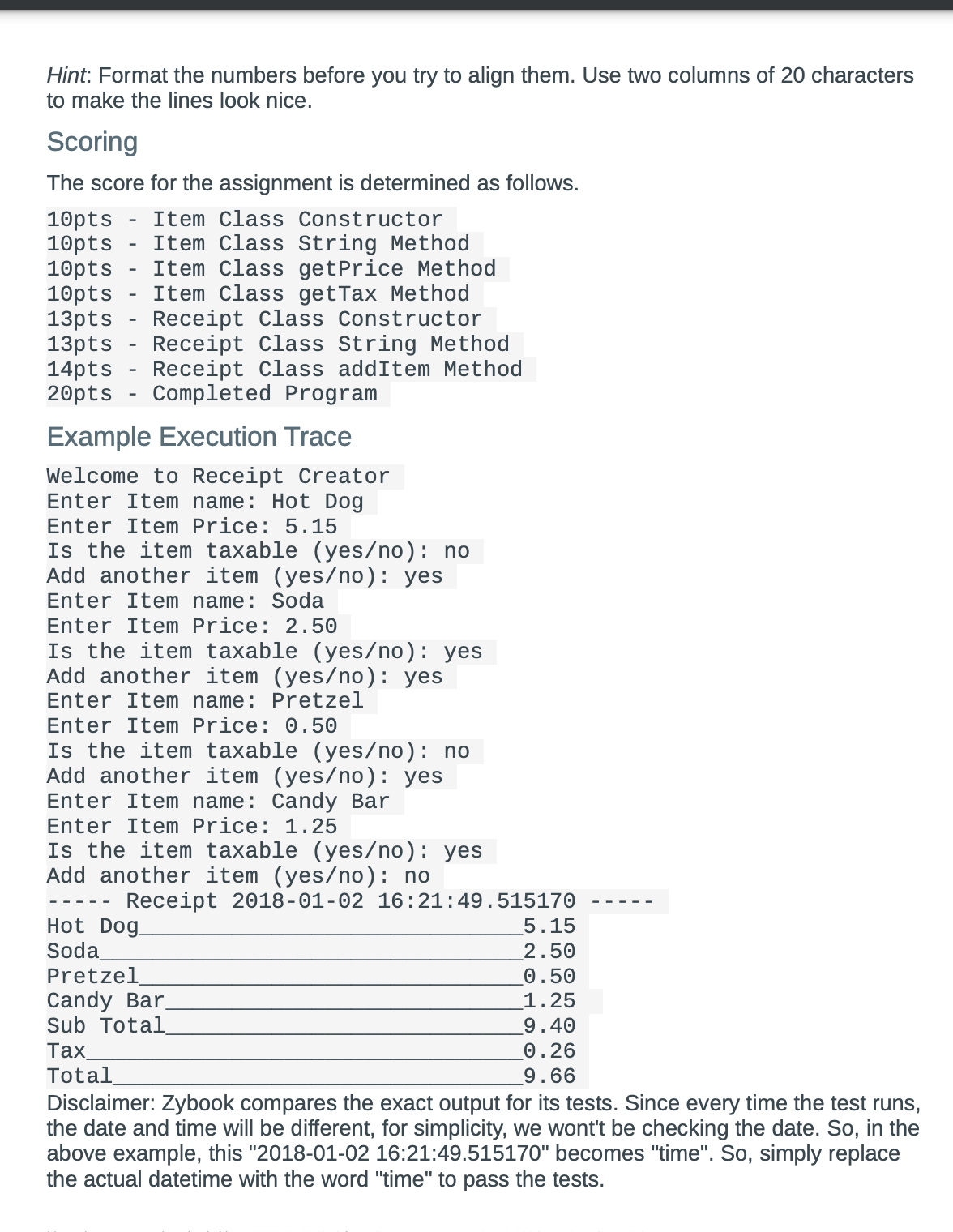
Hint: Format the numbers before you try to align them. Use two columns of 20 characters to make the lines look nice. Scoring The score for the assignment is determined as follows. 10pts Item Class Constructor 10pts 10pts Item Class String Method Item Class getPrice Method 10pts Item Class getTax Method 13pts Receipt Class Constructor 13pts Receipt Class String Method 14pts Receipt Class addItem Method 20pts Completed Program Example Execution Trace Welcome to Receipt Creator Enter Item name: Hot Dog Enter Item Price: 5.15 Is the item taxable (yes/no): no Add another item (yes/no): yes Enter Item name: Soda Enter Item Price: 2.50 Is the item taxable (yes/no): yes Add another item (yes/no): yes Enter Item name: Pretzel Enter Item Price: 0.50 Is the item taxable (yes/no): no Add another item (yes/no): yes Enter Item name: Candy Bar Enter Item Price: 1.25 Is the item taxable (yes/no): yes Add another item (yes/no): no Receipt 2018-01-02 16:21:49.515170 Hot Dog. Soda Pretzel Candy Bar_ Sub Total Tax Total 5.15 2.50 0.50 1.25 9.40 0.26 9.66 Disclaimer: Zybook compares the exact output for its tests. Since every time the test runs, the date and time will be different, for simplicity, we wont't be checking the date. So, in the above example, this "2018-01-02 16:21:49.515170" becomes "time". So, simply replace the actual datetime with the word "time" to pass the tests.
Step by Step Solution
There are 3 Steps involved in it

Get step-by-step solutions from verified subject matter experts
 Study Help