







Question: Given Code: def list_items(inventory): ''' Function to display the list of items from the invetory''' for i in range(len(inventory)): item = inventory[i] print(f{i+1}. {item[1]} {item[0].title()}
![items from the invetory''' for i in range(len(inventory)): item = inventory[i] print(f"{i+1}.](https://dsd5zvtm8ll6.cloudfront.net/si.experts.images/questions/2024/09/66f3a7392da97_08866f3a738980d2.jpg)
![{item[1]} {item[0].title()} ({item[2]})") print() def add_item(inventory): ''' Function to add a new](https://dsd5zvtm8ll6.cloudfront.net/si.experts.images/questions/2024/09/66f3a739f0f4b_08966f3a7396d8a8.jpg)
 Given Code:
def list_items(inventory): ''' Function to display the list of items from the invetory''' for i in range(len(inventory)): item = inventory[i] print(f"{i+1}. {item[1]} {item[0].title()} ({item[2]})") print()
def add_item(inventory): ''' Function to add a new item to the invetory''' name = input("Name: ") color = input("Color: ") weight = int(input("Weight: ")) item = [] item.append(name) item.append(color) item.append(weight) inventory.append(item) print(name + " was added. ")
def delete_item(inventory): ''' Function to delete an item from the invetory''' index = int(input("Number: ")) item = inventory.pop(index - 1) print(item[0] + " was deleted. ")
def edit_item_name(inventory): ''' Function to delete an item from the invetory''' index = int(input("Number: ")) newName = input("Enter updated name: ") inventory[index - 1][0] = newName print("Item number " + str(index) + " name was updated. ")
def display_menu(): print("The Wizard Inventory List program") print() print("COMMAND MENU") print("list - List all inventory items") print("add - Add an item") print("del - Delete an item") print("edit - Edit name of an item") print("exit - Exit program") print()
def main(): display_menu() inventory = [["wooden staff", "Brown", 30.0], ["wizard hat", "Black", 1.5], ["cloth shoes", "Blue", 5.3]]
while True: command = input("Command: ") if command.lower() == "list": list_items(inventory) elif command.lower() == "add": add_item(inventory) elif command.lower() == "del": delete_item(inventory) elif command.lower() == "edit": edit_item_name(inventory) elif command.lower() == "exit": break else: print("Not a valid command. Please try again. ") print("Bye!")
if __name__ == "__main__": main()
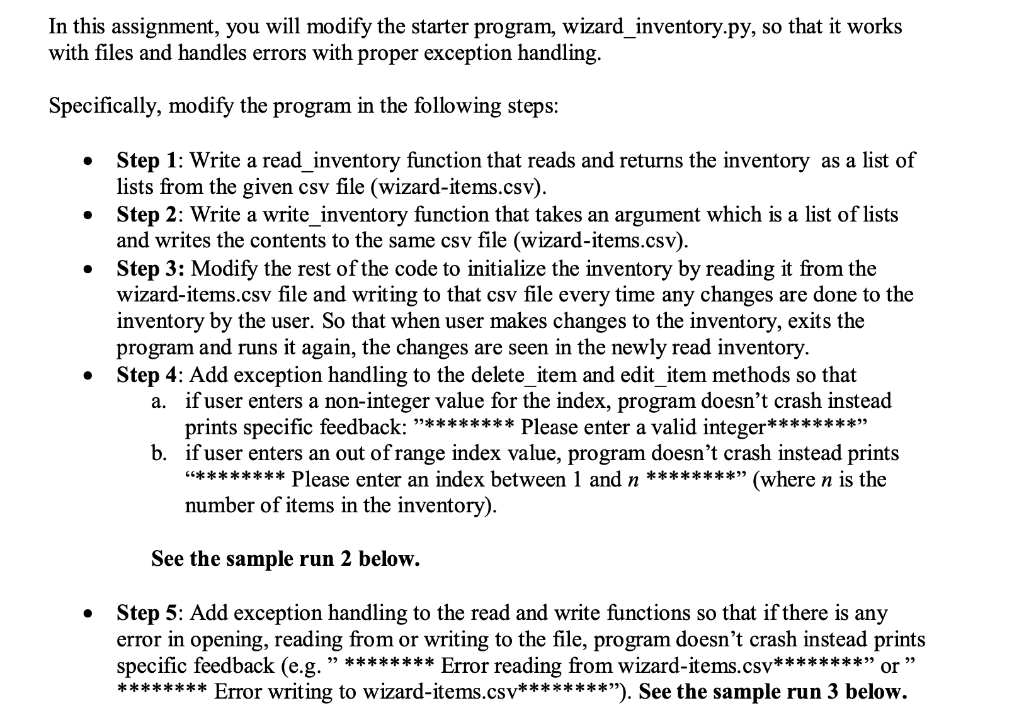
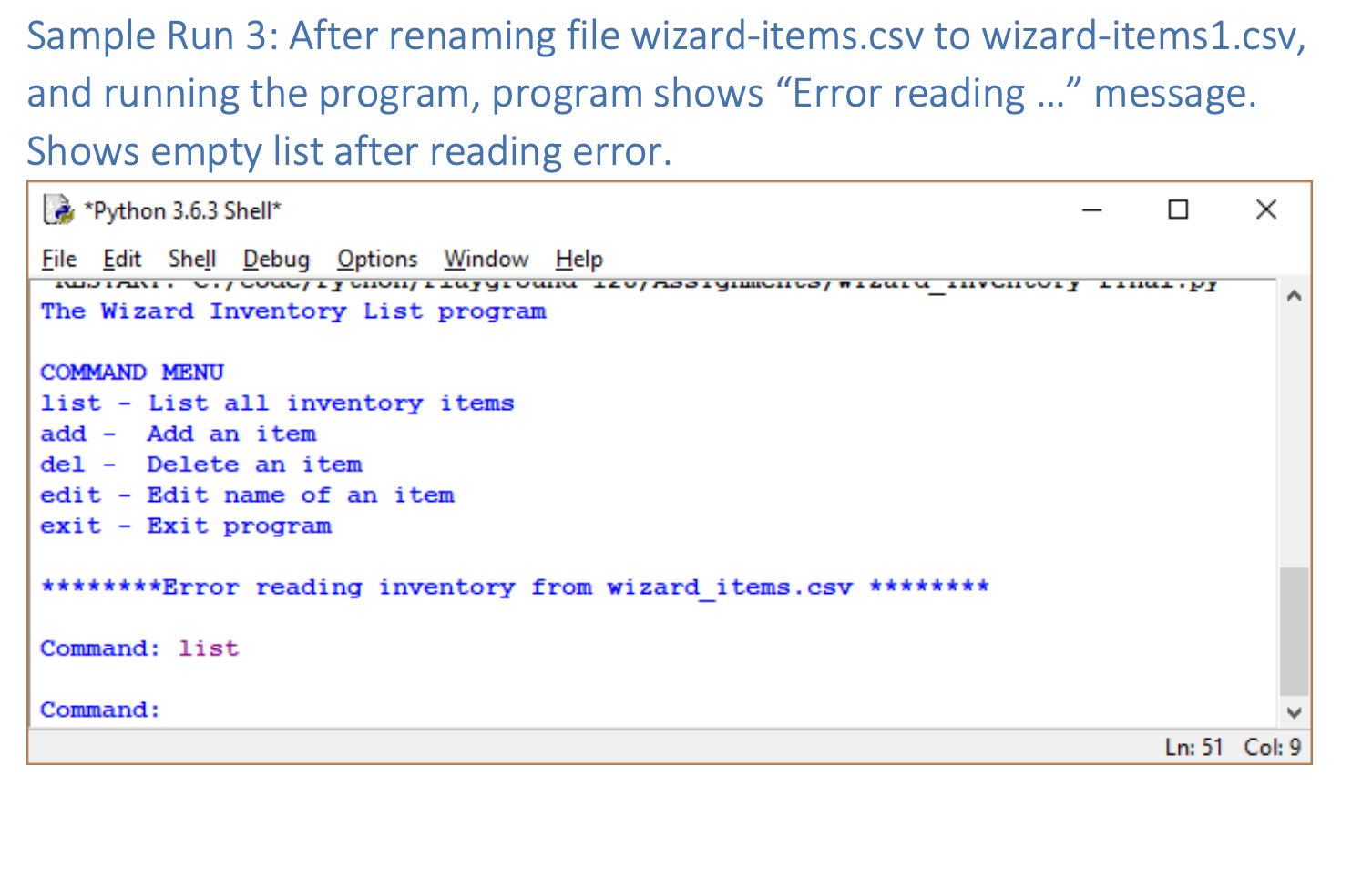
In this assignment, you will modify the starter program, wizard_inventory.py, so that it works with files and handles errors with proper exception handling. Specifically, modify the program in the following steps: . . Step 1: Write a read_inventory function that reads and returns the inventory as a list of lists from the given csv file (wizard-items.csv). Step 2: Write a write_inventory function that takes an argument which is a list of lists and writes the contents to the same csv file (wizard-items.csv). Step 3: Modify the rest of the code to initialize the inventory by reading it from the wizard-items.csv file and writing to that csv file every time any changes are done to the inventory by the user. So that when user makes changes to the inventory, exits the program and runs it again, the changes are seen in the newly read inventory. Step 4: Add exception handling to the delete_item and edit_item methods so that a. if user enters a non-integer value for the index, program doesn't crash instead prints specific feedback: "******** Please enter a valid integer******** b. if user enters an out of range index value, program doesn't crash instead prints ********* Please enter an index between 1 and n ******** (where n is the number of items in the inventory). . See the sample run 2 below. Step 5: Add exception handling to the read and write functions so that if there is any error in opening, reading from or writing to the file, program doesn't crash instead prints specific feedback (e.g. ******** Error reading from wizard-items.csv******** or ******** Error writing to wizard-items.csv********* **"). See the sample run 3 below. Sample Run 1: Edit name, exit program and run again, edits show in list l Python 3.6.3 Shell File Edit Shell Debug Options Window Help aga - Aaa an ltem del - Delete an item edit - Edit name of an item exit - Exit program Command: list 1. Brown Wooden Staff (3.1) 2. Black Wizard Hat (1.5) 3. Black Cloak Of Invisibility (10.2) 4. Blue Scroll Of Uncursing (2.7) Command: edit Number: 2 Enter updated name: Wizard Cap Item number 2 name was updated. Command: list 1. Brown Wooden Staff (3.1) 2. Black Wizard Cap (1.5) 3. Black Cloak Of Invisibility (10.2) 4. Blue Scroll Of Uncursing (2.7) Command: exit Bye! >>> main() The Wizard Inventory List program COMMAND MENU list - List all inventory items add - Add an item del - Delete an item edit - Edit name of an item exit - Exit program Command: list 1. Brown Wooden Staff (3.1) 2. Black Wizard Cap (1.5) 3. Black Cloak Of Invisibility (10.2) 4. Blue Scroll Of Uncursing (2.7) Ln: 227 Col: 9 Sample Run 2: User enters invalid input for del and edit commands L *Python 3.6.3 Shell* File Edit Shell Debug Options Window Help NDJIMAI. c. / Couc, SY LIIULI/ PlayLuumu-12UMODIYIMCHILS/ Wizalu_101VCU LULY-Linal.py The Wizard Inventory List program COMMAND MENU list - List all inventory items add - Add an item del - Delete an item edit - Edit name of an item exit - Exit program Command: list 1. Brown Wooden Staff (3.1) 2. Black Wizard Hat (1.5) 3. Black Cloak Of Invisibility (10.2) 4. Blue Scroll Of Uncursing (2.7) Command: del Number: eight ********Please enter a valid integer. ******** Command: del Number: 8 ********Please enter an integer between 1 and 4 ******** Command: edit Number: eight ********Please enter a valid integer.******** Command: edit Number: -8 Enter updated name: New Name ********Please enter an integer between 1 and 4 ******** Command: Ln: 149 Col: 9 Sample Run 3: After renaming file wizard-items.csv to wizard-items1.csv, and running the program, program shows Error reading ... message. Shows empty list after reading error. *Python 3.6.3 Shell File Edit Shell Debug Options Window Help IL LILL.PY IWNICI. V. LUULE LLIUL LILYYLULU ILU 90. y. LILO MIGULU_LVULLULI The Wizard Inventory List program
Step by Step Solution
There are 3 Steps involved in it

Get step-by-step solutions from verified subject matter experts
 Study Help