







Question: Go to the PhET simulation website: https://phet.colorado.edu/sims/html/wave-on-a-string/latest/wave-on-a-string en.html Restart OFbed End Loans End OFuba No End 10 cm 2 3 9 Normal Amplitude Frequency 0.30
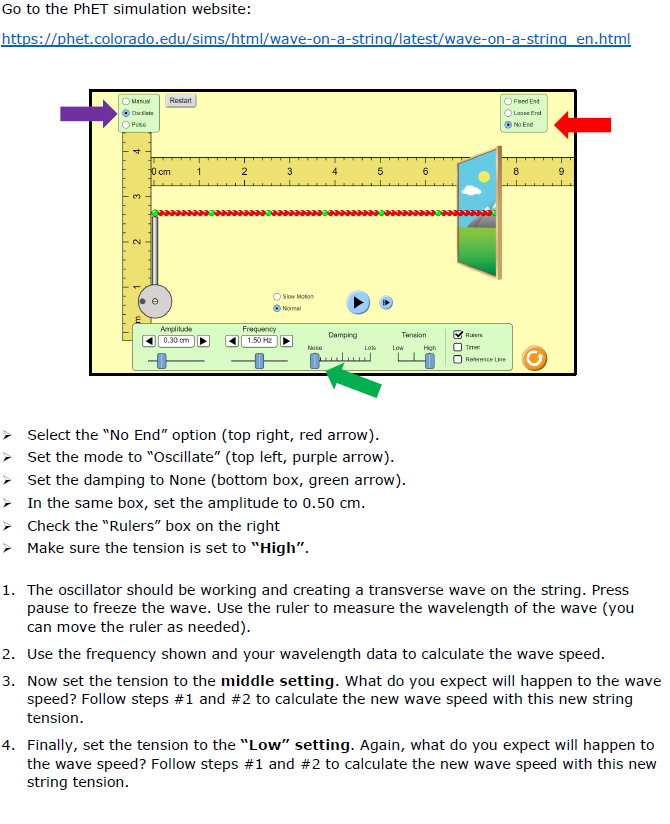
Go to the PhET simulation website: https://phet.colorado.edu/sims/html/wave-on-a-string/latest/wave-on-a-string en.html Restart OFbed End Loans End OFuba No End 10 cm 2 3 9 Normal Amplitude Frequency 0.30 m 150 HE Dumping Terrian Nana High O T Reference Line Select the "No End" option (top right, red arrow). Set the mode to "Oscillate" (top left, purple arrow). Set the damping to None (bottom box, green arrow). In the same box, set the amplitude to 0.50 cm. Check the "Rulers" box on the right Make sure the tension is set to "High". 1. The oscillator should be working and creating a transverse wave on the string. Press pause to freeze the wave. Use the ruler to measure the wavelength of the wave (you can move the ruler as needed). 2. Use the frequency shown and your wavelength data to calculate the wave speed. 3. Now set the tension to the middle setting. What do you expect will happen to the wave speed? Follow steps #1 and #2 to calculate the new wave speed with this new string tension. 4. Finally, set the tension to the "Low" setting. Again, what do you expect will happen to the wave speed? Follow steps #1 and #2 to calculate the new wave speed with this new string tension
Step by Step Solution
There are 3 Steps involved in it

Get step-by-step solutions from verified subject matter experts
 Study Help