







Question: Goal Program in Python 3 a B - Tree according to the specs given below. Your BTree allows a user to indicate the value of
Goal
Program in Python a BTree according to the specs given below. Your BTree allows a user to indicate the value of
t on creation. I have also included a tester and sample output. The tester used to grade will be almost identical.
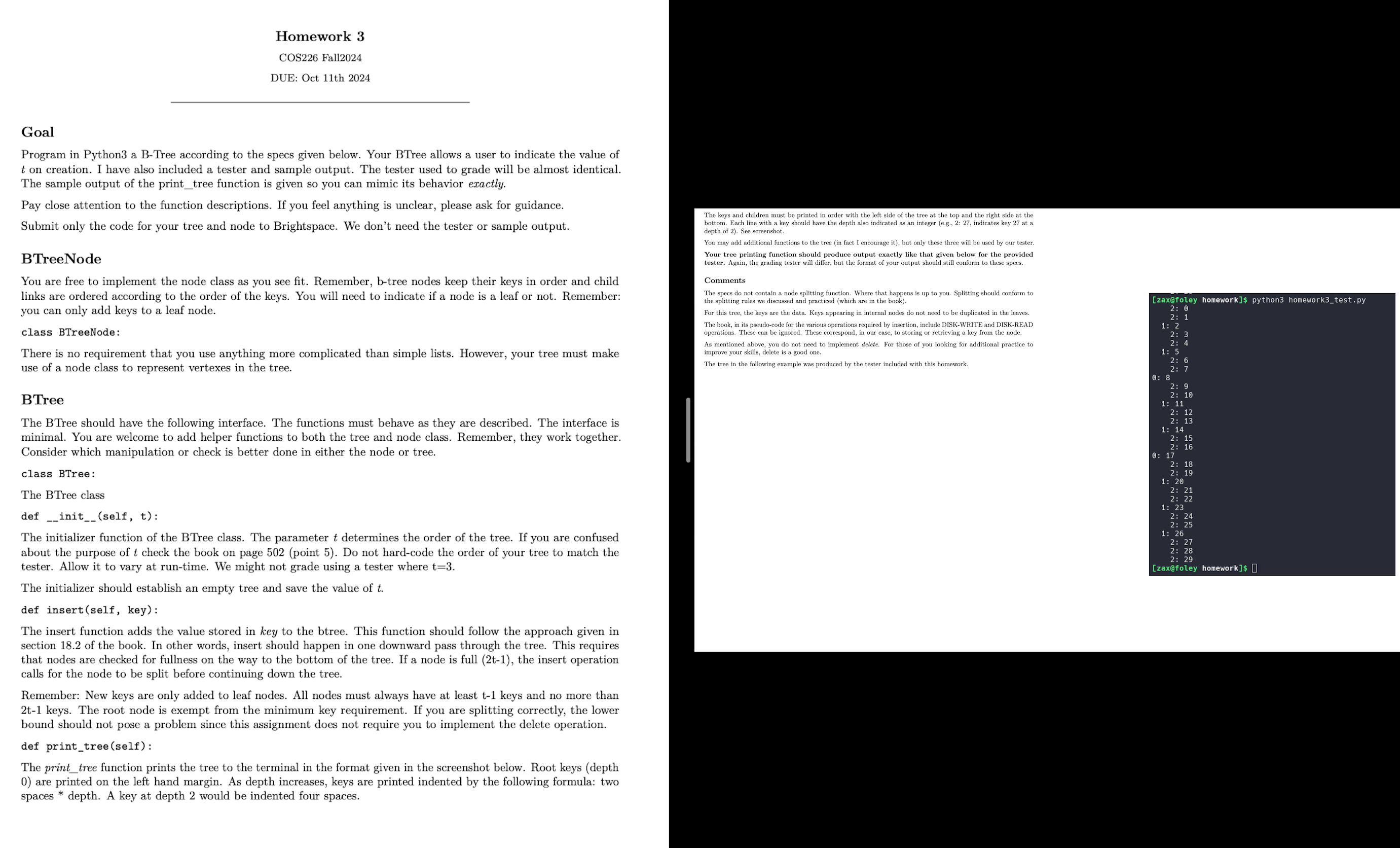
The sample output of the printtree function is given so you can mimic its behavior exactly.
Pay close attention to the function descriptions. If you feel anything is unclear, please ask for guidance.
Submit only the code for your tree and node to Brightspace. We don't need the tester or sample output.
BTreeNode
You are free to implement the node class as you see fit. Remember, btree nodes keep their keys in order and child
links are ordered according to the order of the keys. You will need to indicate if a node is a leaf or not. Remember:
you can only add keys to a leaf node.
class BTreeNode:
There is no requirement that you use anything more complicated than simple lists. However, your tree must make
use of a node class to represent vertexes in the tree.
BTree
The BTree should have the following interface. The functions must behave as they are described. The interface is
minimal. You are welcome to add helper functions to both the tree and node class. Remember, they work together.
Consider which manipulation or check is better done in either the node or tree.
class BTree:
The BTree class
def initself t:
The initializer function of the BTree class. The parameter t determines the order of the tree. If you are confused
about the purpose of t check the book on page point Do not hardcode the order of your tree to match the
tester. Allow it to vary at runtime. We might not grade using a tester where t
The initializer should establish an empty tree and save the value of t
def insertself key:
The insert function adds the value stored in key to the btree. This function should follow the approach given in
section of the book. In other words, insert should happen in one downward pass through the tree. This requires
that nodes are checked for fullness on the way to the bottom of the tree. If a node is full t the insert operation
calls for the node to be split before continuing down the tree.
Remember: New keys are only added to leaf nodes. All nodes must always have at least t keys and no more than
t keys. The root node is exempt from the minimum key requirement. If you are splitting correctly, the lower
bound should not pose a problem since this assignment does not require you to implement the delete operation.
def printtreeself:
The printtree function prints the tree to the terminal in the format given in the screenshot below. Root keys depth
are printed on the left hand margin. As depth increases, keys are printed indented by the following formula: two
spaces depth. A key at depth would be indented four spaces.
The keys and children must be printed in order with the left side of the tree at the top and the right side at the
bottom. Each line with a key should have the depth also indicated as an integer eg: indicates key at
Yepthor screenshot.
You may add additional functions to the tree in fact I encourage it but only these three will be used by our tester.
Your tree printing function should produce output exactly like that given below for the provided
tester. Again, the grading tester will differ, but the format of your output should still conform to these specs.
Comments
The specs do not contain a node splitting function. Where that happens is up to you. Splitting should conform to
the splitting rules we discussed and practiced which are in the book
For this the which are in the book
The data. Keys appearing in internal nodes do not need to be duplicated in the leaves.
The book, in its pseudocode for the various operations required by insertion, include DISKWRITE and DISKREAD
As mentioned
improve your skills, delete is a good one.
The tree in the following example was produced by the tester included with this homework.
Step by Step Solution
There are 3 Steps involved in it
1 Expert Approved Answer
Step: 1 Unlock

Question Has Been Solved by an Expert!
Get step-by-step solutions from verified subject matter experts
Step: 2 Unlock
Step: 3 Unlock
 Study Help