







Question: Grader - Instructions Excel 2019 Project Step Instructions Points Possible highest and lowest priced items in inventory. In cell B45, enter a function to display
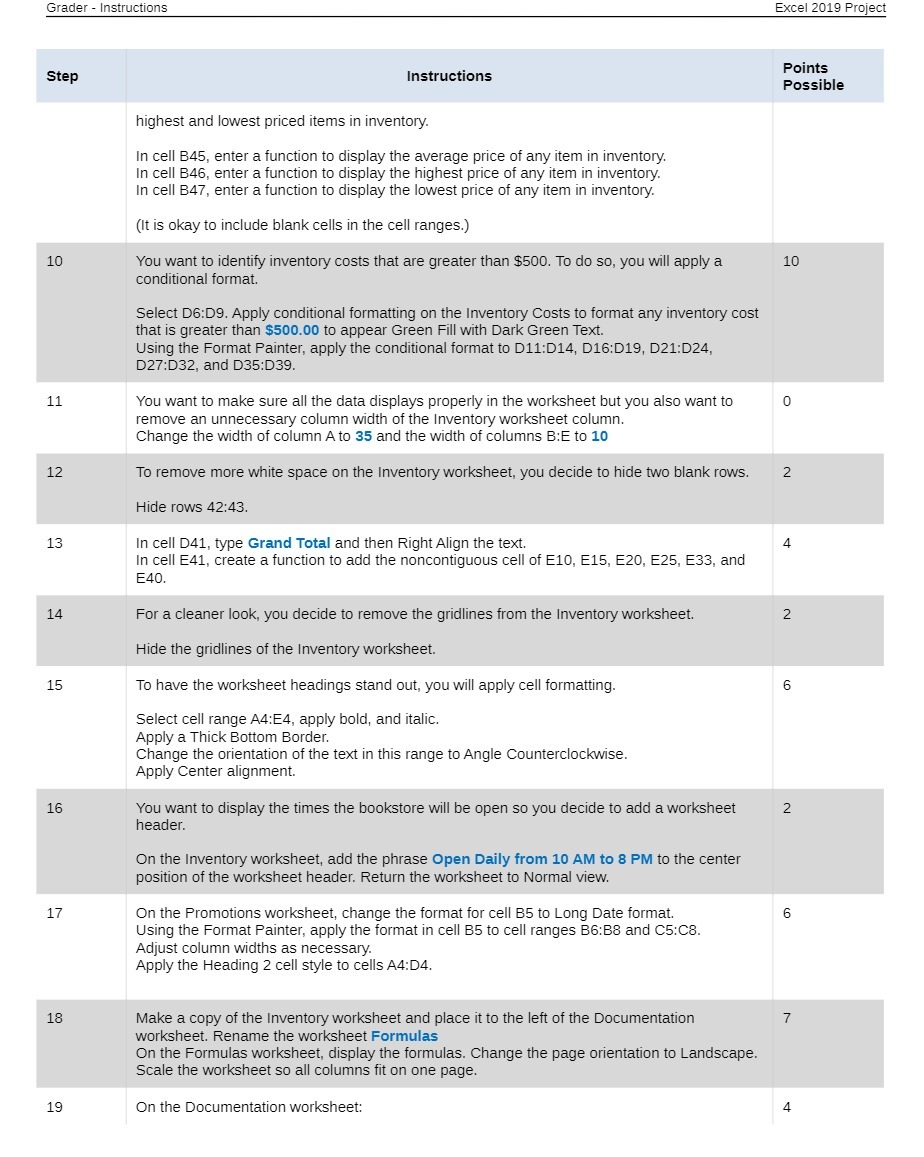
Grader - Instructions Excel 2019 Project Step Instructions Points Possible highest and lowest priced items in inventory. In cell B45, enter a function to display the average price of any item in inventory. In cell B46, enter a function to display the highest price of any item in inventory. In cell B47, enter a function to display the lowest price of any item in inventory. (It is okay to include blank cells in the cell ranges.) 10 You want to identify inventory costs that are greater than $500. To do so, you will apply a 10 conditional format. Select D6:D9. Apply conditional formatting on the Inventory Costs to format any inventory cost that is greater than $500.00 to appear Green Fill with Dark Green Text. Using the Format Painter, apply the conditional format to D11:D14, D16:D19, D21:D24, D27:D32, and D35:D39. 11 You want to make sure all the data displays properly in the worksheet but you also want to 0 remove an unnecessary column width of the Inventory worksheet column. Change the width of column A to 35 and the width of columns B:E to 10 12 To remove more white space on the Inventory worksheet, you decide to hide two blank rows. 2 Hide rows 42:43. 13 In cell D41, type Grand Total and then Right Align the text. 4 In cell E41, create a function to add the noncontiguous cell of E10, E15, E20, E25, E33, and E40. 14 For a cleaner look, you decide to remove the gridlines from the Inventory worksheet. 2 Hide the gridlines of the Inventory worksheet. 15 To have the worksheet headings stand out, you will apply cell formatting. 6 Select cell range A4:E4, apply bold, and italic. Apply a Thick Bottom Border. Change the orientation of the text in this range to Angle Counterclockwise. Apply Center alignment. 16 You want to display the times the bookstore will be open so you decide to add a worksheet 2 header. On the Inventory worksheet, add the phrase Open Daily from 10 AM to 8 PM to the center position of the worksheet header. Return the worksheet to Normal view. 17 On the Promotions worksheet, change the format for cell B5 to Long Date format. 6 Using the Format Painter, apply the format in cell B5 to cell ranges B6:58 and C5:CS. Adjust column widths as necessary. Apply the Heading 2 cell style to cells A4:D4. 18 Make a copy of the Inventory worksheet and place it to the left of the Documentation 7 worksheet. Rename the worksheet Formulas On the Formulas worksheet, display the formulas. Change the page orientation to Landscape. Scale the worksheet so all columns fit on one page 19 On the Documentation worksheet: 4
Step by Step Solution
There are 3 Steps involved in it

Get step-by-step solutions from verified subject matter experts
 Study Help