







Question: Hankins Aerospace DEVELOPING AN ANNUAL REPORT GETTING STARTED Save the file IL _ WD 3 6 5 _ 2 0 2 1 _ CS 4
Hankins Aerospace
DEVELOPING AN ANNUAL REPORT
GETTING STARTED
Save the file ILWDCSaFirstLastNamedocx as ILWDCSaFirstLastNamedocx
Edit the file name by changing to
If you do not see the docx file extension, do not type it The file extension will be added for you automatically.
To complete this Project, you will also need the following files:
SupportWDCSaData.png
o SupportWDCSaFounder.docx
SupportWDCSaList.docx
SupportWDCSaTable.docx
With the file ILWDCSaFirstLastNamedocx open, ensure that your first and last name is displayed in the footer.
If the footer does not display your name, delete the file and download a new copy.
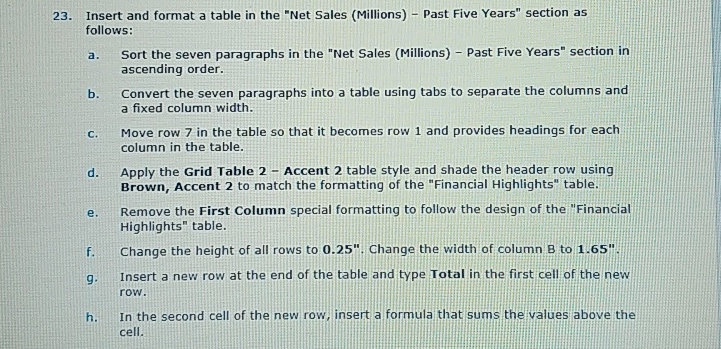
Insert and format a table in the "Net Sales Millions Past Five Years" section as follows:
a Sort the seven paragraphs in the "Net Sales Millions Past Five Years" section in ascending order.
b Convert the seven paragraphs into a table using tabs to separate the columns and a fixed column width.
c Move row in the table so that it becomes row and provides headings for each column in the table.
d Apply the Grid Table Accent table style and shade the header row using Brown, Accent to match the formatting of the "Financial Highlights" table.
e Remove the First Column special formatting to follow the design of the "Financial Highlights table.
f Change the height of all rows to Change the width of column to
Insert a new row at the end of the table and type Total in the first cell of the new row.
h In the second cell of the new row, insert a formula that sums the values above the cell.
Step by Step Solution
There are 3 Steps involved in it
1 Expert Approved Answer
Step: 1 Unlock

Question Has Been Solved by an Expert!
Get step-by-step solutions from verified subject matter experts
Step: 2 Unlock
Step: 3 Unlock
 Study Help