







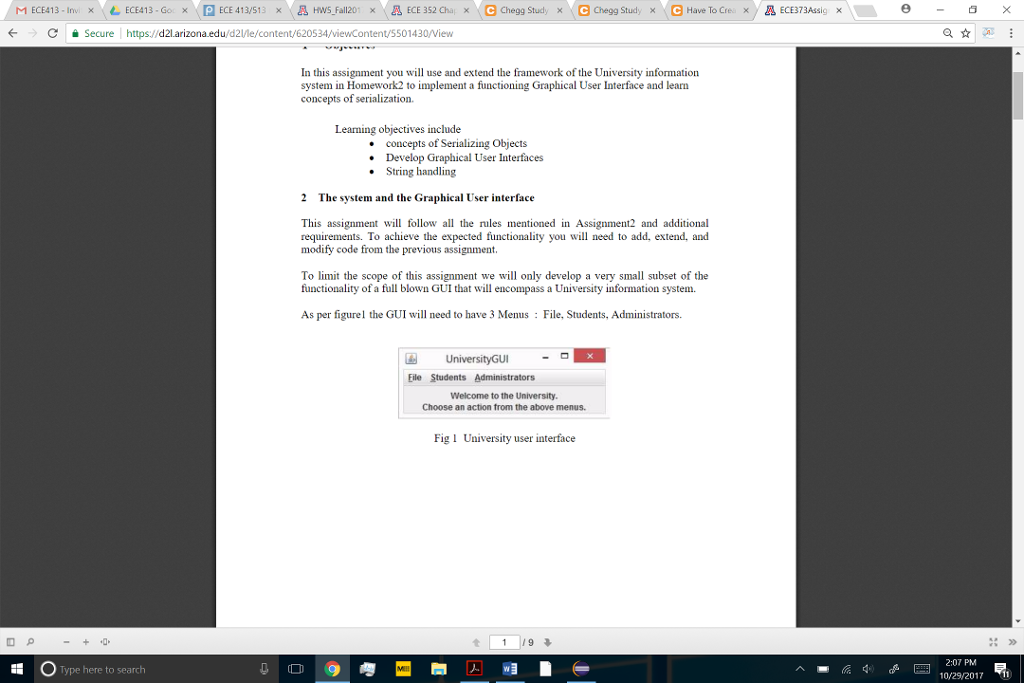
Question: Have to create a GUI for my java code I also have provided the code for the saveData() and loadData methods. The GUI should like
Have to create a GUI for my java code
I also have provided the code for the saveData() and loadData methods. The GUI should like the one in the second picture.

public static void saveData(University univ)
{
try
{
FileOutputStream fos = new FileOutputStream("university.ser");
ObjectOutputStream oos = new ObjectOutputStream(fos);
oos.writeObject(univ);
oos.close();
fos.close();
}
catch (Exception e)
{
e.printStackTrace();
}
}
public static University loadData()
{
University univ = null ;
try
{
FileInputStream fis = new FileInputStream("university.ser");
ObjectInputStream ois = new ObjectInputStream(fis);
univ = (University)ois.readObject();
}
catch (IOException i)
{
i.printStackTrace();
}
catch (ClassNotFoundException e)
{
e.printStackTrace();
}
return univ;
}
Secure https://d21.arizona.edu/d21/le/content/620534/viewContent/5501430/View Task 2 This task requires you to build a simple Graphical User Interface as shown in Section 2 and test for the correct functionality .You need to develop the GUI manually. Do not generate GUI using other software tools. Doing this will be easily recognizable and your homework will not be accepted/graded. The objective here is learn how to make a GUI using swing and awt so that one understand the programing concepts involved in developing one Part 1 File Menu 1) Make sure you interface o GUI File-Save with the saveData0 method so it runs when selected o GUI File ->Load with the loadData0 method so it runs when selected o GUI File->Exit to close the GUI 2) Run Driver2.java In the GUI, Click File->Save and then do File->Load Under Administrators choose Print All Info. Make sure the output (no Carols earning info) is displayed this time on a pop up scrollable window as below (not on eclipse console). The popup window does not have to look identical but it needs to be pop up and serollable . t 49 05 Type here to search 10/29/20171 Secure https://d21.arizona.edu/d21/le/content/620534/viewContent/5501430/View Task 2 This task requires you to build a simple Graphical User Interface as shown in Section 2 and test for the correct functionality .You need to develop the GUI manually. Do not generate GUI using other software tools. Doing this will be easily recognizable and your homework will not be accepted/graded. The objective here is learn how to make a GUI using swing and awt so that one understand the programing concepts involved in developing one Part 1 File Menu 1) Make sure you interface o GUI File-Save with the saveData0 method so it runs when selected o GUI File ->Load with the loadData0 method so it runs when selected o GUI File->Exit to close the GUI 2) Run Driver2.java In the GUI, Click File->Save and then do File->Load Under Administrators choose Print All Info. Make sure the output (no Carols earning info) is displayed this time on a pop up scrollable window as below (not on eclipse console). The popup window does not have to look identical but it needs to be pop up and serollable . t 49 05 Type here to search 10/29/20171
Step by Step Solution
There are 3 Steps involved in it

Get step-by-step solutions from verified subject matter experts
 Study Help