



Question: Having a little trouble with the wanted format for this submission. Would really appreciate if you could help me with an outline for this submission!
Having a little trouble with the wanted format for this submission. Would really appreciate if you could help me with an outline for this submission!
------------------------------------------------------------------------------------------------------------------------
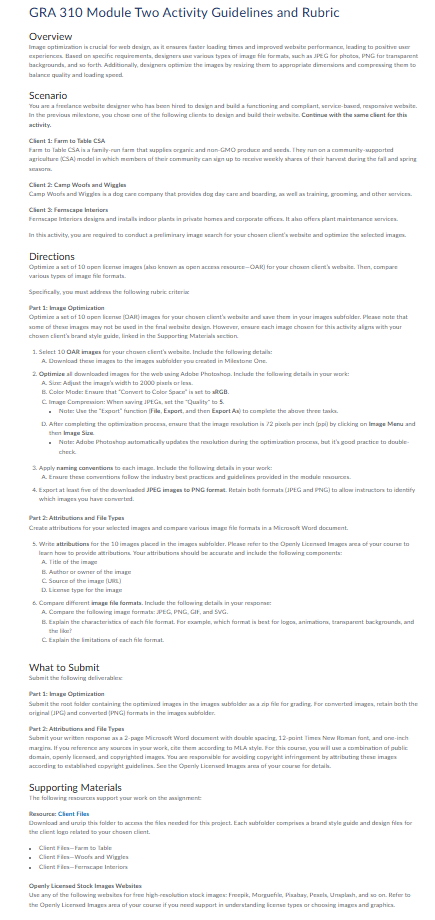
GRA 310 Module Two Activity Guidelines and Rubric
Overview
Image optimization is crucial for web design, as it ensures faster loading times and improved website performance, leading to positive user experiences. Based on specific requirements, designers use various types of image file formats, such as JPEG for photos, PNG for transparent backgrounds, and so forth. Additionally, designers optimize the images by resizing them to appropriate dimensions and compressing them to balance quality and loading speed.
Scenario
You are a freelance website designer who has been hired to design and build a functioning and compliant, service-based, responsive website. In the previous milestone, you chose one of the following clients to design and build their website. Continue with the same client for this activity.
Client 1: Farm to Table CSA Farm to Table CSA is a family-run farm that supplies organic and non-GMO produce and seeds. They run on a community-supported agriculture (CSA) model in which members of their community can sign up to receive weekly shares of their harvest during the fall and spring seasons.
Client 2: Camp Woofs and Wiggles Camp Woofs and Wiggles is a dog care company that provides dog day care and boarding, as well as training, grooming, and other services.
Client 3: Fernscape Interiors Fernscape Interiors designs and installs indoor plants in private homes and corporate offices. It also offers plant maintenance services.
In this activity, you are required to conduct a preliminary image search for your chosen client's website and optimize the selected images.
Directions
Optimize a set of 10 open license images (also known as open access resource?OAR) for your chosen client's website. Then, compare various types of image file formats.
Specifically, you must address the following rubric criteria:
Part 1: Image Optimization Optimize a set of 10 open license (OAR) images for your chosen client's website and save them in your images subfolder. Please note that some of these images may not be used in the final website design. However, ensure each image chosen for this activity aligns with your chosen client's brand style guide, linked in the Supporting Materials section.
- Select 10 OAR images for your chosen client's website. Include the following details:
- Download these images to the images subfolder you created in Milestone One.
- Optimize all downloaded images for the web using Adobe Photoshop. Include the following details in your work:
- Size: Adjust the image's width to 2000 pixels or less.
- Color Mode: Ensure that "Convert to Color Space" is set to sRGB.
- Image Compression: When saving JPEGs, set the "Quality" to 5.
- Note: Use the "Export" function (File, Export, and then Export As) to complete the above three tasks.
- After completing the optimization process, ensure that the image resolution is 72 pixels per inch (ppi) by clicking on Image Menu and then Image Size.
- Note: Adobe Photoshop automatically updates the resolution during the optimization process, but it's good practice to double-check.
- Apply naming conventions to each image. Include the following details in your work:
- Ensure these conventions follow the industry best practices and guidelines provided in the module resources.
- Export at least five of the downloaded JPEG images to PNG format. Retain both formats (JPEG and PNG) to allow instructors to identify which images you have converted.
Part 2: Attributions and File Types Make attributions for your selected images and compare various image file formats in a Microsoft Word document.
- Write attributions for the 10 images placed in the images subfolder. Please refer to the Openly Licensed Images area of your course to learn how to provide attributions. Your attributions should be accurate and include the following components:
- Title of the image
- Author or owner of the image
- Source of the image (URL)
- License type for the image
- Compare different image file formats. Include the following details in your response:
- Compare the following image formats: JPEG, PNG, GIF, and SVG.
- Explain the characteristics of each file format. For example, which format is best for logos, animations, transparent backgrounds, and the like?
- Explain the limitations of each file format.
What to Submit
Submit the following deliverables:
Part 1: Image Optimization Submit the root folder containing the optimized images in the images subfolder as a zip file for grading. For converted images, retain both the original (JPG) and converted (PNG) formats in the images subfolder.
Part 2: Attributions and File Types Submit your written response as a Microsoft Word document with double spacing. For this course, you will use a combination of public domain, openly licensed, and copyrighted images. You are responsible for avoiding copyright infringement by attributing these images according to established copyright guidelines. See the Openly Licensed Images area of your course for details.
Supporting Materials
The following resources support your work on the assignment:
Resource: Client Files Download and unzip this folder to access the files needed for this project. Each subfolder comprises a brand style guide and design files for the client logo related to your chosen client.
- Client Files?Farm to Table
- Client Files?Woofs and Wiggles
- Client Files?Fernscape Interiors
Openly Licensed Stock Images Websites Use any of the following websites for free high-resolution stock images: Freepik, Morguefile, Pixabay, Pexels, Unsplash, and so on. Refer to the Openly Licensed Images area of your course if you need support in understanding license types or choosing images and graphics.
Step by Step Solution
There are 3 Steps involved in it

Get step-by-step solutions from verified subject matter experts