







Question: Heart Rate B Project Description: In this problem, you will investigate the heart rate at different ages. You will also provide the results as a
Heart Rate
B
Project Description:
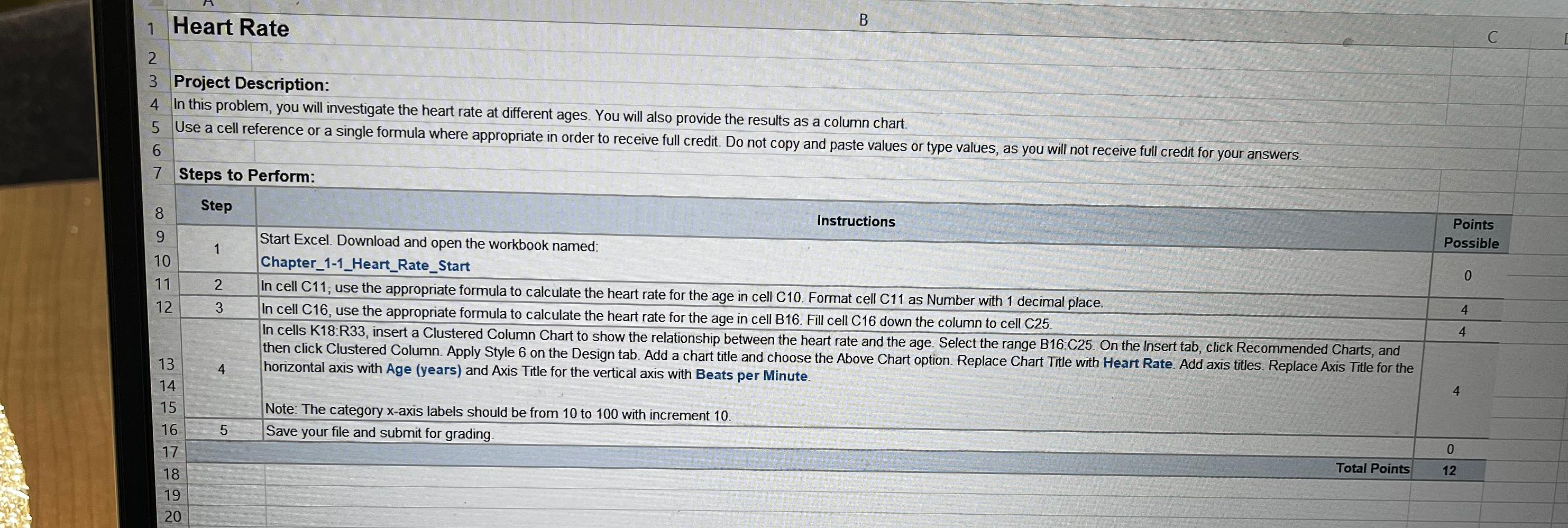
In this problem, you will investigate the heart rate at different ages. You will also provide the results as a column chart.
Use a cell reference or a single formula where appropriate in order to receive full credit. Do not copy and paste values or type values, as you will not receive full credit for your answers.
Steps to Perform:
Step
Instructions
Start Excel. Download and open the workbook named:
ChapterHeartRateStart
In cell C; use the appropriate formula to calculate the heart rate for the age in cell C Format cell as Number with decimal place.
In cell C use the appropriate formula to calculate the heart rate for the age in cell B Fill cell C down the column to cell C
In cells K:R insert a Clustered Column Chart to show the relationship between the heart rate and the age. Select the range B:C On the Insert tab, click Recommended Charts, and
then click Clustered Column. Apply Style on the Design tab. Add a chart title and choose the Above Chart option. Replace Chart Title with Heart Rate. Add axis titles. Replace Axis Title for the
horizontal axis with Age years and Axis Title for the vertical axis with Beats per Minute.
Note: The category axis labels should be from to with increment
Save your file and submit for grading.
Step by Step Solution
There are 3 Steps involved in it
1 Expert Approved Answer
Step: 1 Unlock

Question Has Been Solved by an Expert!
Get step-by-step solutions from verified subject matter experts
Step: 2 Unlock
Step: 3 Unlock
 Study Help