







Question: Hello can the output be like that please.As the output in there and thank you VIRGIN 10:09 PM in-ca-central-1-prod-fleet01-xythos.content.blackboardcdn.com Lab Objectives: Familiarize with the arithmetic
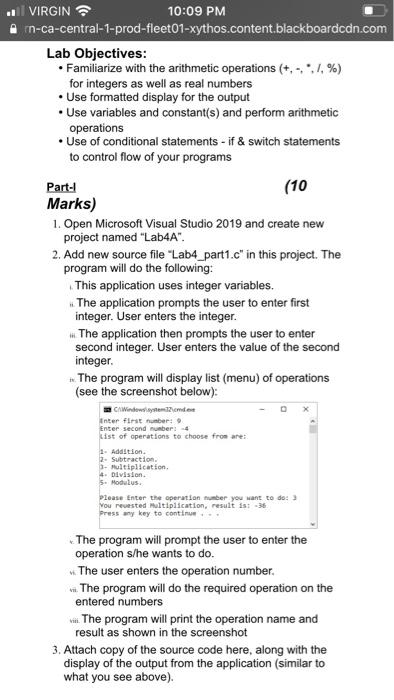
VIRGIN 10:09 PM in-ca-central-1-prod-fleet01-xythos.content.blackboardcdn.com Lab Objectives: Familiarize with the arithmetic operations (+,-./%) for integers as well as real numbers Use formatted display for the output Use variables and constant(s) and perform arithmetic operations Use of conditional statements - if & switch statements to control flow of your programs Part-1 (10 Marks) 1. Open Microsoft Visual Studio 2019 and create new project named "Lab4A". 2. Add new source file "Lab4_part1.c" in this project. The program will do the following: This application uses integer variables. The application prompts the user to enter first integer. User enters the integer. The application then prompts the user to enter second integer. User enters the value of the second integer The program will display list (menu) of operations (see the screenshot below): Windows system 12 onder inter first number: Enter second number 4 List of operations to choose from are: 1- Addition, 2. Subtraction - Multiplication 4. Division 5. Modulus. Please enter the operation number you want to do: You reuested Multiplication, result is: 36 Press any key to continue The program will prompt the user to enter the operation s/he wants to do. The user enters the operation number wn. The program will do the required operation on the entered numbers it. The program will print the operation name and result as shown in the screenshot 3. Attach copy of the source code here, along with the display of the output from the application (similar to what you see above)
Step by Step Solution
There are 3 Steps involved in it

Get step-by-step solutions from verified subject matter experts
 Study Help