







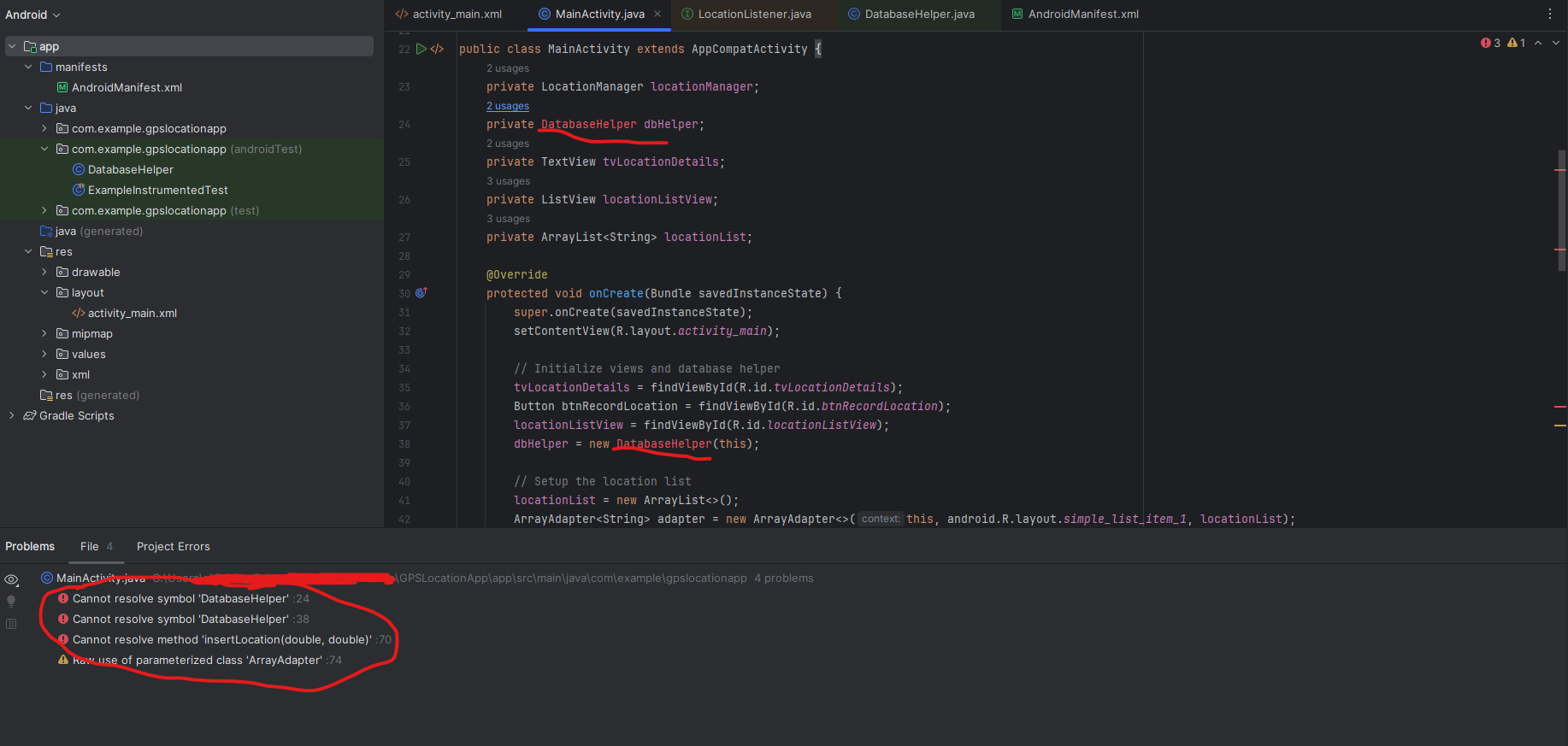
Question: Hello can you please fix my android studio api 2 7 gps code?. The problem seems to be is that databasehelper class is never used
Hello can you please fix my android studio api gps code?. The problem seems to be is that databasehelper class is never used and so it cant be resolved. Can you please fix it so that the class is used?There are more errors too. I will give you two java classes which are mainactivity.java and databasehelper.java because those seem to have the errors. Please give me the full codes for each.
Mainactivity.java:
package com.example.gpslocationapp;
import android.Manifest;
import android.annotation.SuppressLint;
import android.content.pmPackageManager;
import android.location.Location;
import android.location.LocationListener;
import android.location.LocationManager;
import android.osBundle;
import android.widget.ArrayAdapter;
import android.widget.Button;
import android.widget.ListView;
import android.widget.TextView;
import android.widget.Toast;
import androidx.annotation.NonNull;
import androidx.appcompat.app.AppCompatActivity;
import androidx.core.app.ActivityCompat;
import java.util.ArrayList;
public class MainActivity extends AppCompatActivity
private LocationManager locationManager;
private DatabaseHelper dbHelper;
private TextView tvLocationDetails;
private ListView locationListView;
private ArrayList locationList;
@Override
protected void onCreateBundle savedInstanceState
super.onCreatesavedInstanceState;
setContentViewRlayout.activitymain;
Initialize views and database helper
tvLocationDetails findViewByIdRidtvLocationDetails;
Button btnRecordLocation findViewByIdRidbtnRecordLocation;
locationListView findViewByIdRidlocationListView;
dbHelper new DatabaseHelperthis;
Setup the location list
locationList new ArrayList;
ArrayAdapter adapter new ArrayAdapterthis android.Rlayout.simplelistitem locationList;
locationListView.setAdapteradapter;
Initialize Location Manager
locationManager LocationManager getSystemServiceLOCATIONSERVICE;
Button click to record location
btnRecordLocation.setOnClickListenerv
if ActivityCompatcheckSelfPermissionthis Manifest.permission.ACCESSFINELOCATION PackageManager.PERMISSIONGRANTED &&
ActivityCompat.checkSelfPermissionthis Manifest.permission.ACCESSCOARSELOCATION PackageManager.PERMISSIONGRANTED
ActivityCompat.requestPermissionsthis new StringManifestpermission.ACCESSFINELOCATION;
return;
locationManager.requestLocationUpdatesLocationManagerGPSPROVIDER, locationListener;
;
private final LocationListener locationListener new LocationListener
@SuppressLintSetTextIn
@Override
public void onLocationChangedLocation location
double latitude location.getLatitude;
double longitude location.getLongitude;
Show the coordinates
tvLocationDetails.setTextLat: latitude Lon: longitude;
Save to the database
dbHelper.insertLocationlatitude longitude;
Add to the location list for display
locationList.addLat: latitude Lon: longitude;
ArrayAdapter locationListView.getAdapternotifyDataSetChanged;
Toast.makeTextMainActivitythis, "Location Recorded", Toast.LENGTHSHORTshow;
@Override
public void onStatusChangedString provider, int status, Bundle extras
@Override
public void onProviderEnabled@NonNull String provider
@Override
public void onProviderDisabled@NonNull String provider
;
Databasehelper.java
package com.example.gpslocationapp;
import android.content.ContentValues;
import android.content.Context;
import android.database.Cursor;
import android.database.sqlite.SQLiteDatabase;
import android.database.sqlite.SQLiteOpenHelper;
public class DatabaseHelper extends SQLiteOpenHelper
private static final String DATABASENAME "locations.db;
private static final int DATABASEVERSION ;
public static final String TABLELOCATIONS "locations";
public static final String COLUMNID id;
public static final String COLUMNLAT "latitude";
public static final String COLUMNLON "longitude";
public DatabaseHelperContext context
supercontext DATABASENAME, null, DATABASEVERSION;
@Override
public void onCreateSQLiteDatabase db
String CREATETABLE "CREATE TABLE TABLELOCATIONS
COLUMNID INTEGER PRIMARY KEY AUTOINCREMENT,
COLUMNLAT REAL,
COLUMNLON REAL;
dbexecSQLCREATETABLE;
@Override
public void onUpgradeSQLiteDatabase db int oldVersion, int newVersion
dbexecSQLDROP TABLE IF EXISTS TABLELOCATIONS;
onCreatedb;
public void insertLocationdouble latitude, double longitude
SQLiteDatabase db this.getWritableDatabase;
ContentValues values new ContentValues;
values.putCOLUMNLAT, latitude;
values.putCOLUMNLON, longitude;
dbinsertTABLELOCATIONS, null, values;
dbclose;
public Cursor getAllLocations
SQLiteDatabase db this.getReadableDatabase;
return dbqueryTABLELOCATIONS, null, null, null, null, null, null;
Step by Step Solution
There are 3 Steps involved in it
1 Expert Approved Answer
Step: 1 Unlock

Question Has Been Solved by an Expert!
Get step-by-step solutions from verified subject matter experts
Step: 2 Unlock
Step: 3 Unlock
 Study Help