







Question: hello I have an error for my android studio code that uses api 2 7 and it is about a gps app. Can you please
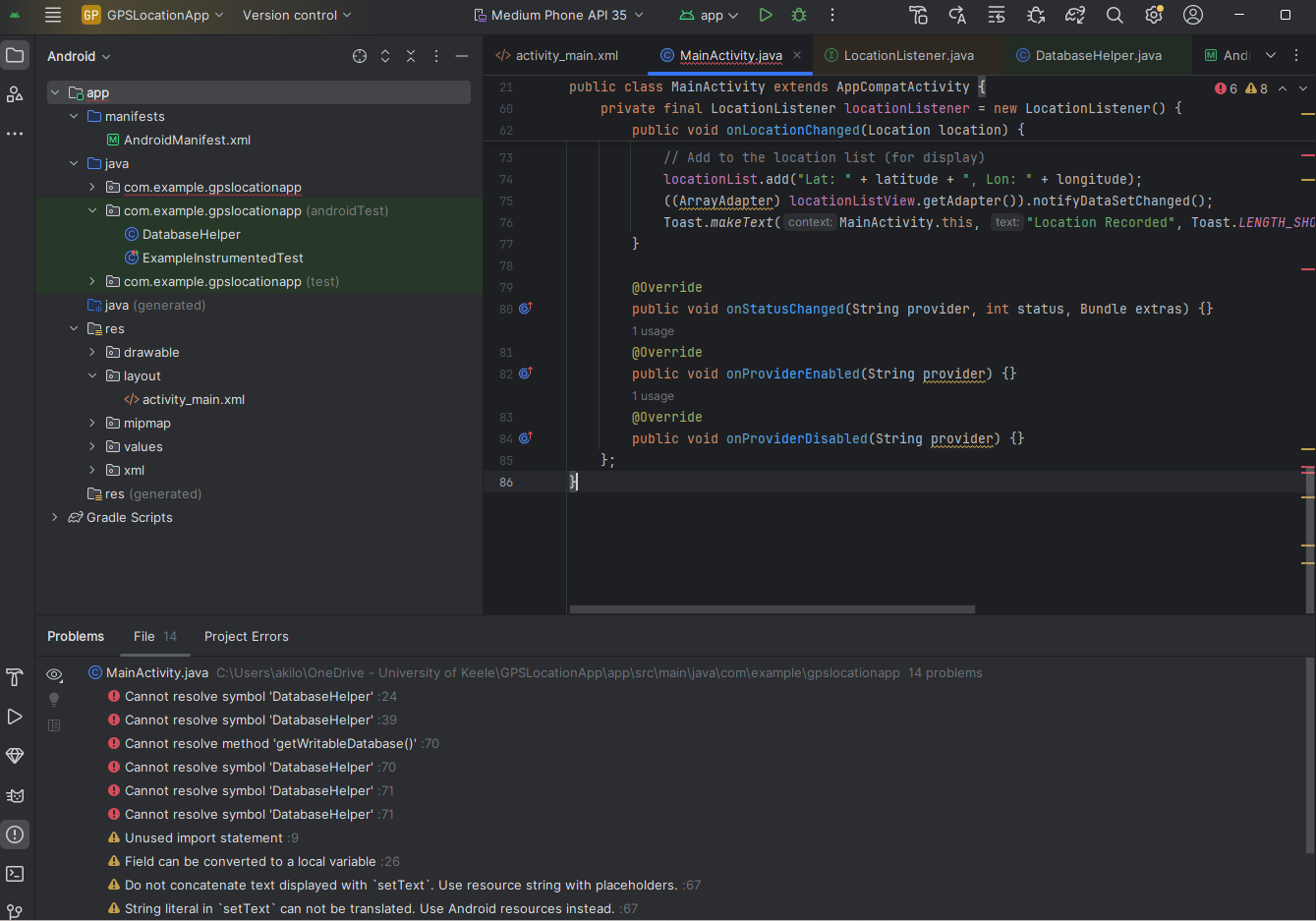
hello I have an error for my android studio code that uses api and it is about a gps app. Can you please locate the errors and fix them for me because it has a red underline underneath itI want to be able to run it but so far nobody helped fix it I will give you the code for MainActivity.java and I will give you a screenshot of the errors. If you need any of the other codes for the java classes please be sure to tell me otherwise here is the code of MainActivity.java:
package com.example.gpslocationapp;
import android.Manifest;
import android.content.pmPackageManager;
import android.location.Location;
import android.location.LocationListener;
import android.location.LocationManager;
import android.osBundle;
import android.view.View;
import android.widget.Button;
import android.widget.ListView;
import android.widget.TextView;
import android.widget.ArrayAdapter;
import android.widget.Toast;
import androidx.appcompat.app.AppCompatActivity;
import androidx.core.app.ActivityCompat;
import java.util.ArrayList;
public class MainActivity extends AppCompatActivity
private LocationManager locationManager;
private DatabaseHelper dbHelper;
private TextView tvLocationDetails;
private Button btnRecordLocation;
private ListView locationListView;
private ArrayList locationList;
@Override
protected void onCreateBundle savedInstanceState
super.onCreatesavedInstanceState;
setContentViewRlayout.activitymain;
Initialize views and database helper
tvLocationDetails findViewByIdRidtvLocationDetails;
btnRecordLocation findViewByIdRidbtnRecordLocation;
locationListView findViewByIdRidlocationListView;
dbHelper new DatabaseHelperthis;
Setup the location list
locationList new ArrayList;
ArrayAdapter adapter new ArrayAdapterthis android.Rlayout.simplelistitem locationList;
locationListView.setAdapteradapter;
Initialize Location Manager
locationManager LocationManager getSystemServiceLOCATIONSERVICE;
Button click to record location
btnRecordLocation.setOnClickListenerv
if ActivityCompatcheckSelfPermissionMainActivitythis, Manifest.permission.ACCESSFINELOCATION PackageManager.PERMISSIONGRANTED &&
ActivityCompat.checkSelfPermissionMainActivitythis, Manifest.permission.ACCESSCOARSELOCATION PackageManager.PERMISSIONGRANTED
ActivityCompat.requestPermissionsMainActivitythis, new StringManifestpermission.ACCESSFINELOCATION;
return;
locationManager.requestLocationUpdatesLocationManagerGPSPROVIDER, locationListener;
;
private final LocationListener locationListener new LocationListener
@Override
public void onLocationChangedLocation location
double latitude location.getLatitude;
double longitude location.getLongitude;
Show the coordinates
tvLocationDetails.setTextLat: latitude Lon: longitude;
Save to the database
dbHelper.getWritableDatabaseexecSQLINSERT INTO DatabaseHelper.TABLELOCATIONS
DatabaseHelper.COLUMNLAT DatabaseHelper.COLUMNLON VALUES latitude longitude ;
Add to the location list for display
locationList.addLat: latitude Lon: longitude;
ArrayAdapter locationListView.getAdapternotifyDataSetChanged;
Toast.makeTextMainActivitythis, "Location Recorded", Toast.LENGTHSHORTshow;
@Override
public void onStatusChangedString provider, int status, Bundle extras
@Override
public void onProviderEnabledString provider
@Override
public void onProviderDisabledString provider
;
Step by Step Solution
There are 3 Steps involved in it
1 Expert Approved Answer
Step: 1 Unlock

Question Has Been Solved by an Expert!
Get step-by-step solutions from verified subject matter experts
Step: 2 Unlock
Step: 3 Unlock
 Study Help