







Question: Hello, I am working on a Java GUI that will have two JTextArea's, one on the right and left, and in the center column will
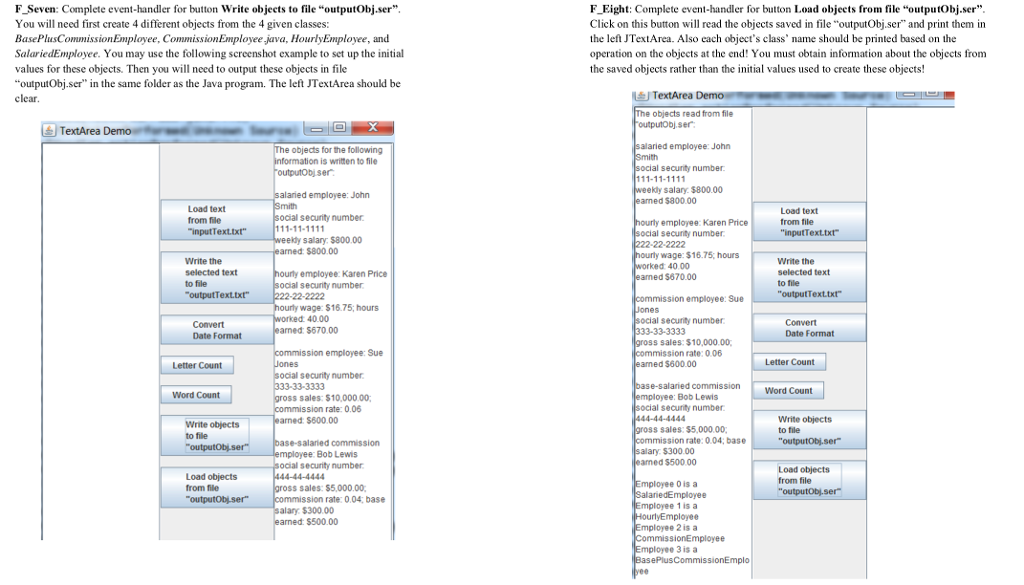
Hello, I am working on a Java GUI that will have two JTextArea's, one on the right and left, and in the center column will be two JButtons. One of which needs to be able to write objects to a file named "outputObjects.ser". There are 4 objects that need to be created from classes; BasePlusCommissionEmployee, CommissionEmployee, HourlyEmployee, and SalariedEmployee. The output from the objects needs to be saved in the file, as well as displayed in textArea2 (the second JTextArea), and the other text area should be left blank.
The second button needs to be able to load the objects from file "outputObjects.ser". By clocking on this button it will read the objects saved to the file, and print them in textArea1 (the first text area). Each objects class name should be printed based on the operation on the objects at the end. The information obtained about the objects must be from the saved objects rather than the initial values used to create the objects.
Im pretty much stuck, I dont fully know how to make the objects, but the classes are all sub classes to the super class Employee, which has been serialized. Any help would be great. Thank you
Here is a screen shot of the actual assignment if I wasnt fully understandable.
F Seven: Complete event-handler for button Write objects to file "outputObj.ser" You will need first create 4 different objects from the 4 given classes: BasePlusCommissionEmployee, CommissionEmployee java, HourlyEimployee, and SalariedEmployee. You may use the following screenshot example to set up the initial values for these objects. Then you will need to output these objects in file "outputObj.ser" in the same folder as the Java program. The left TextArea should be F_Eight: Complete event-handler for button Load objects from file "outputobj.ser" Click on this button will read the objects saved in file "outputObj.ser" and print them in the left JTextArea. Also each object's class' name should be printed based on the operation on the objects at the end! You must obtain information about the objects from the saved objects rather than the initial values used to create these objects! TextArea e objects read from file outputobj.ser TextArea he objects for the following alaried employee: John is written to file l secunity number ser salary. $800.00 alaried employee: John aned $800.00 Load text from file inputText.txt Load text from file "inputText.txt ocial security number employee: Karen Price secunity number salary $800.00 22-2222 arned: $800.00 wage: $16.75; hours Write the selected text to file outputText.txt Write the selected text to file "outputTexttt 40.00 employee: Karen Price aned $670.00 ocial security number employee: Sue wage: $1675; hours 40.00 security number Convert Date Format Convert Date Format arned: $670.00 s sales: $10,000.00 ssion employee: Sue rate: 0.06 Letter Count arned $600.00 Letter Count security number commission Word Count Word Count s sales: $10,00000; Bob Lewis ssion rate: 0.06 security number Write objects to file arned: $800.00 Write objects to file s sales: $5,000.00, rate: 004; base Bob Lewis alary $300.00 amed $500.00 mployee 0is a mployee 1is a mployee 2is a mployee 3 is a security number Load objects from file Load objects from file sales: $5,000.00 mployee ssion rate: 0.04, base alary $300.00 mployee $500.00 mployee F Seven: Complete event-handler for button Write objects to file "outputObj.ser" You will need first create 4 different objects from the 4 given classes: BasePlusCommissionEmployee, CommissionEmployee java, HourlyEimployee, and SalariedEmployee. You may use the following screenshot example to set up the initial values for these objects. Then you will need to output these objects in file "outputObj.ser" in the same folder as the Java program. The left TextArea should be F_Eight: Complete event-handler for button Load objects from file "outputobj.ser" Click on this button will read the objects saved in file "outputObj.ser" and print them in the left JTextArea. Also each object's class' name should be printed based on the operation on the objects at the end! You must obtain information about the objects from the saved objects rather than the initial values used to create these objects! TextArea e objects read from file outputobj.ser TextArea he objects for the following alaried employee: John is written to file l secunity number ser salary. $800.00 alaried employee: John aned $800.00 Load text from file inputText.txt Load text from file "inputText.txt ocial security number employee: Karen Price secunity number salary $800.00 22-2222 arned: $800.00 wage: $16.75; hours Write the selected text to file outputText.txt Write the selected text to file "outputTexttt 40.00 employee: Karen Price aned $670.00 ocial security number employee: Sue wage: $1675; hours 40.00 security number Convert Date Format Convert Date Format arned: $670.00 s sales: $10,000.00 ssion employee: Sue rate: 0.06 Letter Count arned $600.00 Letter Count security number commission Word Count Word Count s sales: $10,00000; Bob Lewis ssion rate: 0.06 security number Write objects to file arned: $800.00 Write objects to file s sales: $5,000.00, rate: 004; base Bob Lewis alary $300.00 amed $500.00 mployee 0is a mployee 1is a mployee 2is a mployee 3 is a security number Load objects from file Load objects from file sales: $5,000.00 mployee ssion rate: 0.04, base alary $300.00 mployee $500.00 mployee
Step by Step Solution
There are 3 Steps involved in it

Get step-by-step solutions from verified subject matter experts
 Study Help