







Question: Hello, i have a datagridview from a csv and would like to bind it to a line graph with data points. Can someone please help
Hello, i have a datagridview from a csv and would like to bind it to a line graph with data points. Can someone please help me based off what i have. 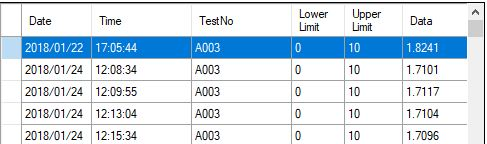
try { var line = reader.ReadLine(); string[] values = line.Split(',');
if (line.Split(',')[0].Equals("Date")) { date = line.Split(',')[1]; time = line.Split(',')[3]; } if (line.IndexOf(testname, StringComparison.CurrentCultureIgnoreCase) >= 0) { DataRow allShiftRow = Construct.MainDataTable.NewRow(); Data = line.Split(',')[12]; testNo = line.Split(',')[3]; Upplimit = line.Split(',')[8]; LowLimit = line.Split(',')[10]; allShiftRow["Date"] = date; // X axis allShiftRow["Time"] = time; allShiftRow["TestNo"] = testNo; allShiftRow["Upper Limit"] = Upplimit;//convert to integer and use most common value(from column) should be max of y axis allShiftRow["Lower Limit"] = LowLimit; allShiftRow["Data"] = Data;// ************* i need to turn this into a decimal**** data points // Construct.MainDataTable.Rows.Add(allShiftRow);
} } catch {
} } } } dataGridView1.DataSource = Construct.MainDataTable;
//chart1.Series[0] = new Series(); //************************* // I would like to add the 1ine chart here //chart1.DataSource = dataGridView1.DataSource; progressBarCount++; progressBar1.Value = progressBarCount * progressBar1.Maximum / Construct.pathList.Count; Application.DoEvents(); if (progressBar1.Value == progressBar1.Maximum) {
progressBar1.Visible = false;
chart1.Visible = true; }
} }
Lower Upper Data Limit Date 2018/01/22 17:05:44 2018/01/24 12:08:34 2018/01/24 12:09:55 2018/01/24 12:13:04 Time TestNo A003 A003 A003 A003 Limit 10 10 10 10 10 1.8241 1.7101 1.7104 2018/01/24 12:15:34 A003 1.7096 Lower Upper Data Limit Date 2018/01/22 17:05:44 2018/01/24 12:08:34 2018/01/24 12:09:55 2018/01/24 12:13:04 Time TestNo A003 A003 A003 A003 Limit 10 10 10 10 10 1.8241 1.7101 1.7104 2018/01/24 12:15:34 A003 1.7096
Step by Step Solution
There are 3 Steps involved in it

Get step-by-step solutions from verified subject matter experts
 Study Help