







Question: Hello. I need help. can anyone help me. This assignment is from web development & design foundations with Html5.can you please modify my code and
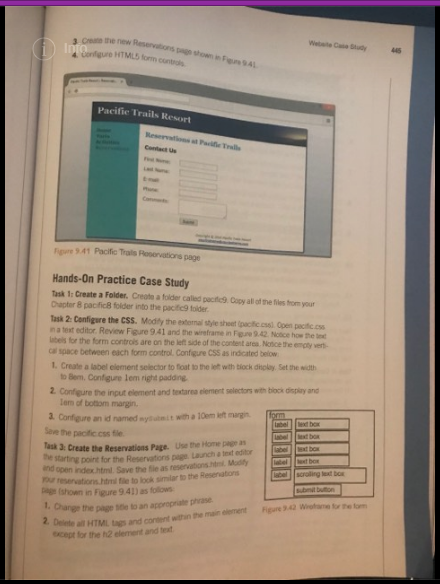
Hello. I need help. can anyone help me. This assignment is from web development & design foundations with Html5.can you please modify my code and make the image same as the one i posted below. this image is from chapter 9 page 445. i need both css and index both file
____index.html______
content="width=device-width, initial-scale=1.0">
Pacific Trails Resort
- Home
- Yurts
- Activities
- Reservations
Enjoy Nature in Luxury
Pacific Trails Resort
offer a special loading experience on the
california North Coast. Relax in the serenity with panoramic view of the
Pacific Ocean.
- Private yurts with decks overlooking the ocean
- Activities lodge with fireplace and gift shop
- Nightly fine dining at the Overlook cafe
- heated outdoor pool and whirlpool
- Guided hiking for redwoods
Pacific Trails Resort
12010 Pacific Trails Road
Zephyr, CA 95555
888-555-5555
888-555-5555
Copyright © 2016 Pacific Trails Resort
firstname@lastname.com
______________________________________
____pacific.css____
body { background-color: #FFFFFF; background-image:url(background.jpg); color: #666666; font-family: Arial, Verdana, sans-serif; } main { padding-left: 20px; padding-right: 20px; display: block; background-color: #FFFFFF; margin-left: 170px; padding-top: 1px; padding-bottom: 1px; } h1 { background-color: #000033; color: #FFFFFF; font-family: Georgia, "Times New Roman", serif; line-hight: 200%; background-image: url(sunset.jpg); background-position: right; background-repeat:no-repeat; padding-left: 20px; height: 72px; margin-bottom: 0; } nav {font-weight: bold; float: left; width: 160px; padding-top: 20px; padding-left: 20px; padding-right: 5px; background-color: #90C7E3; } nav ul { list-style-type: none; margin: 0; padding-left: 0; } nav a {text-decoration: none;} nav a:link { color: #000033; } nav a:visited { color: #344873; } nav a:hoover { color: #FFFFFF; } h2 { color: #3399CC; font-family: Georgia, "Times New Roman", serif; } h3 {color: #000033; } dt { color: #000033; font-weight: bold; } .resort { color: #000033; font-size: 1.2 em; font-weight: bold;} footer { font-size: .70 em; font- style: italic; text-align: center; padding:10px; margin-left: 170px; background-color: #FFFFFF; } #wrapper { background-color: #90C7E3; margin-left: auto; margin-right: auto; width: 80%; min-width:700px; max-width:1024px; box-shadow:3px 3px 3px #333; } #homehero {height: 300px; background-image: url(coast.jpg); background-size:100% 100%; background-repeat:no-repeat; margin-left: 170px; } #yurthero {height: 300px; background-image: url(yurt.jpg); background-size:100% 100%; background-repeat:no-repeat; margin-left: 170px; } #trailhero {height: 300px; background-image: url(trail.jpg); background-size:100% 100%; background-repeat:no-repeat; margin-left: 170px; } * { box-sizing: border-box; } header, nav, main, footer { display: block;} #mobile { display: none; } #desktop { display: inline; } @media only screen and (max-width: 1024px) { body { margin: 0; padding: 0; background-image: none; } #wrapper { width: auto; min-width: 0; margin: 0; box-shadow: none; } h1 { margin: 0; } nav { float: none; width: auto; padding: 0.5em; } nav li { display: inline-block; } nav a { padding: 1em; } main { padding: 1em; margin-left: 0; font-size: 90%; } footer { margin: 0; } #homehero {margin-left: 0;} #yurthero {margin-left: 0;} #trailhero {margin-left: 0;} } @media only screen and (max-width: 1024px) { h1 { height: 100%; font-size: 1.5em; padding-left: 0.3em; } nav { padding: 0; } nav a { display: block; padding: 0.2em; font-size: 1.3em; border-bottom: 1px ridge #330000; } nav ul { margin: 0; padding: 0; } nav li { display: block; margin: 0; padding: 0; } main { padding-top: 0.1em; padding-right: 0.6em; padding-bottom: 0.1em; padding-left: 0.4em; } #homehero { display: none; } #yurthero { display: none; } #trailhero { display: none; } footer { padding: 0; } #mobile { display: inline; } #desktop { display: none; } }
/* New stylesheet added*/
.outerDiv{ width:800px; margin:0 auto; height: 1050px; border: 1px solid black;} .headerDiv{ padding-left: 20px; padding-top: 12px; background-color: black ; height: 50px;} .headerText{ font-size: 20px; font-weight: 600; color: white;} .leftSidebar{ width: 20%; float: left;} .rightSidebar{ width: auto; float: left} .innerRightSidebar{ padding-left:10px; } .innerRightSidebarHeadText{ height: 23px; color: aquamarine; font-weight: 600} table{ margin-left: 30px;} table tr td{ text-align: center} table tr:nth-child(odd){ background-color: silver;
}
Webte Case Study44 Pacifie Trails Resort at Pacific Trall 9.41 Pacific Trals Roservations page Hands-On Practice Case Study Task 1: Create a Folder. Create a folder called pacifc9 Copy all of the files from your Chapter 8 pacificB folder into the pacific9 toider ask 2 Configere the CSS. Modily the extermal style sheet (pacific.cssi Open pacitic.css n a teat editor Review Figure 9.41 and the wireframe in Fe9.42 Notice how the ex ubels for the form controls are on the left side of the content area Notice the empty vert- cal space between each form control. Configure CSS as indicated beiow I. Create a label element selector to foat to the left with tilock dholay, Set the width to Bem. Confgure lem right padding 2 Configure the input element and textares element selectons with block display and Lem of botiom margin Configure an id named ytt with a 10em let mg Save the pacific.css fie label 3: Create the Reservations Page. Use the Hoe age |- starting point for the Reservators put Launch a test edtr and open Pu reservationie to lock simlar to the Resenations page (shown in Fpre 941)asfokws ndex.html. Save the fie as reservations.htni. Madiy I. Change the page Se to an appropriate prae or the fom 2. Delete a HTML tgs and content within the main elementFigune 3-42 W xcept for the h2 element and textStep by Step Solution
There are 3 Steps involved in it

Get step-by-step solutions from verified subject matter experts
 Study Help