







Question: Hello. I need help filling out the Analysis Document part at the end. Not the entire code. Thank you. Programming Assignment 3 For this assignment
Hello. I need help filling out the Analysis Document part at the end. Not the entire code. Thank you. 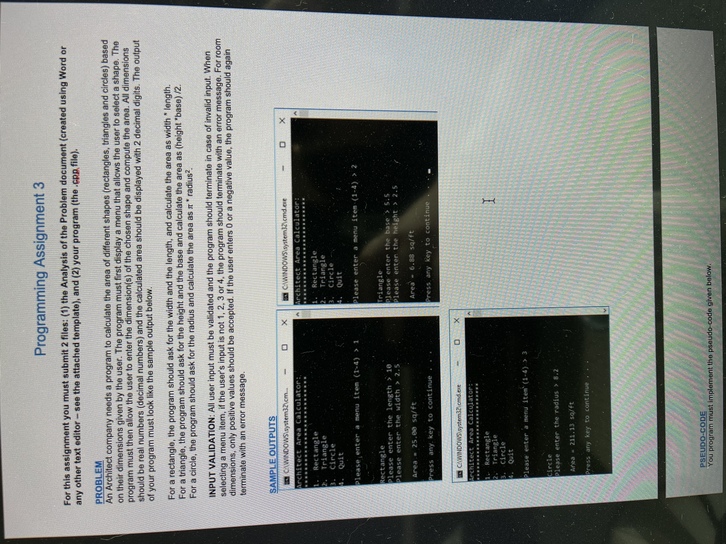
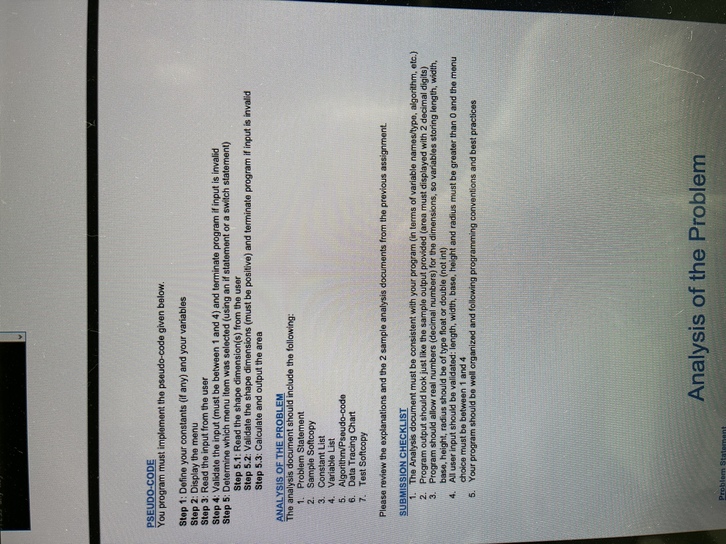
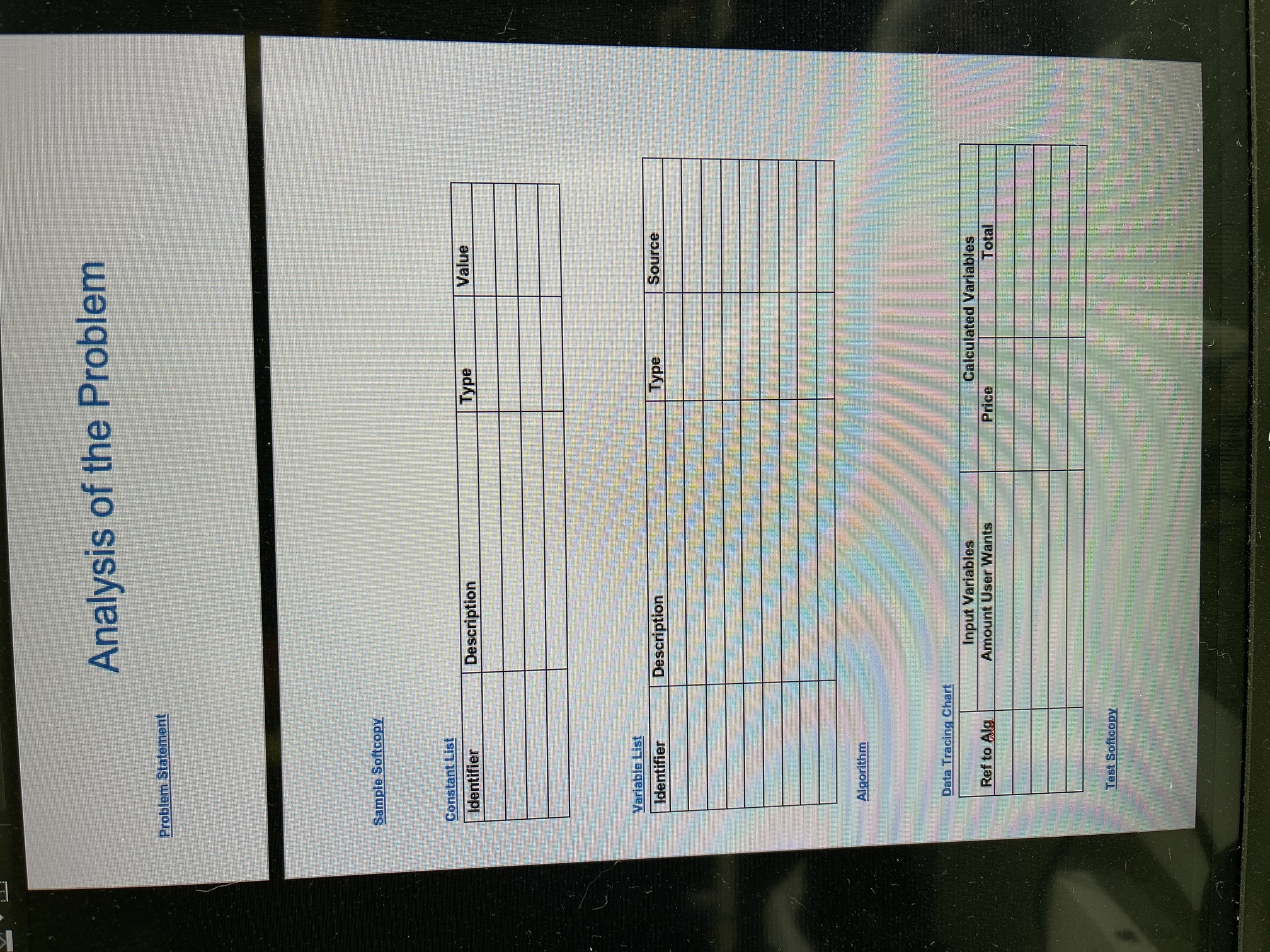
Programming Assignment 3 For this assignment you must submit 2 files: (1) the Analysis of the Problem document (created using Word or any other text editor - see the attached template), and (2) your program (the.cop filo). PROBLEM An Architect company needs a program to calculate the area of different shapes (rectangles, triangles and circles) based on their dimensions given by the user. The program must first display a menu that allows the user to select a shape. The program must then allow the user to enter the dimension(s) of the chosen shape and compute the area. All dimensions should be real numbers (decimal numbers) and the calculated area should be displayed with 2 decimal digits. The output of your program must look like the sample output below. For a rectangle, the program should ask for the width and the length, and calculate the area as width length. For a triangle, the program should ask for the height and the base and calculate the area as (height "base) 12. For a circle, the program should ask for the radius and calculate the area as radius? INPUT VALIDATION: All user input must be validated and the program should terminate in case of invalid input. When selecting a menu item, if the user's input is not 1, 2, 3 or 4, the program should terminate with an error message. For room dimensions, only positive values should be accepted. If the user enters 0 or a negative value, the program should again terminate with an error message. SAMPLE OUTPUTS CAWINDOWS\systemom Architect Area calculator: X 1. Rectangle 2. Triangle 3. Circle CAWINDOWS\systememd.ee Architect Area Calculator! 1. Rectangle Triangle 3. circle 4. Quit Please enter a menu item (144) > 1 Please enter a menu ites (1-4), > 2 Triangle please enter the base > S.S. Please enter the height > 2.5 Rectangle Please enter the length > 10 Please enter the width > 2.5 Area - 25.00 s/ft Press any key to continue Area - 6.88 soft Press any key to continue o WINDOWS temode Architect Area Calculator 1 Rectangle Triangle Circle Quit Please enter a new item' (1-4) ) ) Circle please enter the radius 3.2 Area - 211.13 sqft Press any key to continue PSEUDO-CODE You program must implement the pseudo-code given below. PSEUDO-CODE You program must implement the pseudo-code given below. Step 1: Define your constants (if any) and your variables Step 2: Display the menu Step 3: Read the input from the user Step 4: Validate the input (must be between 1 and 4) and terminate program if input is invalid Step 5: Determine which menu item was selected (using an if statement or a switch statement) Step 5.1: Read the shape dimension(s) from the user Step 5.2: Validate the shape dimensions (must be positive) and terminate program if input is invalid Step 5.3. Calculate and output the area ANALYSIS OF THE PROBLEM The analysis document should include the following: 1. Problem Statement 2. Sample Softcopy 3. Constant List 4. Variable List 5. Algorithm/Pseudo-code 6. Data Tracing Chart 7. Test Softcopy Please review the explanations and the 2 sample analysis documents from the previous assignment. SUBMISSION CHECKLIST 1. The Analysis document must be consistent with your program (in terms of variable names/typo, algorithm, etc.) 2. Program output should look just like the sample output provided (area must displayed with 2 decimal digits) 3. Program should allow real numbers (decimal numbers) for the dimensions, so variables storing longth, width base, height, radius should be of type float or double (not int) 4. All user input should be validated: length, width, base, height and radius must be greater than 0 and the menu choice must be between 1 and 4 5. Your program should be well organized and following programming conventions and best practices Analysis of the Problem Problem Statement Analysis of the Problem Problem Statement Sample Softcopy Constant List Identifier Value Description Type Variable List Identifier Description Type Source Algorithm Data Tracing Chart Input Variables Amount User Wants Calculated Variables Price Total Ref to Alg Test Softcopy
Step by Step Solution
There are 3 Steps involved in it

Get step-by-step solutions from verified subject matter experts
 Study Help