



Question: Hello I'm really appreciate what you guys do , I have tons of work to finish and you guys help me a lot . Thanks
Hello I'm really appreciate what you guys do , I have tons of work to finish and you guys help me a lot . Thanks ^_^
If you can help please . this is my email BTW ammarxhisoka@hotmail.com
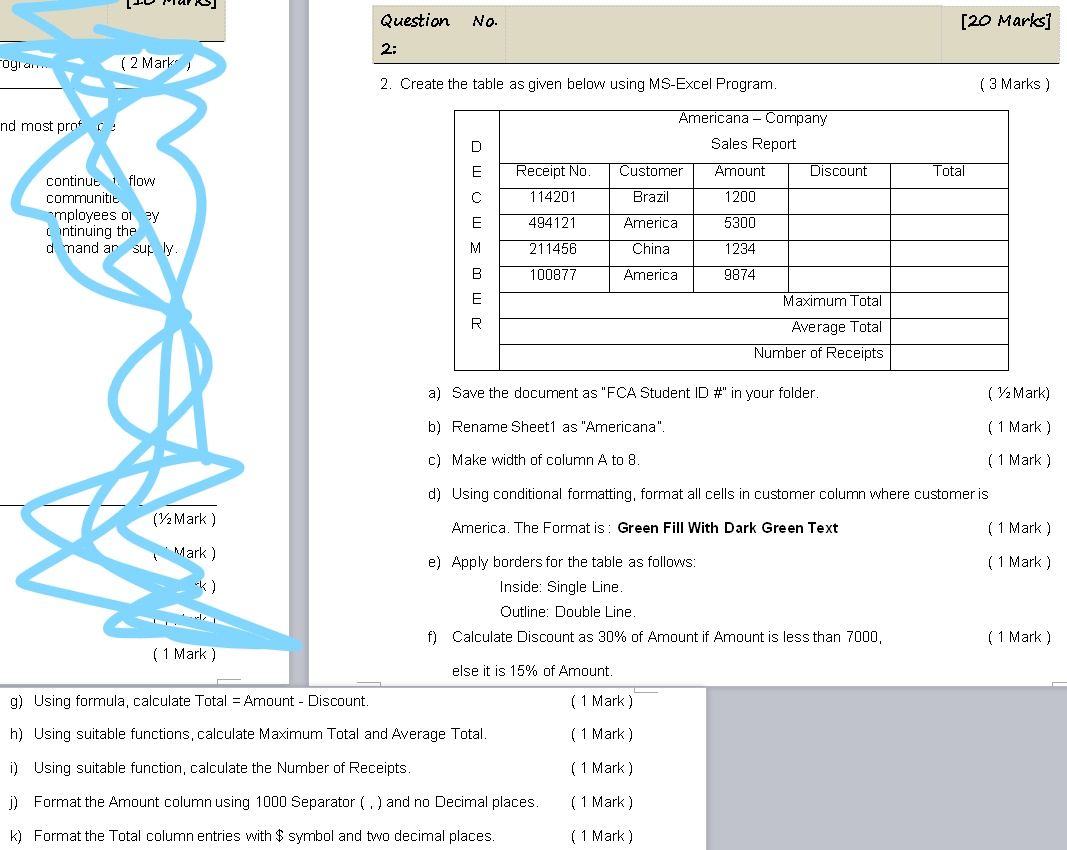
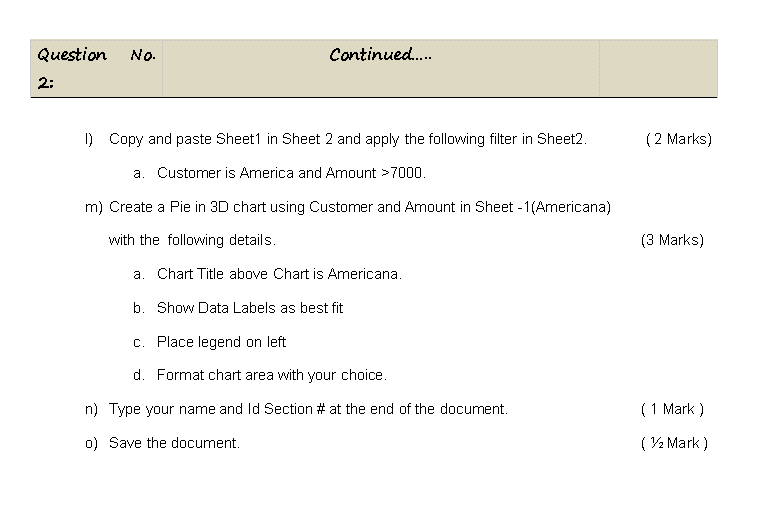
ITP Plei 91 Question No. [20 Marks] 2: Cogia. ( 2 Mark 2. Create the table as given below using MS-Excel Program. (3 Marks ) nd most prot Total Receipt No. 114201 continut flow communitit employees ol y Intinuing the d mand ar sur ly. DM o 3 MOMO Americana - Company Sales Report Customer Amount Discount Brazil 1200 America 5300 China 1234 494121 211456 100877 America 9874 Maximum Total Average Total Number of Receipts a) Save the document as "FCA Student ID #" in your folder. ( 72 Mark) b) Rename Sheet1 as "Americana". (1 Mark) C) Make width of column A to 8. ( 1 Mark) d) Using conditional formatting, format all cells in customer column where customer is America. The Format is: Green Fill With Dark Green Text ( 1 Mark) (V2 Mark ) Mark) ( 1 Mark) e) Apply borders for the table as follows: Inside: Single Line. Outline: Double Line. f) Calculate Discount as 30% of Amount if Amount is less than 7000, ( 1 Mark) ( 1 Mark) else it is 15% of Amount. g) Using formula, calculate Total = Amount - Discount. ( 1 Mark) h) Using suitable functions, calculate Maximum Total and Average Total. (1 Mark) i) Using suitable function, calculate the Number of Receipts. ( 1 Mark) j) Format the Amount column using 1000 Separator (.) and no Decimal places. k) Format the Total column entries with $ symbol and two decimal places. (1 Mark) (1 Mark) Question No. Continued..... 2: 1) Copy and paste Sheet1 in Sheet 2 and apply the following filter in Sheet2. (2 Marks) a. Customer is America and Amount >7000. m) Create a Pie in 3D chart using Customer and Amount in Sheet - 1(Americana) with the following details. (3 Marks) a. Chart Title above Chart is Americana. b. Show Data Labels as best fit C. Place legend on left d. Format chart area with your choice. n) Type your name and Id Section # at the end of the document, (1 Mark) 0) Save the document. ( 22 Mark) ITP Plei 91 Question No. [20 Marks] 2: Cogia. ( 2 Mark 2. Create the table as given below using MS-Excel Program. (3 Marks ) nd most prot Total Receipt No. 114201 continut flow communitit employees ol y Intinuing the d mand ar sur ly. DM o 3 MOMO Americana - Company Sales Report Customer Amount Discount Brazil 1200 America 5300 China 1234 494121 211456 100877 America 9874 Maximum Total Average Total Number of Receipts a) Save the document as "FCA Student ID #" in your folder. ( 72 Mark) b) Rename Sheet1 as "Americana". (1 Mark) C) Make width of column A to 8. ( 1 Mark) d) Using conditional formatting, format all cells in customer column where customer is America. The Format is: Green Fill With Dark Green Text ( 1 Mark) (V2 Mark ) Mark) ( 1 Mark) e) Apply borders for the table as follows: Inside: Single Line. Outline: Double Line. f) Calculate Discount as 30% of Amount if Amount is less than 7000, ( 1 Mark) ( 1 Mark) else it is 15% of Amount. g) Using formula, calculate Total = Amount - Discount. ( 1 Mark) h) Using suitable functions, calculate Maximum Total and Average Total. (1 Mark) i) Using suitable function, calculate the Number of Receipts. ( 1 Mark) j) Format the Amount column using 1000 Separator (.) and no Decimal places. k) Format the Total column entries with $ symbol and two decimal places. (1 Mark) (1 Mark) Question No. Continued..... 2: 1) Copy and paste Sheet1 in Sheet 2 and apply the following filter in Sheet2. (2 Marks) a. Customer is America and Amount >7000. m) Create a Pie in 3D chart using Customer and Amount in Sheet - 1(Americana) with the following details. (3 Marks) a. Chart Title above Chart is Americana. b. Show Data Labels as best fit C. Place legend on left d. Format chart area with your choice. n) Type your name and Id Section # at the end of the document, (1 Mark) 0) Save the document. ( 22 Mark)
Step by Step Solution
There are 3 Steps involved in it

Get step-by-step solutions from verified subject matter experts