







Question: Hello May i please have some help with this homework problem? due by tomorrow night at midnight. HELP please Thank you. You will modify the
Hello May i please have some help with this homework problem? due by tomorrow night at midnight. HELP please Thank you.
You will modify the WordList class (see attached files) so that is uses an Array to store words instead of an ArrayList.
Modify as follows:
- Remove the import statement
- Update the class comment with your name as author and a date for version
- Change the type for the field words so that it is an array of String objects
- Add a size field to keep track of the number of words in the list
- Modify the constructor to initialize words to an array of size 10 and initialize the size field.
- Modify the getSize method to return the size field
- Modify the add method to do the following:
- If the array is full, get a new array that is double the size of the current one and copy the contents of the old array to the new one. You can do this yourself or you can look for the appropriate version of the copyOf method in the Arrays class
- Add the new word to the end of the list
- Adjust the size field.
- Modify the remove method to do the following:
- If the index is invalid, print an appropriate error message and return null
- If the index is valid, save the word in a local variable to be returned at the end.
- "Remove" the word by sliding down the elements at positions index + 1 through end of the list
- Adjust the size field
- Return saved word that was removed
- Modify the printWords method as needed
You should not have to modify the Driver to get it to run, but you may want to make changes to test your code.
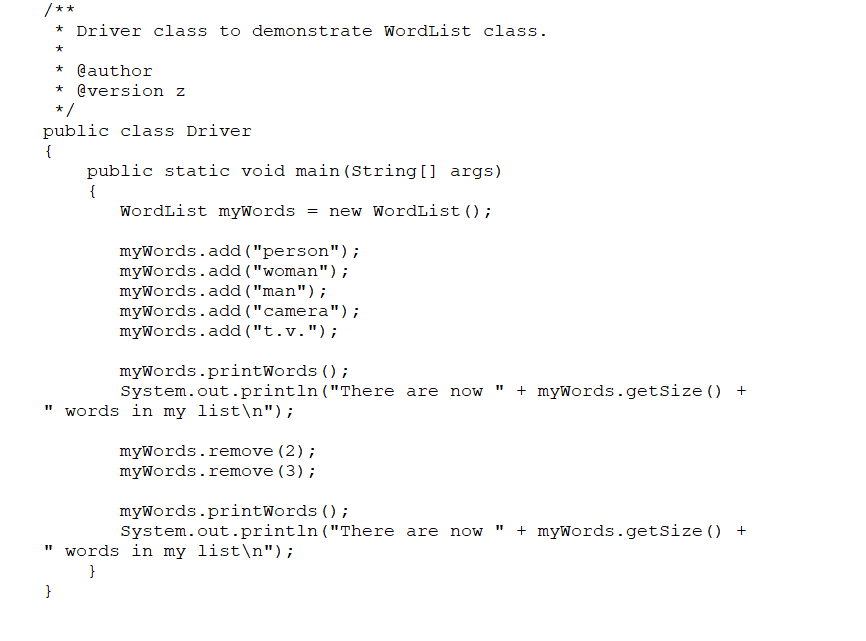
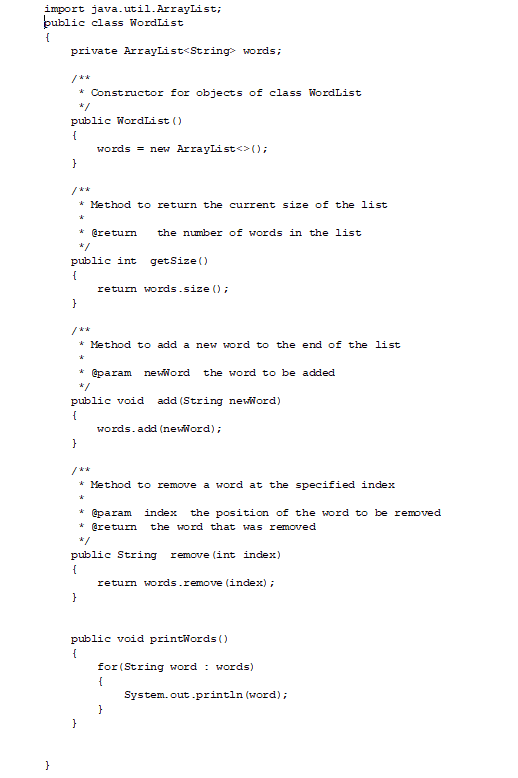
/** * Driver class to demonstrate WordList class. * * @author * @version z * public class Driver { public static void main(String[] args) { WordList myWords new WordList(); = mywords.add("person"); mywords.add("woman"); mywords.add("man"); mywords.add("camera"); mywords.add("t.v."); IT myWords.printwords(); System.out.println("There are now " words in my list "); + mywords.getSize() + mywords.remove (2); mywords.remove (3); IT + mywords.getSize() + myWords.printwords(); System.out.println("There are now " words in my list "); } } import java.util.ArrayList; public class WordList { private ArrayList
Step by Step Solution
There are 3 Steps involved in it

Get step-by-step solutions from verified subject matter experts
 Study Help