







Question: Hello there, I need a WebGL expert to help adding HTML elements with ids gl-canvas, vertex-shader, and fragment-shader for the canvas and shader scripts to
Hello there, I need a WebGL expert to help adding HTML elements with ids "gl-canvas", "vertex-shader", and "fragment-shader" for the canvas and shader scripts to the following code. I believe the HTML elements are all that it is missing, please provide an example of how I can go about adding them and provide a screenshot of the code in one piece if possible. Thank you in advance, I really need the help.
I need to be able to open this code in a browser to show that it works.
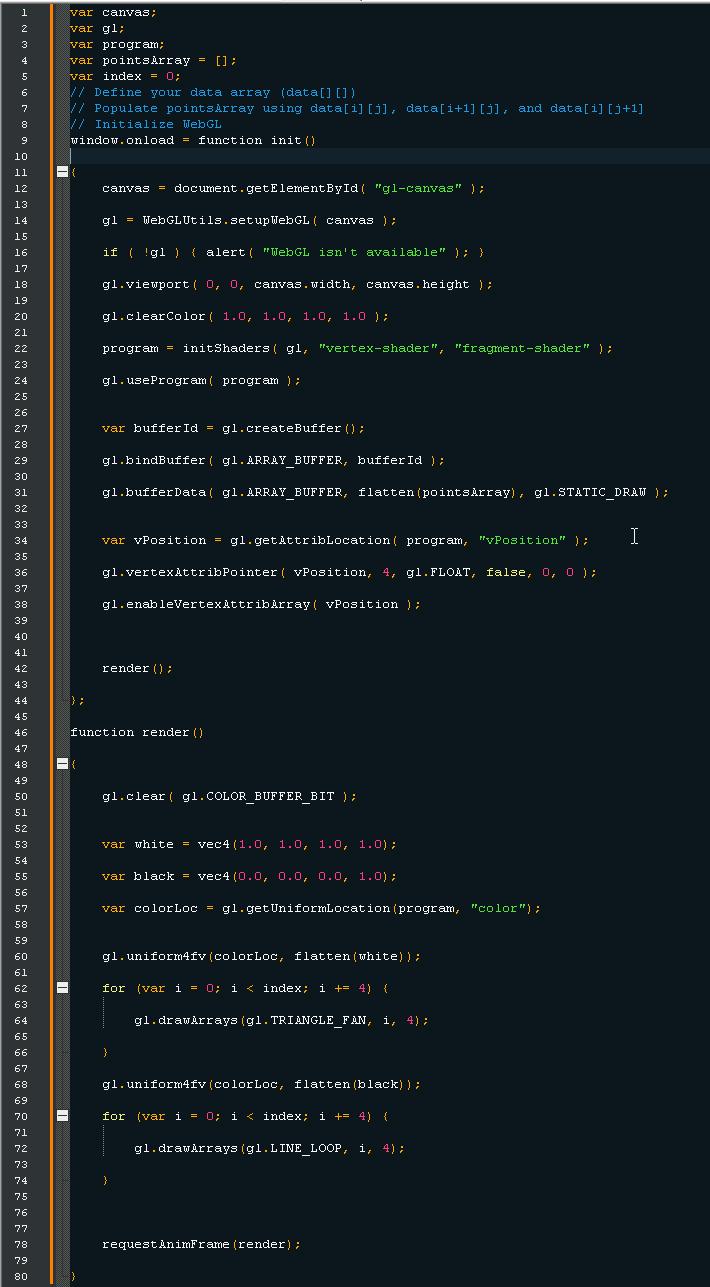
1 var canvas; 2 var gl; 3 var program; 4 var pointsArray = [] ; 5 var index = 0; 6 7 8 // Define your data array (data[] []) // Populate pointsArray using data[i][j], data[i+1][j], and data[i] [j+1] // Initialize WebGL window.onload = function init() 10 11 12 13 14 15 16 17 18 19 20 21 22 23 24 25 canvas = document.getElementById("gl-canvas"); gl WebGLUtils.setup WebGL canvas); if (!gl) { alert("WebGL isn't available"); } gl.viewport( 0, 0, canvas.width, canvas.height); gl.clearColor ( 1.0, 1.0, 1.0, 1.0 ); program initShaders gl, "vertex-shader", "fragment-shader" }; gl.use Program program); 26 27 var buffer Id = gl.createBuffer(); 28 29 30 31 gl.bindBuffer(gl. ARRAY_BUFFER, buffer Id); gl.bufferData gl. ARRAY_BUFFER, flatten (points Array), gl. STATIC DRAW ); 32 33 34 var vPosition = gl.getAttribLocation program, "vPosition" ); I 35 36 gl.vertexAttribPointer vPosition, 4, gl. FLOAT, false, 0, 0); 37 38 gl.enableVertexAttribArray( vPosition); 39 40 41 42 render(); 43 44 45 46 function render()) 47 48 49 50 gl.clear gl.COLOR_BUFFER_BIT ); 51 52 53 var white = vec4(1.0, 1.0, 1.0, 1.0); 54 55 var black = vec4 (0.0, 0.0, 0.0, 1.0); 56 57 var colorLoc = gl.getUniformLocation (program, "color"); 58 59 60 gl.uniform4fv (colorLoc, flatten (white)); 61 62 for (var i = 0; i < index; i += 4) { 63 64 gl.drawArrays (gl. TRIANGLE_FAN, 1, 4); 65 66 67 68 69 70 71 72 gl.uniform4fv (colorLoc, flatten (black)); for (var i = 0; i < index; i += 4) { gl.drawArrays (gl.LINE_LOOP, 1, 4); 73 74 75 76 77 78 request AnimFrame (render); 79 80
Step by Step Solution
There are 3 Steps involved in it

Get step-by-step solutions from verified subject matter experts
 Study Help