







Question: Hello Tutor, please help me with this exercise problem. I would really appriciate your help. I would leave a thumbs up and a really good
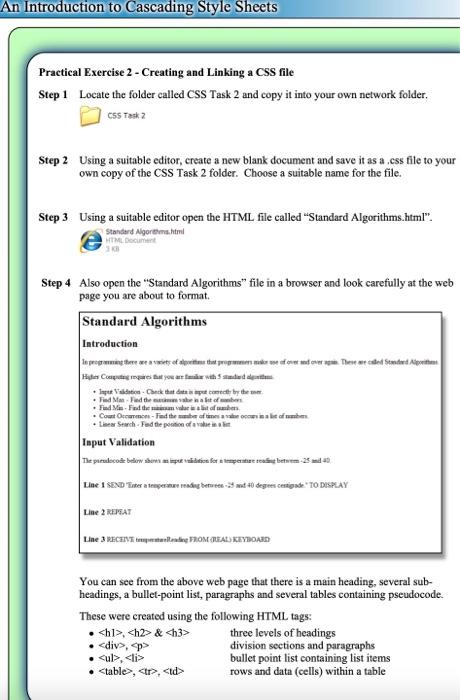
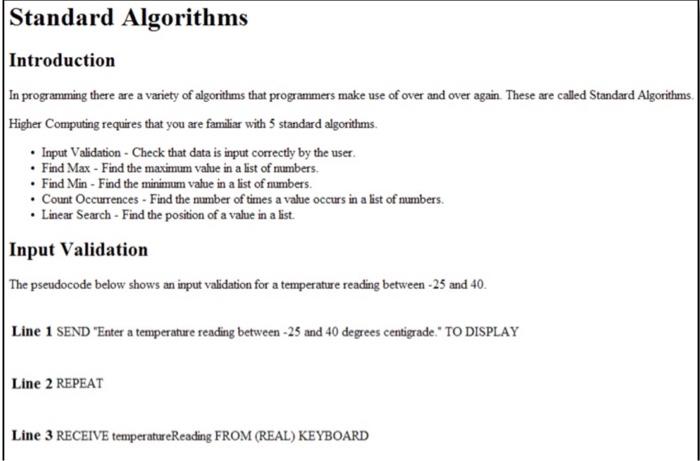
An Introduction to Cascading Style Sheets Practical Exercise 2 - Creating and Linking a CSS file Step 1 Locate the folder called CSS Task 2 and copy it into your own network folder. CSS Task 2 Step 2 Using a suitable editor, create a new blank document and save it as a .css file to your own copy of the CSS Task 2 folder. Choose a suitable name for the file. Step 3 Using a suitable editor open the HTML file called "Standard Algorithms.html" Standard Algorithms. HTML DC Step 4 Also open the "Standard Algorithms" file in a browser and look carefully at the web page you are about to format Standard Algorithms Introduction | iagregarange tara that grogers raise of on The de Sendete How to withstand pulation Check that by the Find Mead the . Find Man Find the cavallista - -fat the started Search Pad the pain Input Validation The picodebew specificatie te bem-230 Line 1 SEND "inter a tengerne reading between 9 st *0 degeer centigrade " TO DISPLAY Line 3 REPEAT Line 3 RECEIVE parade FROM CLEALS KEYBOARD You can see from the above web page that there is a main heading, several sub- headings, a bullet-point list, paragraphs and several tables containing pseudocode. These were created using the following HTML tags: .
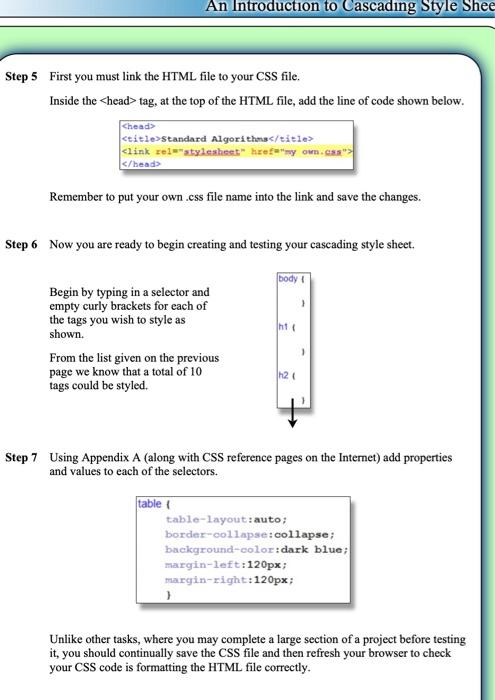
, & three levels of headings , p division sections and paragraphs bullet point list containing list items , , rows and data (cells) within a table An Introduction to Cascading Style Shee Step 5 First you must link the HTML file to your CSS file. Inside the tag, at the top of the HTML file, add the line of code shown below. Standard Algorithms Remember to put your own.css file name into the link and save the changes. Step 6 Now you are ready to begin creating and testing your cascading style sheet body ht Begin by typing in a selector and empty curly brackets for each of the tags you wish to style as shown. From the list given on the previous page we know that a total of 10 tags could be styled h24 Step 7 Using Appendix A (along with CSS reference pages on the Internet) add properties and values to each of the selectors. table table-layout: auto; border-collapse:collapse ; background-color:dark blue; margin-left:120px; margin-right:120px; Unlike other tasks, where you may complete a large section of a project before testing it, you should continually save the CSS file and then refresh your browser to check your CSS code is formatting the HTML file correctly. Standard Algorithms Introduction In programming there are a variety of algorithms that programmers make use of over and over again. These are called Standard Algorithms. Higher Computing requires that you are familiar with standard algorithms Input Validation - Check that data is input correctly by the user Find Max - Find the maximum value in a list of mumbers. Find Min - Find the minimum value in a list of numbers. Count Occurrences - Find the mumber of times a value occurs in a list of numbers. Linear Search - Find the position of a value in a list. Input Validation The pseudocode below shows an input validation for a temperature reading between -25 and 40. Line 1 SEND "Enter a temperature reading between -25 and 40 degrees centigrade." TO DISPLAY Line 2 REPEAT Line 3 RECEIVE temperatueReading FROM (REAL) KEYBOARD
three levels of headings , p division sections and paragraphs bullet point list containing list items , , rows and data (cells) within a table An Introduction to Cascading Style Shee Step 5 First you must link the HTML file to your CSS file. Inside the tag, at the top of the HTML file, add the line of code shown below. Standard Algorithms Remember to put your own.css file name into the link and save the changes. Step 6 Now you are ready to begin creating and testing your cascading style sheet body ht Begin by typing in a selector and empty curly brackets for each of the tags you wish to style as shown. From the list given on the previous page we know that a total of 10 tags could be styled h24 Step 7 Using Appendix A (along with CSS reference pages on the Internet) add properties and values to each of the selectors. table table-layout: auto; border-collapse:collapse ; background-color:dark blue; margin-left:120px; margin-right:120px; Unlike other tasks, where you may complete a large section of a project before testing it, you should continually save the CSS file and then refresh your browser to check your CSS code is formatting the HTML file correctly. Standard Algorithms Introduction In programming there are a variety of algorithms that programmers make use of over and over again. These are called Standard Algorithms. Higher Computing requires that you are familiar with standard algorithms Input Validation - Check that data is input correctly by the user Find Max - Find the maximum value in a list of mumbers. Find Min - Find the minimum value in a list of numbers. Count Occurrences - Find the mumber of times a value occurs in a list of numbers. Linear Search - Find the position of a value in a list. Input Validation The pseudocode below shows an input validation for a temperature reading between -25 and 40. Line 1 SEND "Enter a temperature reading between -25 and 40 degrees centigrade." TO DISPLAY Line 2 REPEAT Line 3 RECEIVE temperatueReading FROM (REAL) KEYBOARD
| rows and data (cells) within a table An Introduction to Cascading Style Shee Step 5 First you must link the HTML file to your CSS file. Inside the tag, at the top of the HTML file, add the line of code shown below. |
Step by Step Solution
There are 3 Steps involved in it

Get step-by-step solutions from verified subject matter experts
 Study Help