







Question: Hello Tutor, please help me with this exercise problem. I would really appriciate your help. I would leave a thumbs up and a really good
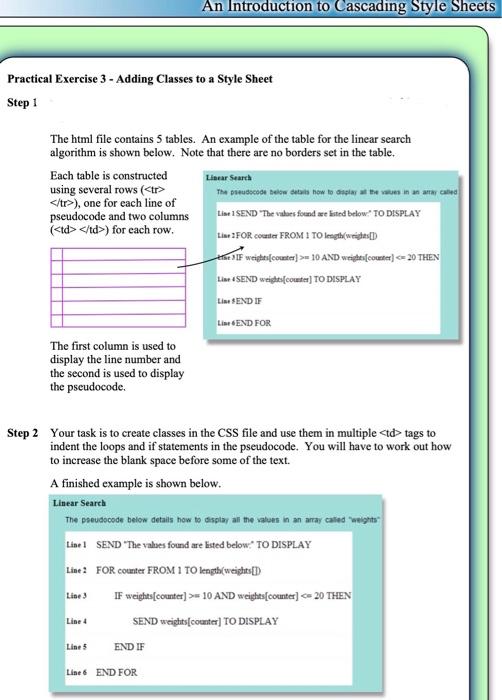
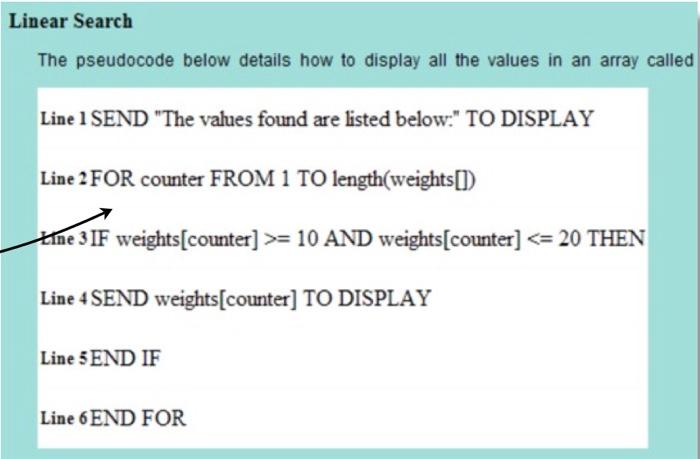
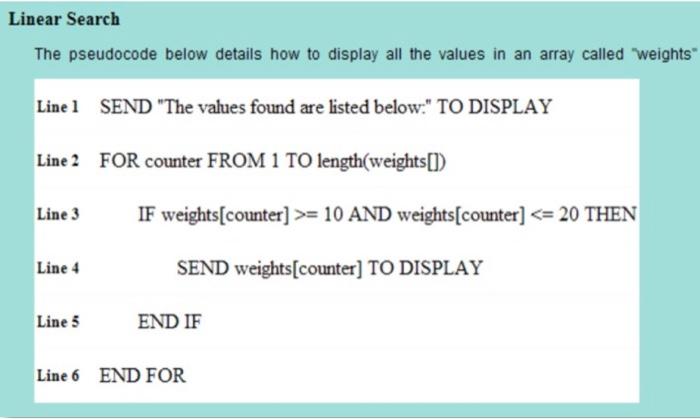
An Introduction to Cascading Style Sheets Practical Exercise 3 - Adding Classes to a Style Sheet Step 1 The html file contains 5 tables. An example of the table for the linear search algorithm is shown below. Note that there are no borders set in the table. Each table is constructed Linear Search using several rows (
), one for each line of pseudocode and two columns Line 1 SEND "The values found we isted below. TO DISPLAY (
) for each row. Line:FOR.com FROM 1 TO length(weights[] the If weight[comter] 10 AND weights (counter} tags to indent the loops and if statements in the pseudocode. You will have to work out how to increase the blank space before some of the text. A finished example is shown below. Linear Search The pseudocode below details how to display an me values in an array cated weights tine! SEND "The values found are listed below." TO DISPLAY Line : FOR. counter FROM 1 TO length(weights[] IF weights[counter] >=10 AND weights[comiter] - 20 THEN SEND weights[comter] TO DISPLAY Lise 3 Line 4 Lises END IF Line 6 END FOR Linear Search The pseudocode below details how to display all the values in an array called Line 1 SEND "The values found are listed below." TO DISPLAY Line 2 FOR counter FROM 1 TO length(weights[]) Kine 3 IF weights[counter] >= 10 AND weights[counter] = 10 AND weights[counter]
Step by Step Solution
There are 3 Steps involved in it

Get step-by-step solutions from verified subject matter experts
 Study Help