







Question: Help me 6.1.4 yes letters The input to this function is a list containing a record of guesses taken and clues received so-far. The format
Help me
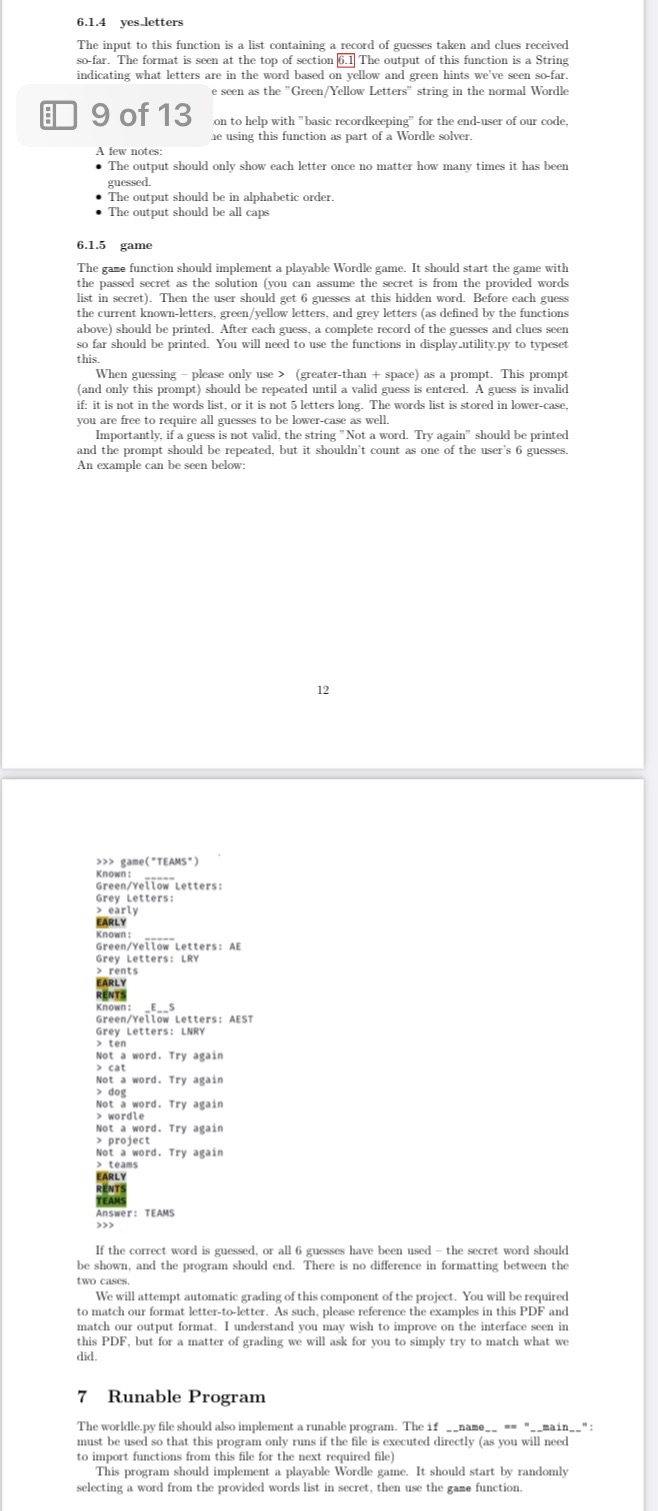
6.1.4 yes letters The input to this function is a list containing a record of guesses taken and clues received so-far. The format is seen at the top of section 5.1 The output of this function is a String indicating what letters are in the word based on yellow and green hints we've seen so-far. e seen as the "Green/Yellow Letters" string in the normal Wordle 9 of 13 on to help with "basic recordkeeping" for the end-user of our code, he using this function as part of a Wordle solver. A few notes: . The output should only show each letter once no matter how many times it has been guessed. . The output should be in alphabetic order. . The output should be all caps 6.1.5 game The game function should implement a playable Wordle game. It should start the game with the passed secret as the solution (you can assume the secret is from the provided words list in secret). Then the user should get 6 guesses at this hidden word. Before each guess the current known-letters, green/yellow letters, and grey letters (as defined by the functions above) should be printed. After each guess, a complete record of the guesses and clues seen so far should be printed. You will need to use the functions in display.utility.py to typeset this. When guessing - please only use > (greater-than + space) as a prompt. This prompt (and only this prompt) should be repeated until a valid guess is entered. A guess is invalid if: it is not in the words list, or it is not 5 letters long. The words list is stored in lower-case, you are free to require all guesses to be lower-case as well. Importantly, if a guess is not valid, the string "Not a word. Try again" should be printed and the prompt should be repeated, but it shouldn't count as one of the user's 6 guesses. An example can be seen below: 12 >>> game( "TEAMS") Known : Green/Yellow Letters: Grey Letters: > early EARLY Known : Green/Yellow Letters: AE Grey Letters: LRY > rents EARLY RENTS Known: _E__S Green/Yellow Letters: AEST Grey Letters: LNRY > ten Not a word. Try again > cat Not a word. Try again > dog Not a word. Try again > wordle Not a word. Try again > project Not a word. Try again > teams EARLY RENTS TEAMS Answer: TEAMS > > > If the correct word is guessed, or all 6 guesses have been used - the secret word should be shown, and the program should end. There is no difference in formatting between the two cases. We will attempt automatic grading of this component of the project. You will be required to match our format letter-to-letter. As such, please reference the examples in this PDF and match our output format. I understand you may wish to improve on the interface seen in this PDF, but for a matter of grading we will ask for you to simply try to match what we did. 7 Runable Program The worldle.py file should also implement a runable program. The if _ _name_. =. "__main_."; must be used so that this program only runs if the file is executed directly (as you will need to import functions from this file for the next required file) This program should implement a playable Wordle game. It should start by randomly selecting a word from the provided words list in secret, then use the game function
6.1.4 yes letters The input to this function is a list containing a record of guesses taken and clues received so-far. The format is seen at the top of section 6.1 The output of this function is a String indicating what letters are in the word based on yellow and green hints we've seen so-far. e seen as the "Green/Yellow Letters" string in the normal Wordle 9 of 13 on to help with "basic recordkeeping" for the end-user of our code, ae using this function as part of a Wordle solver. A few notes: The output should only show each letter once no matter how many times it has been guessed. The output should be in alphabetic order. The output should be all caps 6.1.5 game The game function should implement a playable Wordle game. It should start the game with the passed secret as the solution (you can assume the secret is from the provided words list in secret). Then the user should get 6 guesses at this hidden word. Before each guess the current known-letters, green/yellow letters, and grey letters (as defined by the functions above) should be printed. After each guess, a complete record of the guesses and clues seen so far should be printed. You will need to use the functions in display.utility.py to typeset this. When guessing - please only use> (greater-than + space) as a prompt. This prompt (and only this prompt) should be repeated until a valid guess is entered. A guess is invalid if: it is not in the words list, or it is not 5 letters long. The words list is stored in lower-case, you are free to require all guesses to be lower-case as well. Importantly, if a guess is not valid, the string "Not a word. Try again should be printed and the prompt should be repeated, but it shouldn't count as one of the user's 6 guesses. An example can be seen below: >>> game("TEAMS") Known: Green/Yellow Letters: Grey Letters: > early EARLY Known: wwwww. Green/Yellow Letters: AE Grey Letters: LRY >rents EARLY RENTS Known: ES Green/Yellow Letters: AEST Grey Letters: LNRY > ten Not a word. Try again > cat Not a word. Try again > dog Not a word. Try again > wordle Not a word. Try again > project Not a word. Try again > teams EARLY RENTS TEAMS Answer: TEAMS 12 If the correct word is guessed, or all 6 guesses have been used the secret word should be shown, and the program should end. There is no difference in formatting between the two cases. We will attempt automatic grading of this component of the project. You will be required to match our format letter-to-letter. As such, please reference the examples in this PDF and match our output format. I understand you may wish to improve on the interface seen in this PDF, but for a matter of grading we will ask for you to simply try to match what wer did. 7 Runable Program The worldle.py file should also implement a runable program. The if _name__"__main__": must be used so that this program only runs if the file is executed directly (as you will need to import functions from this file for the next required file) This program should implement a playable Wordle game. It should start by randomly selecting a word from the provided words list in secret, then use the game function.
Step by Step Solution
There are 3 Steps involved in it

Get step-by-step solutions from verified subject matter experts
 Study Help