







Question: help me please 20 On the Winter Program Revenue sheet, in cell B4, create a DAVERAGE function to calculate the average of the Amount field
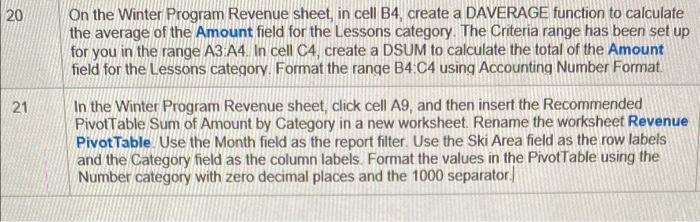
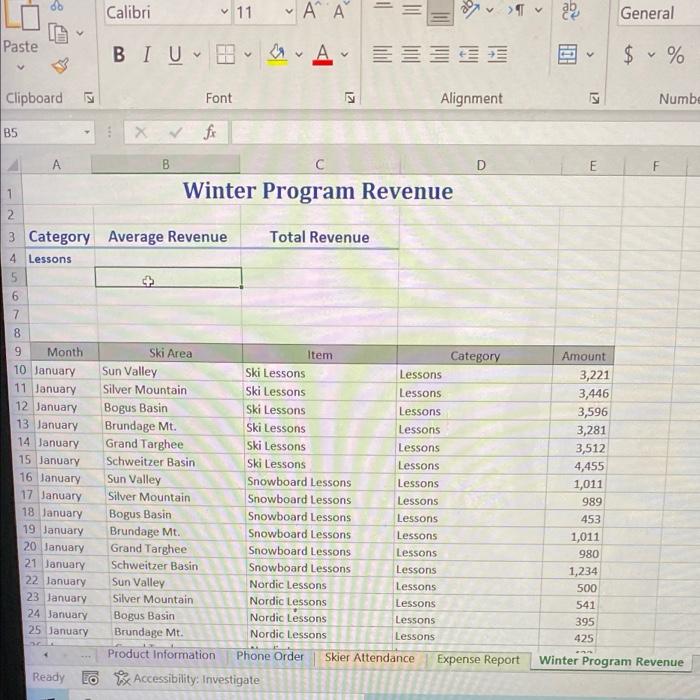
20 On the Winter Program Revenue sheet, in cell B4, create a DAVERAGE function to calculate the average of the Amount field for the Lessons category. The Criteria range has been set up for you in the range A3 A4. In cell C4, create a DSUM to calculate the total of the Amount field for the Lessons category. Format the range B4.C4 using Accounting Number Format. 21 In the Winter Program Revenue sheet, click cell A9, and then insert the Recommended PivotTable Sum of Amount by Category in a new worksheet. Rename the worksheet Revenue Pivot Table Use the Month field as the report filter. Use the Ski Area field as the row labels and the Category field as the column labels. Format the values in the PivotTable using the Number category with zero decimal places and the 1000 separator. 11 Calibri 11 ' ab General Paste BIU v A EH v $ % v Clipboard Font Alignment 12 Numbe B5 fr D E E F B 1 Winter Program Revenue 2 3 Category Average Revenue Total Revenue 4 Lessons 5 6 7 8 9 Month Ski Area Item Category 10 January Sun Valley Ski Lessons Lessons 11 January Silver Mountain Ski Lessons Lessons 12 January Bogus Basin Ski Lessons Lessons 13 January Brundage Mt. Ski Lessons Lessons 14 January Grand Targhee Ski Lessons Lessons 15 January Schweitzer Basin Ski Lessons Lessons 16 January Sun Valley Snowboard Lessons Lessons 17 January Silver Mountain Snowboard Lessons Lessons 18 January Bogus Basin Snowboard Lessons Lessons 19 January Brundage Mt. Snowboard Lessons Lessons 20 January Grand Targhee Snowboard Lessons Lessons 21 January Schweitzer Basin Snowboard Lessons Lessons 22 January Sun Valley Nordic Lessons Lessons 23 January Silver Mountain Nordic Lessons Lessons 24 January Bogus Basin Nordic Lessons Lessons 25 January Brundage Mt. Nordic Lessons Lessons Product Information Phone Order Skier Attendance Expense Report Ready to Accessibility: Investigate Amount 3,221 3,446 3,596 3,281 3,512 4,455 1,011 989 453 1,011 980 1,234 500 541 395 425 Winter Program Revenue 20 On the Winter Program Revenue sheet, in cell B4, create a DAVERAGE function to calculate the average of the Amount field for the Lessons category. The Criteria range has been set up for you in the range A3 A4. In cell C4, create a DSUM to calculate the total of the Amount field for the Lessons category. Format the range B4.C4 using Accounting Number Format. 21 In the Winter Program Revenue sheet, click cell A9, and then insert the Recommended PivotTable Sum of Amount by Category in a new worksheet. Rename the worksheet Revenue Pivot Table Use the Month field as the report filter. Use the Ski Area field as the row labels and the Category field as the column labels. Format the values in the PivotTable using the Number category with zero decimal places and the 1000 separator. 11 Calibri 11 ' ab General Paste BIU v A EH v $ % v Clipboard Font Alignment 12 Numbe B5 fr D E E F B 1 Winter Program Revenue 2 3 Category Average Revenue Total Revenue 4 Lessons 5 6 7 8 9 Month Ski Area Item Category 10 January Sun Valley Ski Lessons Lessons 11 January Silver Mountain Ski Lessons Lessons 12 January Bogus Basin Ski Lessons Lessons 13 January Brundage Mt. Ski Lessons Lessons 14 January Grand Targhee Ski Lessons Lessons 15 January Schweitzer Basin Ski Lessons Lessons 16 January Sun Valley Snowboard Lessons Lessons 17 January Silver Mountain Snowboard Lessons Lessons 18 January Bogus Basin Snowboard Lessons Lessons 19 January Brundage Mt. Snowboard Lessons Lessons 20 January Grand Targhee Snowboard Lessons Lessons 21 January Schweitzer Basin Snowboard Lessons Lessons 22 January Sun Valley Nordic Lessons Lessons 23 January Silver Mountain Nordic Lessons Lessons 24 January Bogus Basin Nordic Lessons Lessons 25 January Brundage Mt. Nordic Lessons Lessons Product Information Phone Order Skier Attendance Expense Report Ready to Accessibility: Investigate Amount 3,221 3,446 3,596 3,281 3,512 4,455 1,011 989 453 1,011 980 1,234 500 541 395 425 Winter Program Revenue
Step by Step Solution
There are 3 Steps involved in it

Get step-by-step solutions from verified subject matter experts
 Study Help